0142530-000 AB KLA-Tencor Confidential 6-49
3/13/09
KLA-Tencor P-16+ / P-6 User’s Guide Sequence Recipe and Data - Saving the Sequence Data
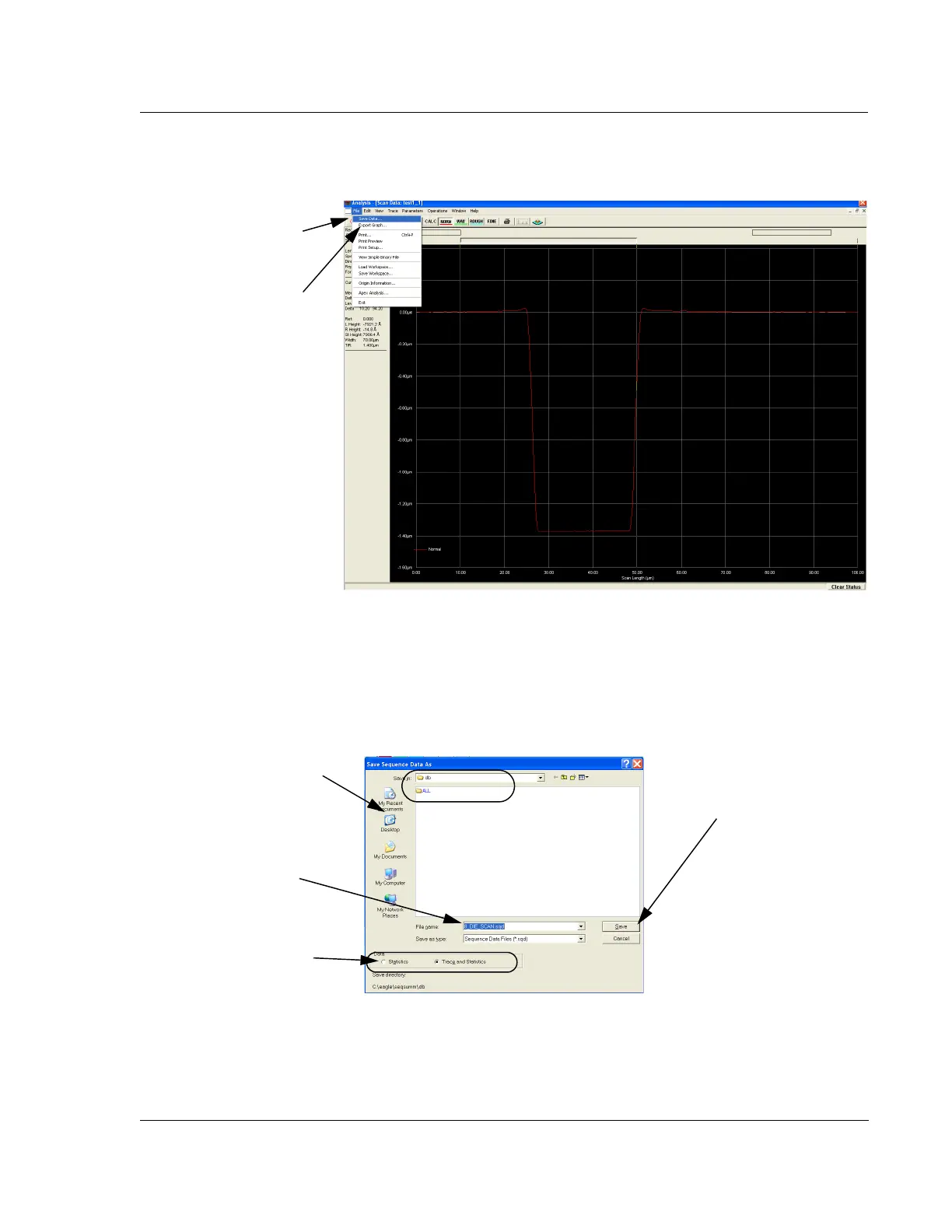
1. Click File, and select Save Data. The dialog box appears. (See Figure 6.39.)
2. Ensure that the data is being saved into the correct folder. (See Figure 6.39.)
3. Type a name (up to 72-alphanumeric characters) in the
File Name field.
The name can be upper or lower case. If using special characters, refer to Using
File Name Conventions on page 2-13. (See Figure 6.39.)
Figure 6.38 Analysis Screen with File Menu
Step 1 Click File to
display its menu.
Choose Save Data…
Figure 6.39 Save Data Set Dialog Box
Step 3 Enter the data set
name in the
File Name
field.
Step 2 Ensure that the
recipe is being stored in the
appropriate folder.
Step 5 When the data
name has been entered
click
Save to save it in
the chosen folder.
Step 4 Choose either
Statistics or Trace to save
the related data in the
named file.



 To Next Page