UMN:CLI User Manual
V5808
134
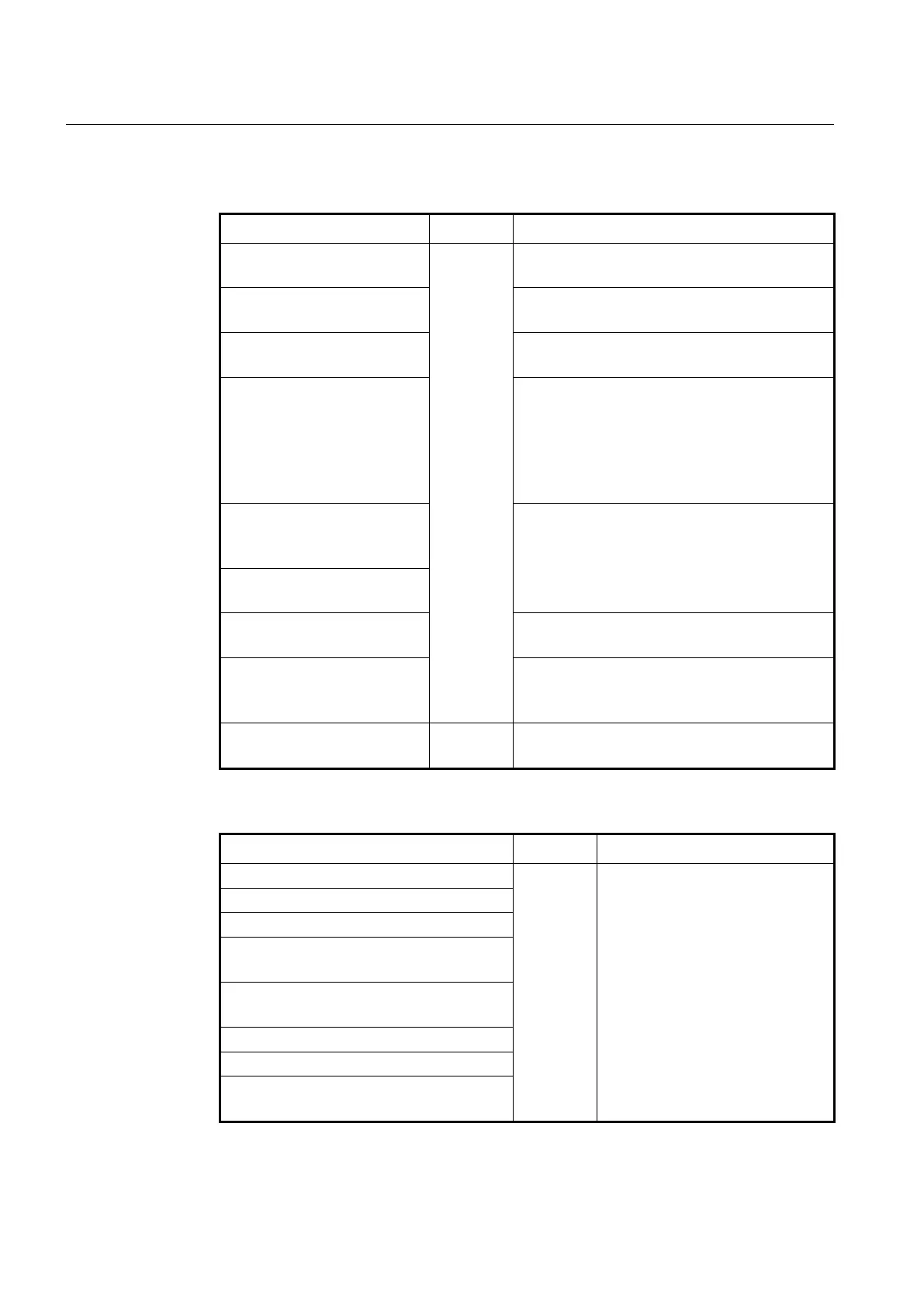
To configure one or more CPU packet filter match pattern(s), use the following command.
match vid <1-4094> [tag-position
<1-8>]
Classifies a VLAN ID.
VLAN: VLAN ID
Classifies a queue of CPU RX/TX packets.
0-7: queue number
Classifies a physical port ID.
PORT: port ID
match 802dot1q tpid { - | TPID }
pcp { - | <0-7> } vid { - | <1-
4094> } [tag-position <1-8>]
Classifies an 802.1q tag.
tpid: tag protocol ID
TPID: tag protocol ID (ex: 8100)
pcp: priority code point
tag-position: VLAN tag position
-: any
match offset <0-127> data HEX
[{ desc DESC | mask MASK
[desc DESC ]}]
Classifies an offset.
0-127: begin position, max 127 bytes
HEX: hex value (ex: ffaa, up to 16 bytes)
MASK: hex value (ex: f0f0)
DESC: description up to 16 bytes
match offset <0-127> length <1-
16> data HEX [mask MASK]
match ethertype { ip | arp |
ETHERTYPE}
Classifies a protocol based VLAN Ethernet type.
ETHERTYPE : selects Ethernet type (hex digit : 0806)
match protocol { icmp | igmp
[reportv2 | reportv1 | leave |
query ]}
Classifies an IGMP/ICMP packet.
match protocol { tcp | udp}
[{srcport PORT | dstport PORT}]
Classifies an TCP/UDP packet.
To delete the configured CPU packet filter match pattern(s), use the following command.
no match vid <1-4094> [tag-position <1-8>]
Deletes a specified packet-classifying
pattern for each option.
no match 802dot1q tpid { - | TPID } pcp { - | <0-
7> } vid { - | <1-4094>} [tag-position <1-8>]
no match offset <0-127> data HEX [mask
MASK]
no match ethertype { ip | arp | ETHERTYPE}
no match protocol { icmp | igmp}
no match protocol { tcp | udp} [{srcport PORT |
dstport PORT}]
To specify the action policy of CPU packet filter for the packets matching the configured



 To Next Page