UMN:CLI User Manual
V5808
706
To block/forward new source MAC address frame when MAC table is full, use the
following command.
Forwards new source MAC address frame when ONU
MAC table is full.
Blocks new source MAC address frame when ONU
MAC table is full.
12.3.2.13 ONT Auto-configuration and Service Provisioning
Automated provisioning and remote management of ONTs are vital service delivery
activities of ISPs and operators - helping to reduce costs, lead times and complexity as
well as to deploy new subscriber services.
ONT provisioning method simplifies network operations by eliminating the need to
configure every network element interface between the OLT ingress and subscriber ports
of our ONTs (H64x series) for diverse GPON service applications.
If the ONT service provisioning settings in XML file are saved in a FTP server prior to
installation/activation of ONTs, the OLT can relay the configured XML file from the FTP
server to the activated ONTs using the commands.
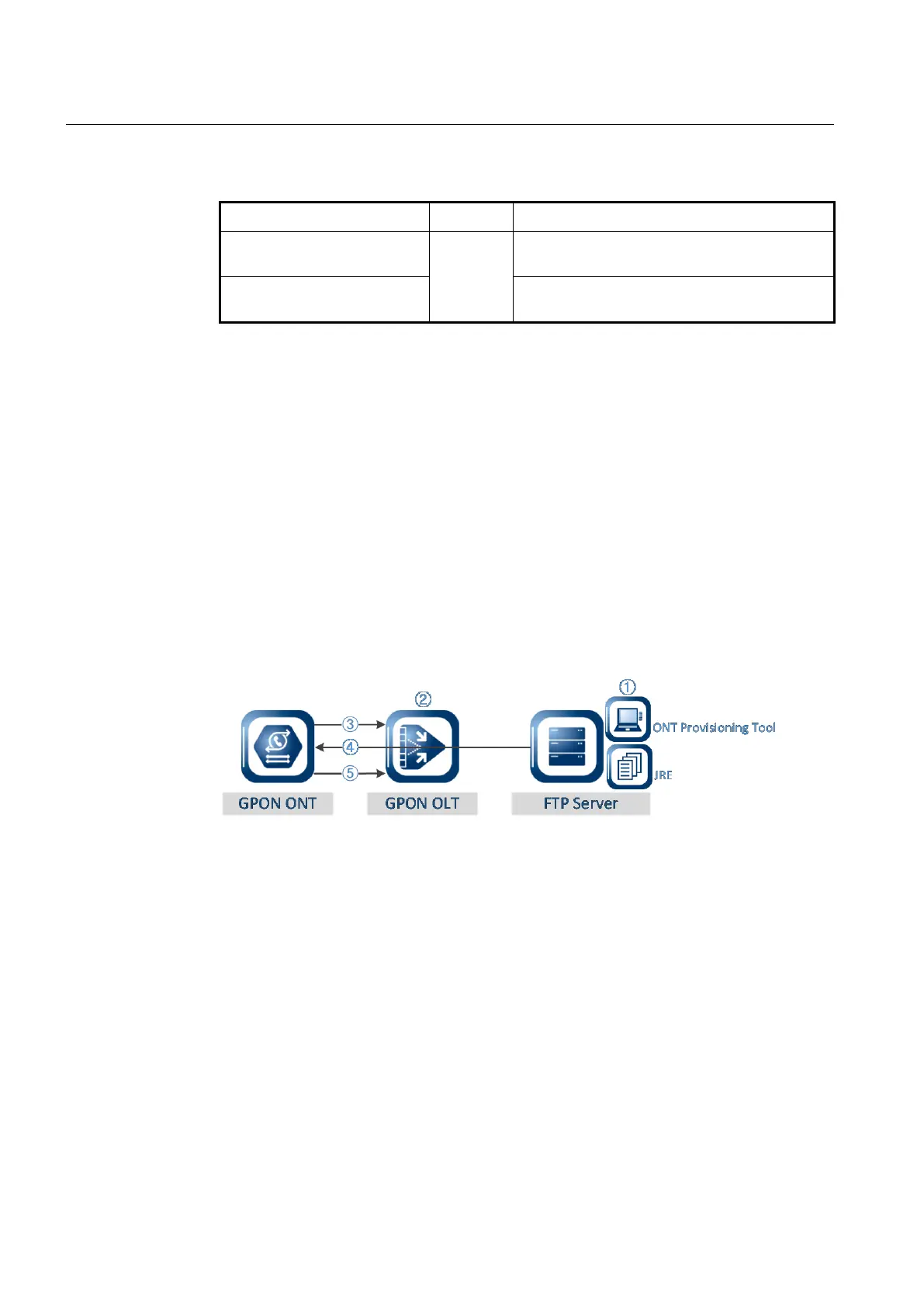
ONT Provisioning Process
① ONT Provisioning Tool & JRE Installation: Install JRE (version 1.6) and
provisioning tool (ONTProvisionTool.exe) to FTP server. Create a new XML
configuration file and modify the ONT settings for ONT provisioning. The ONT
configuration parameters can be changed or saved in XML.
② File Transfer from FTP server to ONT: For the ONT configuration file (XML file)
transfer, the ONT provisioning-related commands should be executed on the OLT.
The OLT is capable to relay the user-defined XML file from the FTP server to the
activated ONTs.
③ ONT Activation
④ Receive XML configuration file from FTP server: The ONT receives the ONT
service configuration file in XML from FTP server. The new service settings are
assigned to this ONT.
⑤ Send File Transfer Message: On the OLT side, the OLT can monitor a file transfer
status by receiving the messages (“File transfer in progress”, “File transfer complete”,



 To Next Page