User Manual UMN:CLI
V5808
133
6.3.9 CPU Packet Management
6.3.9.1 CPU Packet Limit
If the CPU of the system processes too many packets during the operation, it may cause
the performance decrease. To prevent the CPU overload, you can manually limit the
number of the packets handled by CPU.
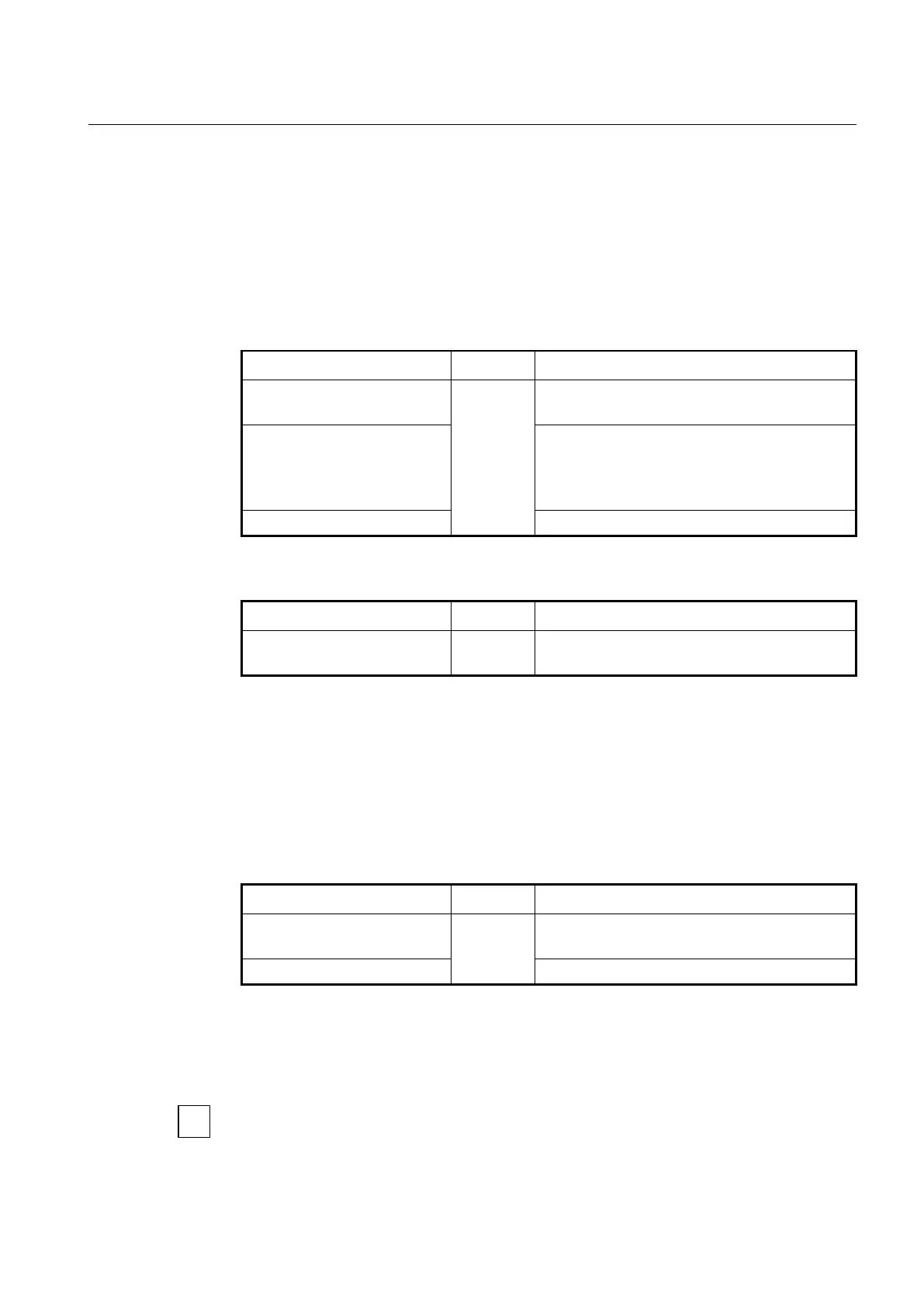
To limit the number of the packets handled by CPU, use the following command.
cpu packet limit <500-20000>
Limits the number of RX packets of CPU.
500-20000: packets per second (default: 1500)
cpu packet limit <0-7> <500-
20000>
Limits the number of RX packets per second based on
queue number.
0-7: queue number
500-20000: packets per second (default: 1500)
no cpu packet limit <0-7>
Deletes the configured packet limit.
To display a configured CPU packet limit, use the following command.
Shows a configured CPU packet limit.
6.3.9.2 CPU Packet Filtering
The V5808 provides a packet filtering feature for incoming/outgoing traffic management
to/from CPU. You have to create a CPU packet filter first and set the packet classification
criteria and the policy. You can use physical port ID, 802.1p priority (CoS), VLAN ID,
802.1q tag, and so on to classify the CPU packets. After applying the CPU packet filter, it
classifies the packets, and processes the traffic according to user-defined policies.
To open CPU Packet Filtering Configuration mode, use the following command.
Creates a CPU packet filter.
NAME: CPU packet filter name
no cpu-pkt-filter { NAME | all }
Deletes the configured CPU packet filter.
After entering CPU packet filtering mode, the prompt changes from SWITCH(config)# to
SWITCH(cpu-flt[NAME])#.
After entering CPU Packet Filtering Configuration mode, the filtering parameters can be
configured by user. The filter match, filter priority, filter action, stage and policy can be
configured for each CPU packet filter.



 To Next Page