UMN:CLI User Manual
V5808
92
4.6.1 802.1x Authentication
4.6.1.1 Enabling 802.1x
To configure 802.1x, the user should enable 802.1x daemon first. To enable 802.1x
daemon, use the following command.
dot1x system-auth-control
no dot1x system-auth-control
4.6.1.2 RADIUS Server
As RADIUS server is registered in authenticator, authenticator also can be registered in
RADIUS server.
Here, authenticator and RADIUS server need extra data authenticating each other be-
sides they register each other’s IP address. The data is key and should be the same
value for each other. For the key value, every kinds of character can be used except the
space or special character.
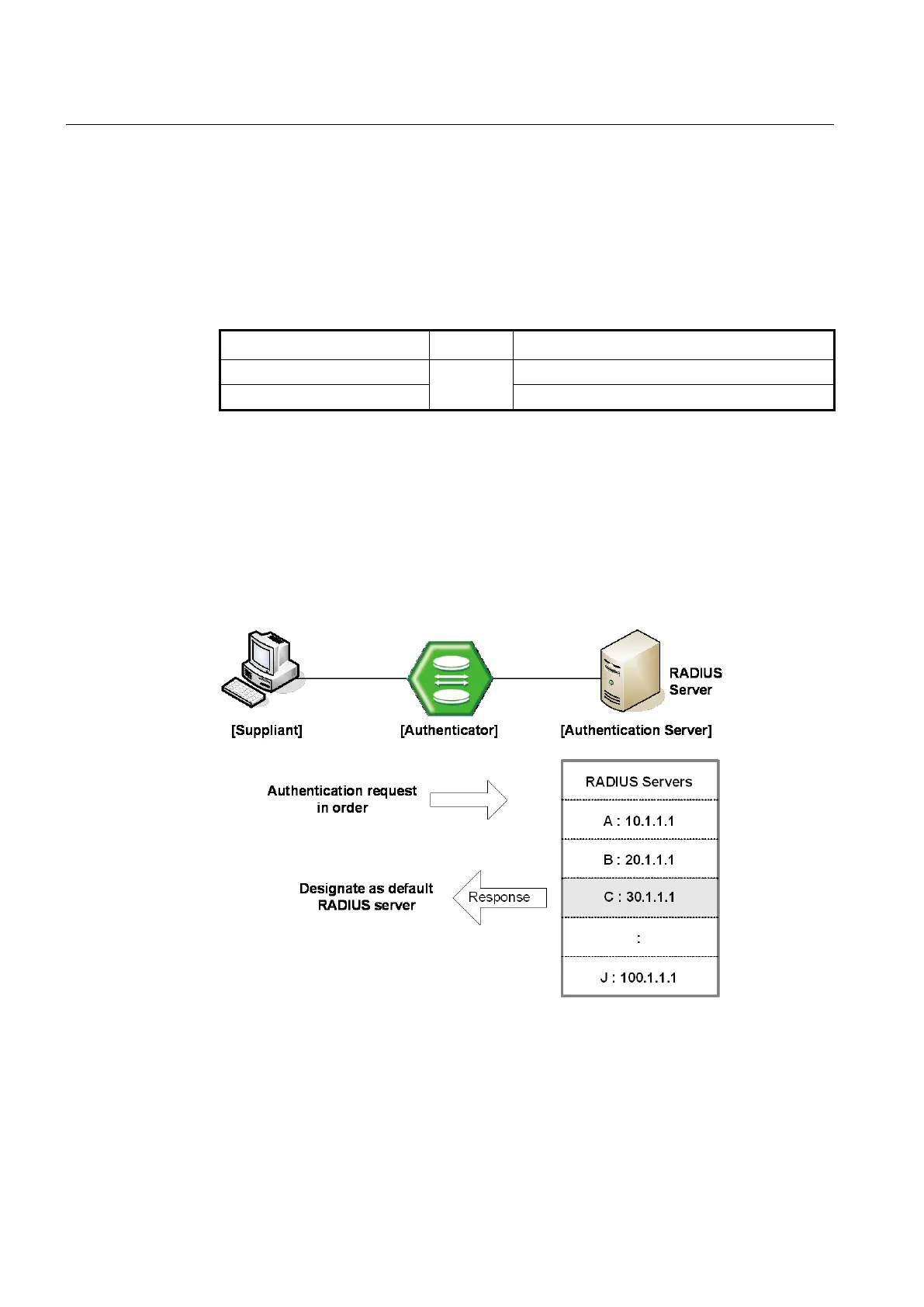
Fig. 4.3 Multiple Authentication Servers
If you register in several servers, the authentication server starts form RADIUS server
registered as first one, then requests the second RADIUS server in case there’s no
response. According to the order of registering the authentication request, the
authentication request is tried and the server which responds to it becomes the default
server from the point of response time.



 To Next Page