UMN:CLI User Manual
V5808
106
5.2 Port Mirroring
Port mirroring is the function of monitoring a designated port. Here, one port to monitor is
called monitor port and a port to be monitored is called mirrored port. Traffic transmitted
from mirrored port are copied and sent to monitor port so that user can monitor network
traffic.
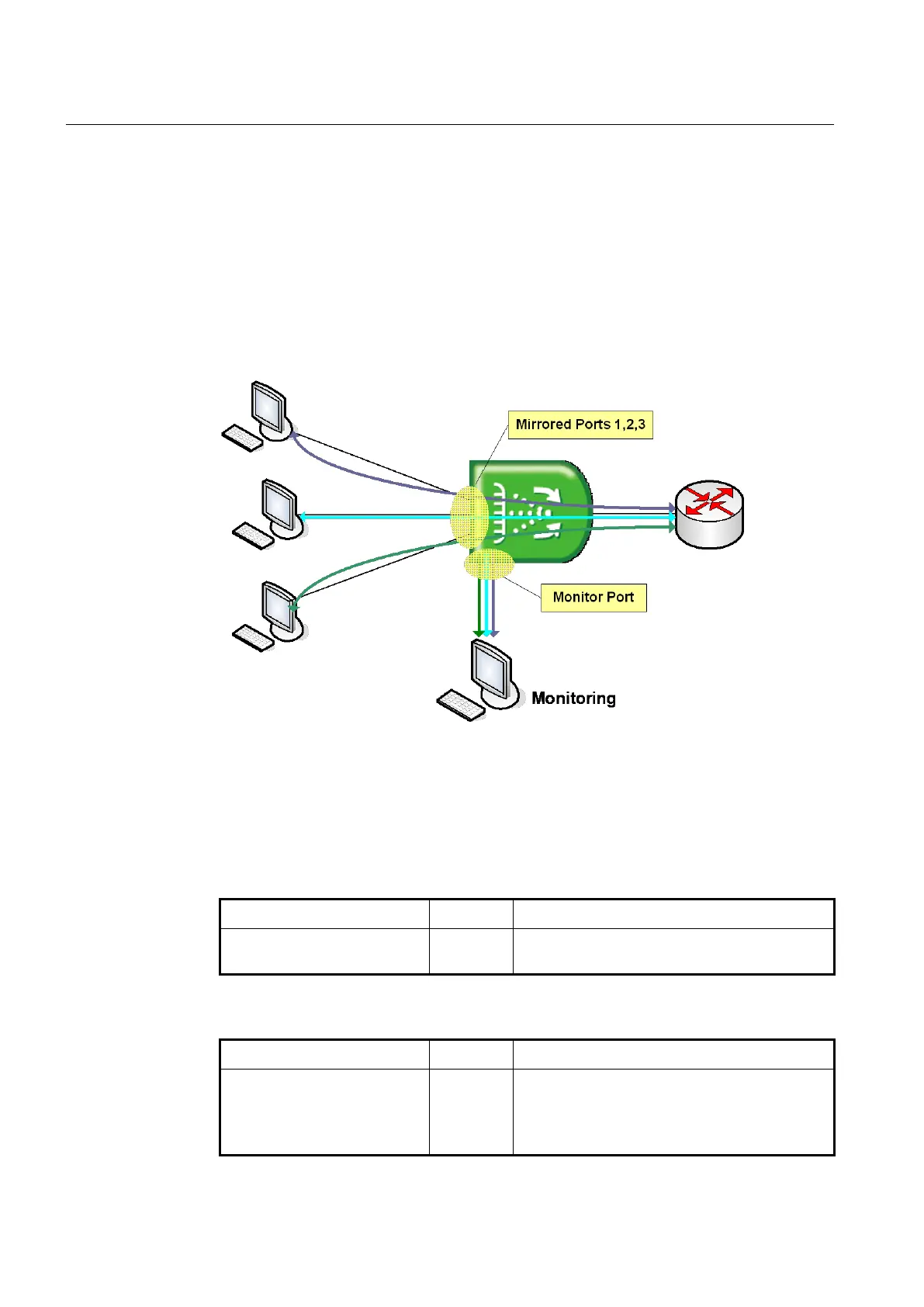
The following is a network structure to analyze the traffic by port mirroring. It analyzes
traffic on the switch and network status by configuring Mirrored port and Monitor port
connecting the computer, that the watch program is installed, to the port configured as
Monitor port.
Fig. 5.1 Port Mirroring
To configure port mirroring, designate mirrored ports and monitor port. Then enable port
mirroring function. Monitor port should be connected to the watch program installed PC.
You can designate only one monitor port but many mirrored ports for one switch.
Step 1 Designate the monitor port, use the following command.
mirror monitor {PORTS | cpu}
Designates the monitor port.
PORTS: port number
Step 2 Designate the mirrored ports, use the following command.
mirror add PORTS [ingress |
egress]
Designates the mirrored ports.
PORTS: port number
ingress: ingress traffic
egress: egress traffic



 To Next Page