UMN:CLI User Manual
V5808
684
(6) Displaying Auto-upgrade Configuration
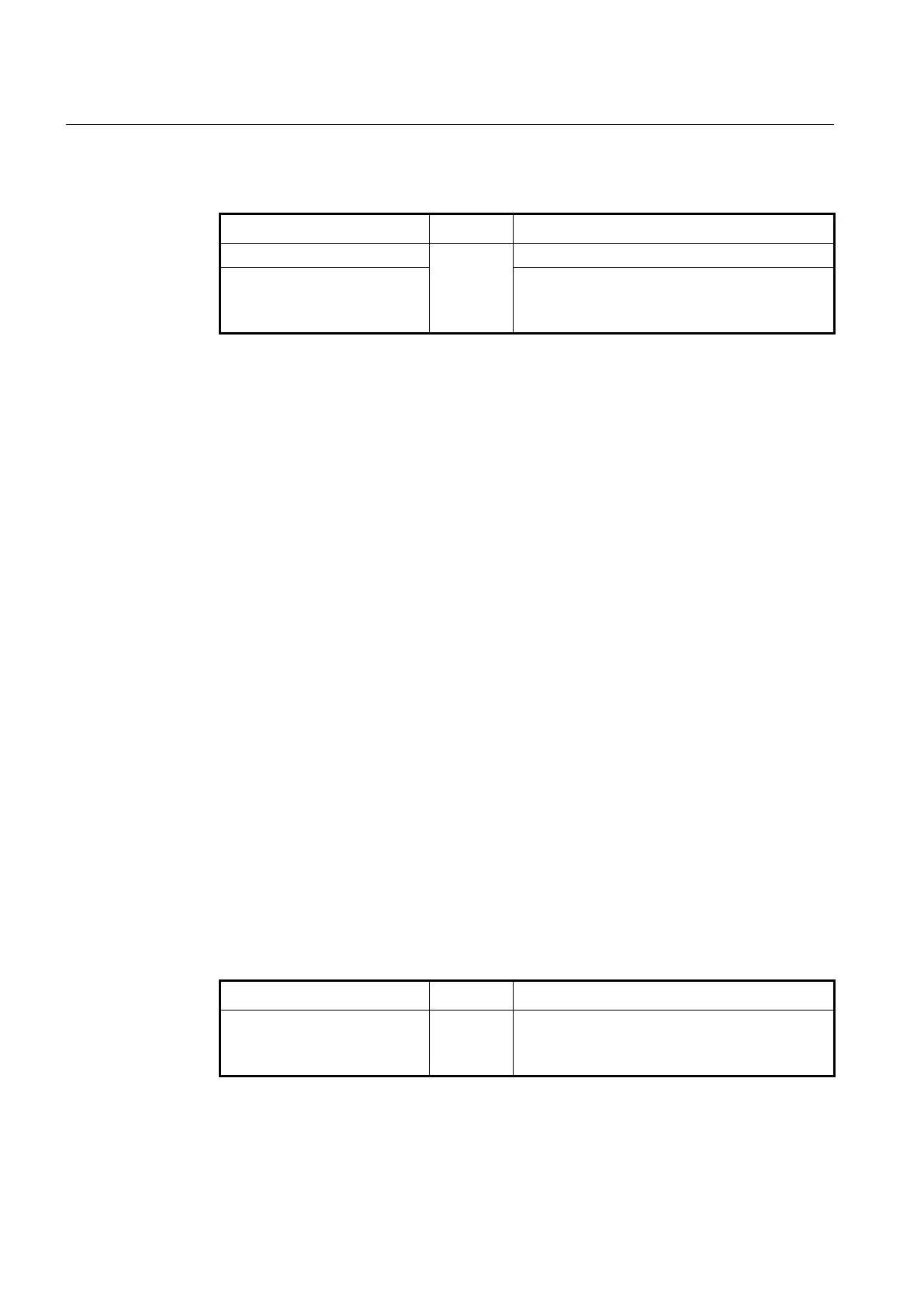
To display the ONU auto upgrade configuration, use the following command.
show onu auto-upgrade info
Enable
Global
GPON
GPON-OLT
Shows a progress of ONU auto-upgrade.
show onu auto-upgrade model-
list [NAME]
Shows a list of ONU model names configured to be
auto-upgraded.
NAME: ONU model name
The following is an example of displaying the progress of ONU auto-upgrade and a list of
ONU model name configured to be auto-upgraded.
SWITCH(gpon)# show onu auto-upgrade info
---------------------------------------------------------------------------------
Auto-upgrade Start Time : 17 (End Time : 18)
Auto-upgrade Reboot Time : 17
---------------------------------------------------------------------------------
OLT | Mode | Upgrade Status | Version Match | Invalid Version Match
---------------------------------------------------------------------------------
3 | enable | Upgrade ONU Progress | enable | enable
4 | disable | Upgrade ONU Progress | enable | enable
SWITCH(config-gpon-olt[3])# show onu auto-upgrade info
---------------------------------------------------------------------------------
Auto-upgrade Start Time : 17 (End Time : 18)
Auto-upgrade Reboot Time : 17
---------------------------------------------------------------------------------
OLT | Mode | Upgrade Status | Version Match | Invalid Version Match
---------------------------------------------------------------------------------
3 | enable | Upgrade ONU Progress | enable | enable
SWITCH(config-gpon-olt[3])# show onu auto-upgrade model-list
---------------------------------------------------------------------------------
OLT | ONU | Model | Upgrade Status | Fail-CNT | Active
---------------------------------------------------------------------------------
3 | 1 | H645 | - | 0 | 22.0.8.26
SWITCH(config-gpon-olt[3])#
To display the firmware for ONU auto-upgrade, use the following command.
show onu auto-upgrade
firmware
Shows the firmware information of auto-upgraded
ONU.
The following is an example of displaying the firmware for ONU auto-upgrade.
SWITCH(config-gpon-olt[3])# show onu auto-upgrade current-fw
Current Firmware : G_ONU_DALLAS_22_0_8_33.bin



 To Next Page