User Manual UMN:CLI
V5808
745
considered as a last resort for frames that do not match any other applicable rule. Best
practice dictates that these entries not be deleted; however, they can be modified to
produce the desired default behaviour.
15, x, x, 15, x, x, x, (0, 15, x, x, 15, x, x)
15, x, x, 14, x, x, x, (0, 15, x, x, 15, x, x)
14, x, x, 14, x, x, x, (0, 15, x, x, 15, x, x)
The ‘x’ is a "do not care" field and should be set to zero.
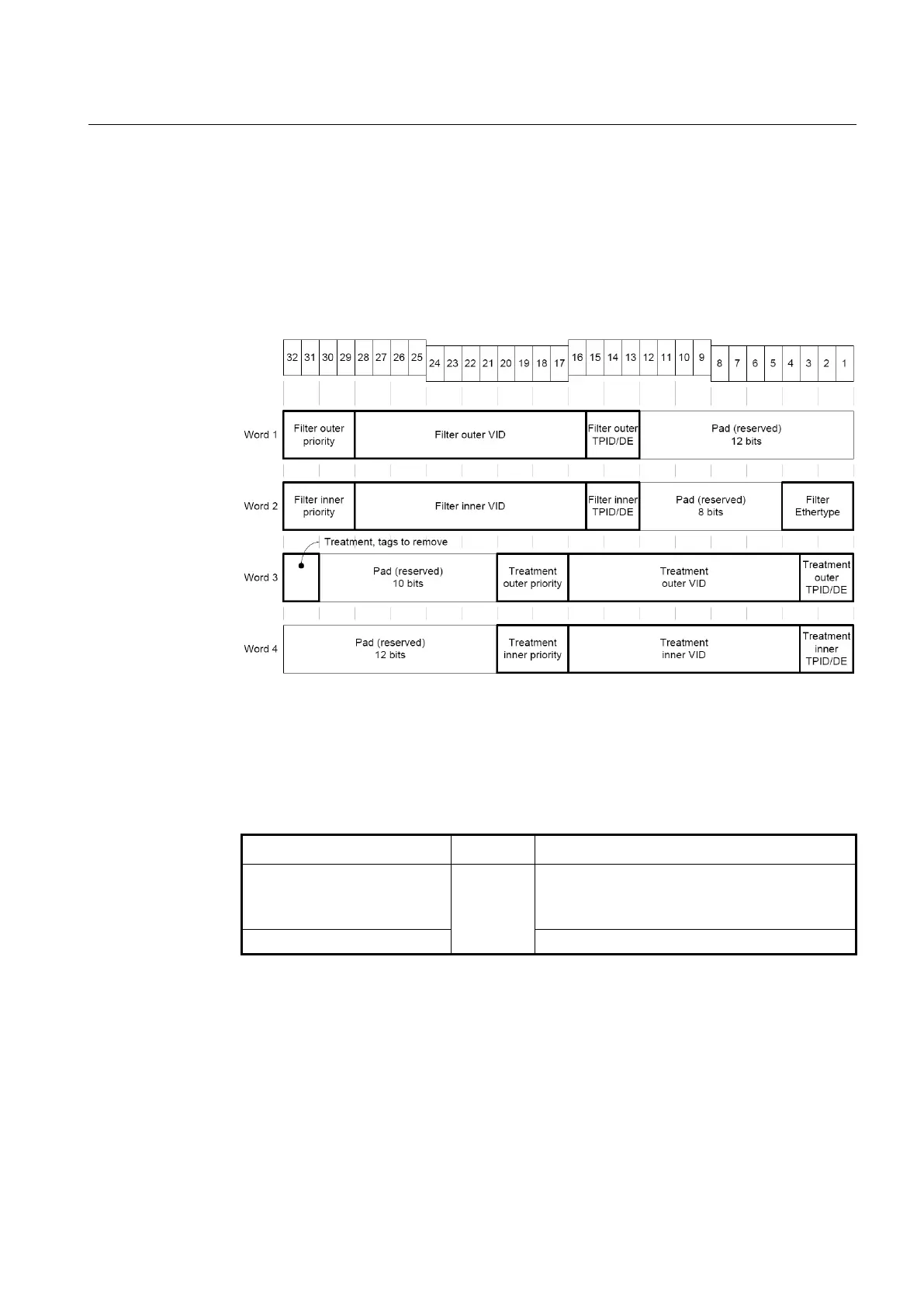
Fig. 12.8 Received Frame Layout
12.6.1.1 Configuration for Single-tagged Frame Treatment
To create the mapping table to configure the single-tagged frame treatment, use the
following command.
single-tagged-frame TABLE
Creates the mapping table to configure the single-
tagged frame treatment.
TABLE: table number
no single-tagged-frame TABLE
Deletes the specified table.
After opening (creating) the mapping table to configure the single-tagged frame treatment,
the prompt changes from SWITCH(config-ext-vlan-oper[NAME])# to SWITCH(config-ext-
vlan-oper[NAME]-single-tagged-frame[TABLE])#.



 To Next Page