User Manual UMN:CLI
V5808
267
8.1.8 Displaying VLAN Information
User can display the VLAN information about Port based VLAN, Protocol based VLAN,
MAC based VLAN, Subnet based VLAN and QinQ.
Shows all VLAN configurations.
Shows a description for specific VLAN.
Shows QinQ configuration.
Shows VLAN based on protocol.
Shows VLAN based on MAC address.
Shows VLAN based on subnet.
Shows VLAN based on the port.
Shows port isolation configuration.
8.1.9 QinQ VLAN Mapping
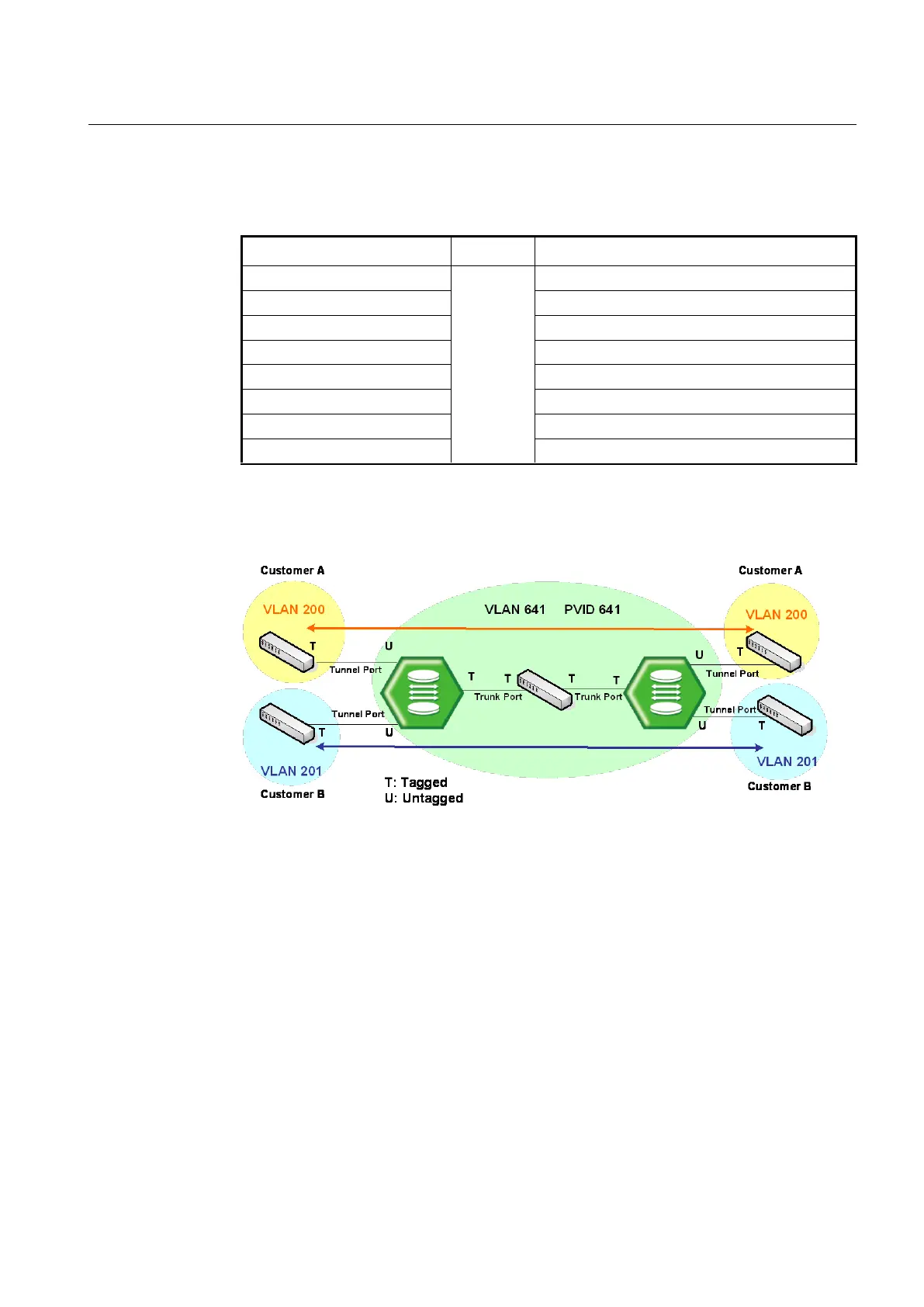
QinQ or Double Tagging is one way for tunneling between several networks.
Fig. 8.3 Example of QinQ Configuration
If QinQ is configured on the V5808, it transmits packets adding another Tag to original
Tag. Customer A group and customer B group can guarantee security because
telecommunication is done between each VLANs at Double Tagging part.
Double tagging is implemented with another VLAN tag in Ethernet frame header.



 To Next Page