7. SYSTEM SETTINGS
145
• Auto Off
For keys on the screen controlled with the mouse or touch panel, select the length of time
that must elapse without any key operations for the keys to disappear automatically.
Off / 1 / 2 / 3 / 4 / 5 / 10 / 20 / 30 / 60 [sec]
• Operation Key
Set whether to include the operation key in the keys on the screen controlled with the
mouse or touch panel.
Off / On
7.2.4 Configuring the Capture Feature
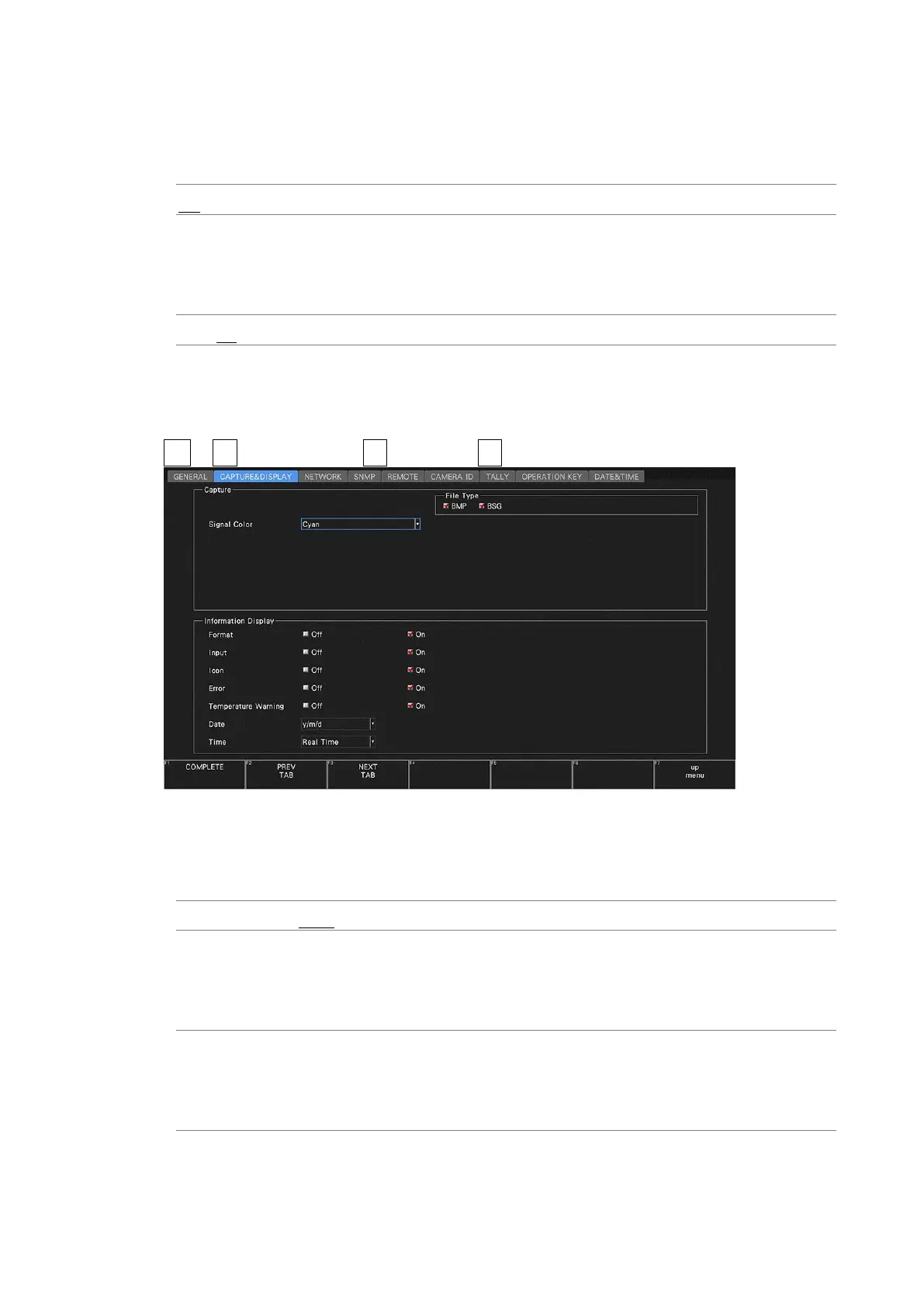
Use Capture on the CAPTURE & DISPLAY tab to configure the capture feature.
SYS → F•2 SYSTEM SETUP → F•2 PREV TAB or F•3 NEXT TAB →
Figure 7-13 CAPTURE & DISPLAY tab
• Signal Color
Select the capture waveform color.
White / Yellow / Cyan / Green / Magenta / Red / Blue
• File Type
Turns on the file format for saving the captured screen data to a USB memory device.
[See also] 8, “CAPTURE FEATURE”
BMP: Files are saved to a USB memory device in BMP format. You can view
the saved files on a PC.
BSG: Files are saved to a USB memory device in BSG format. You can view
the saved files on the instrument.
* By default, BMP and BSG are both on. You cannot set both of these settings to OFF.



 To Next Page