16. Status Display
370
16.8 Displaying a List of Ancillary Data
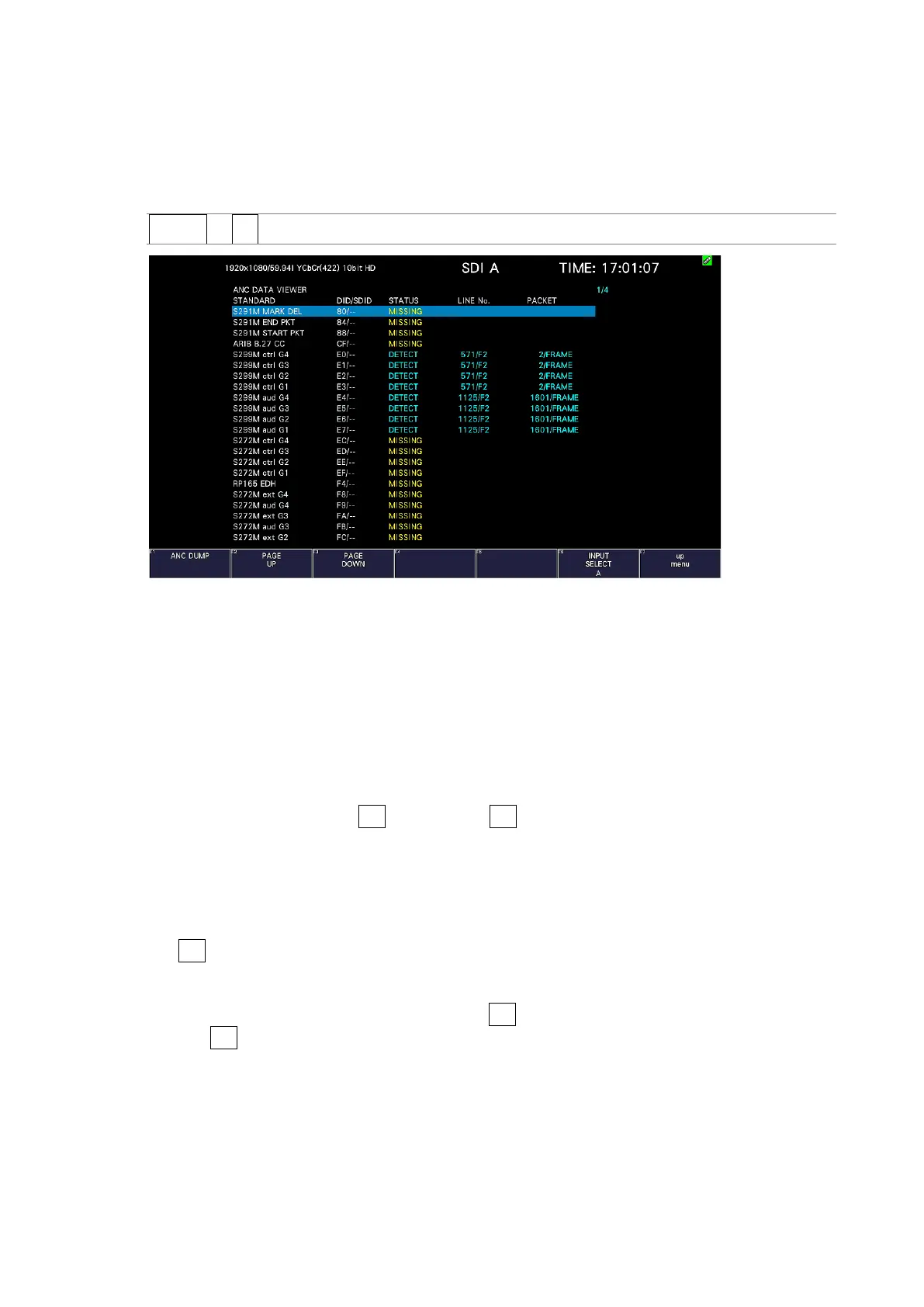
To display a list of ancillary data, follow the procedure below.
Ancillary data not embedded in every frame may not be displayed.
Procedure
STATUS → F•3 ANC DATA VIEWER
Figure 16-17 Ancillary data screen
16.8.1 Ancillary Data Display Description
On the ancillary data screen, data is displayed as a list for each standard. If data is detected,
"DETECT" is displayed in the STATUS column. If data is not detected, "MISSING" is displayed
in the STATUS column.
• Data Viewing
By turning the function dial (F•D) to the right, you can scroll the screen to view all the
data. You can also press F•2 PAGE UP and F•3 PAGE DOWN to move between pages. In
the upper right of the screen, the "page number/total number of pages" is displayed.
If you press the function dial (F•D), the cursor returns to the first data entry.
• Selecting the Displayed Stream
When the input signal is 3G-B, to set the display stream to STREAM1 or STREAM2, press
F•4 STREAM SELECT.
• Selecting the Content to Display
You can select the displayed content using F•5 LINK when the input signal is multi link
and F•5 SUB when the input signal is 6G and 12G.



 To Next Page