19. Network Control
466
19.4.6 EVENT LOG VIEWER
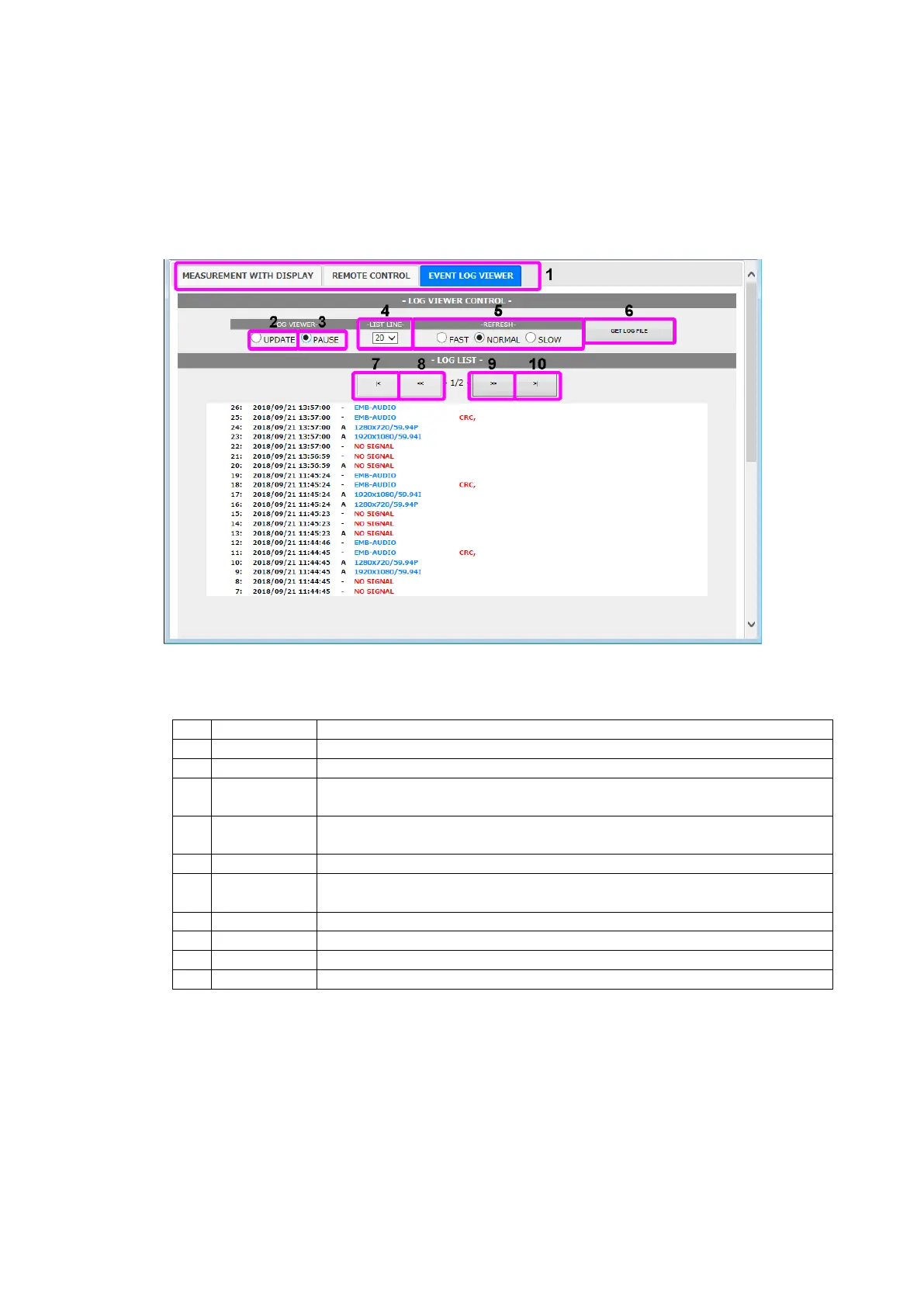
The EVENT LOG VIEWER tab displays the event log of the status display.
Nothing is displayed at first. You can display the log entries by setting LOG VIEWER to
UPDATE. The screen is updated automatically at a given interval.
Set LOG to START on the EVENT LOG menu in advance.
[See also] 16.4, “Configuring Event Log Settings”
Figure 19-9 EVENT LOG VIEWER
Table 19-5 EVENT LOG VIEWER description
Switches the display mode.
The screen is updated automatically. LOG LIST shows the latest log.
The screen is not automatically updated. Past log entries can be displayed in
LOG LIST.
Select the number of entries to display on a screen from 10 to 50 (in 5
steps).
Set the screen’s auto update interval to FAST, NORMAL, or SLOW.
The event log is displayed in a separate window.
From the File menu, choose Save As to save the log in text format.
The latest log entries are displayed when LOG VIEWER is set to PAUSE.
The next newer log page appears when LOG VIEWER is set to PAUSE.
The next older log page appears when LOG VIEWER is set to PAUSE.
The oldest log entries are displayed when LOG VIEWER is set to PAUSE.



 To Next Page