13. Picture Screen
249
13.1 Selecting the Display Mode
To select the picture display mode, follow the procedure below.
Procedure
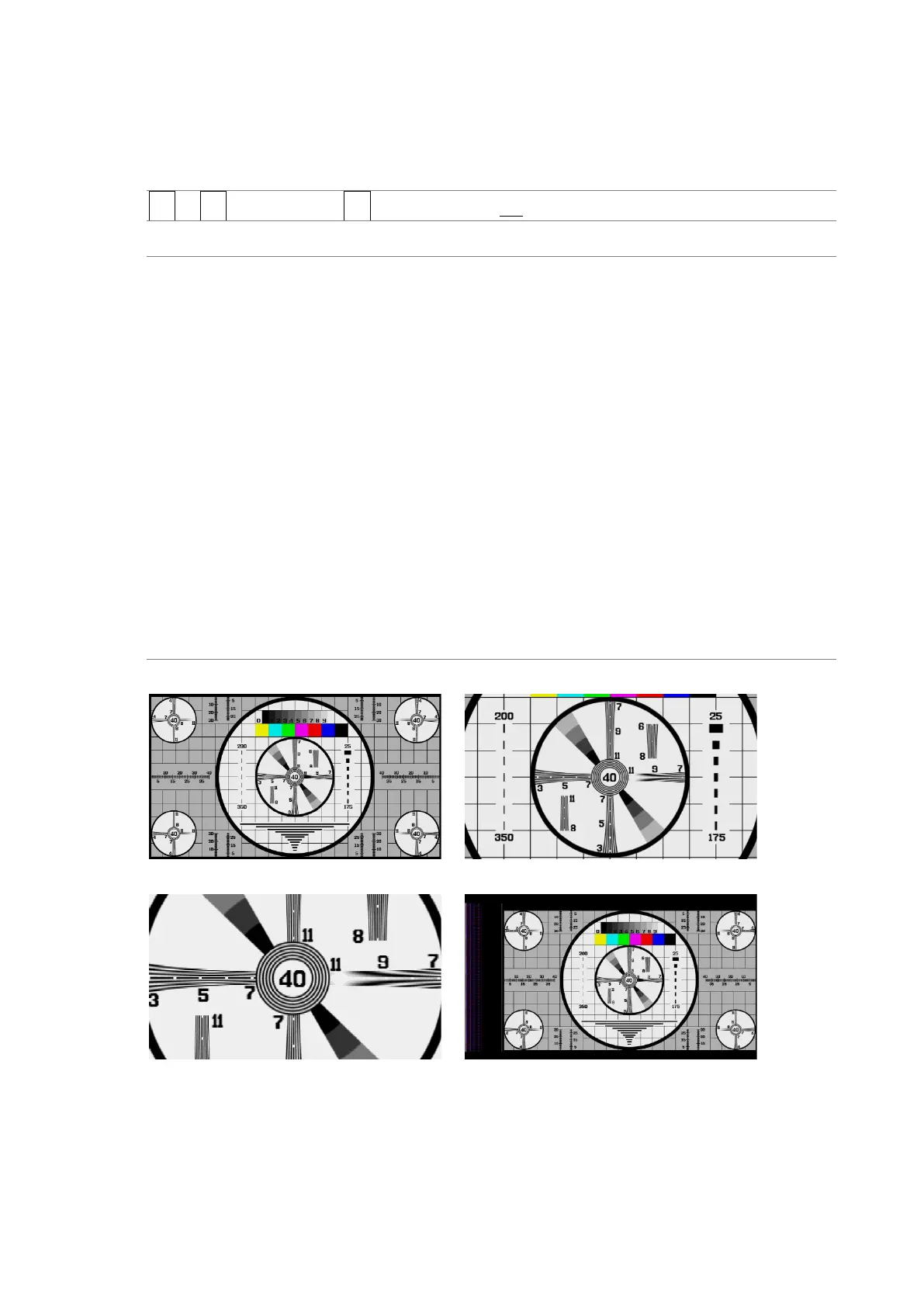
PIC → F•1 PIC CONFIG → F•1 PICTURE MODE: FIT / REAL / X2 / FULL FRM
Settings
FIT: The picture is displayed at the optimal size for the display area.
Because the picture is enlarged or reduced, the display may become coarse
or pixels may drop out. The instrument uses simple filtering to enlarge and
reduce the picture.
REAL: A single sample of the video signal is displayed with a single pixel on the
screen.
If the picture is larger than the display area, use the V•POS and H•POS
knobs to adjust the picture display position. Press a knob to return the
picture to the corresponding default location.
X2: A single sample of the video signal is displayed with 4 pixels (2 horizontal
and 2 vertical pixels) on the screen.
If the picture is larger than the display area, use the V•POS and H•POS
knobs to adjust the picture display position. Press a knob to return the
picture to the corresponding default location.
This is not displayed for 4K.
FULL FRM: A single frame, including the blanking interval, is displayed.
This is not displayed for 4K.
SIZE = FIT SIZE = REAL
SIZE = X2 SIZE = FULL FRM
Figure 13-2 Selecting the display mode



 To Next Page