7. SYSTEM SETTINGS
142
7.2 Configuring the Instrument
To configure the instrument, press F•2 SYSTEM SETUP on the SYS menu.
7.2.1 General Settings
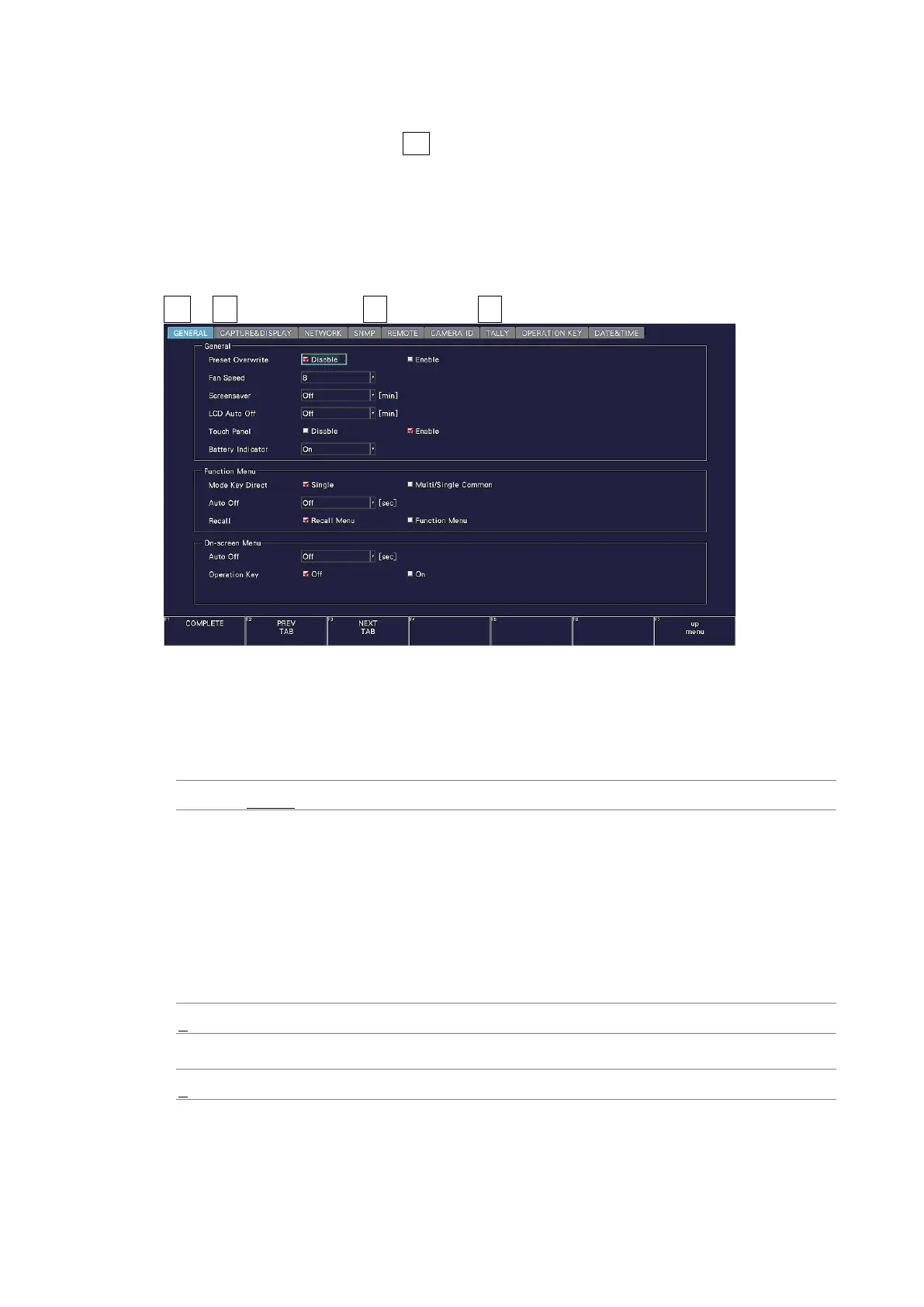
Use General on the GENERAL tab to configure general settings of the instrument.
They are not reset even if you initialize the settings. In addition, they are not recorded to
presets.
SYS → F•2 SYSTEM SETUP → F•2 PREV TAB or F•3 NEXT TAB →
Figure 7-10 GENERAL tab
• Preset Overwrite
Select whether to enable overwriting when registering presets.
Disable this to prevent overwriting presets.
Disable / Enable
• Fan Speed
Select the fan speed.
The larger the value, the higher the speed and the higher the cooling capability. In
contrast, the smaller the value, the quieter the fan noise.
The settings that you specify here will not be initialized even if you initialize the
instrument. In addition, they are not recorded to presets.
LV5300/LV5300A / LV7300-SER02
4 / 5 / 6 / 7 / 8
LV5350 / LV7300-SER01
1 / 2 / 3 / 4 / 5 / 6 / 7 / 8



 To Next Page