15. Audio Display
312
15.1 Setting the Signals to Measure
To configure the measurement signal settings, press F•7 MAPPING on the AUDIO menu.
Procedure
AUDIO → F•7 MAPPING
15.1.1 Selecting the Measurement Signal
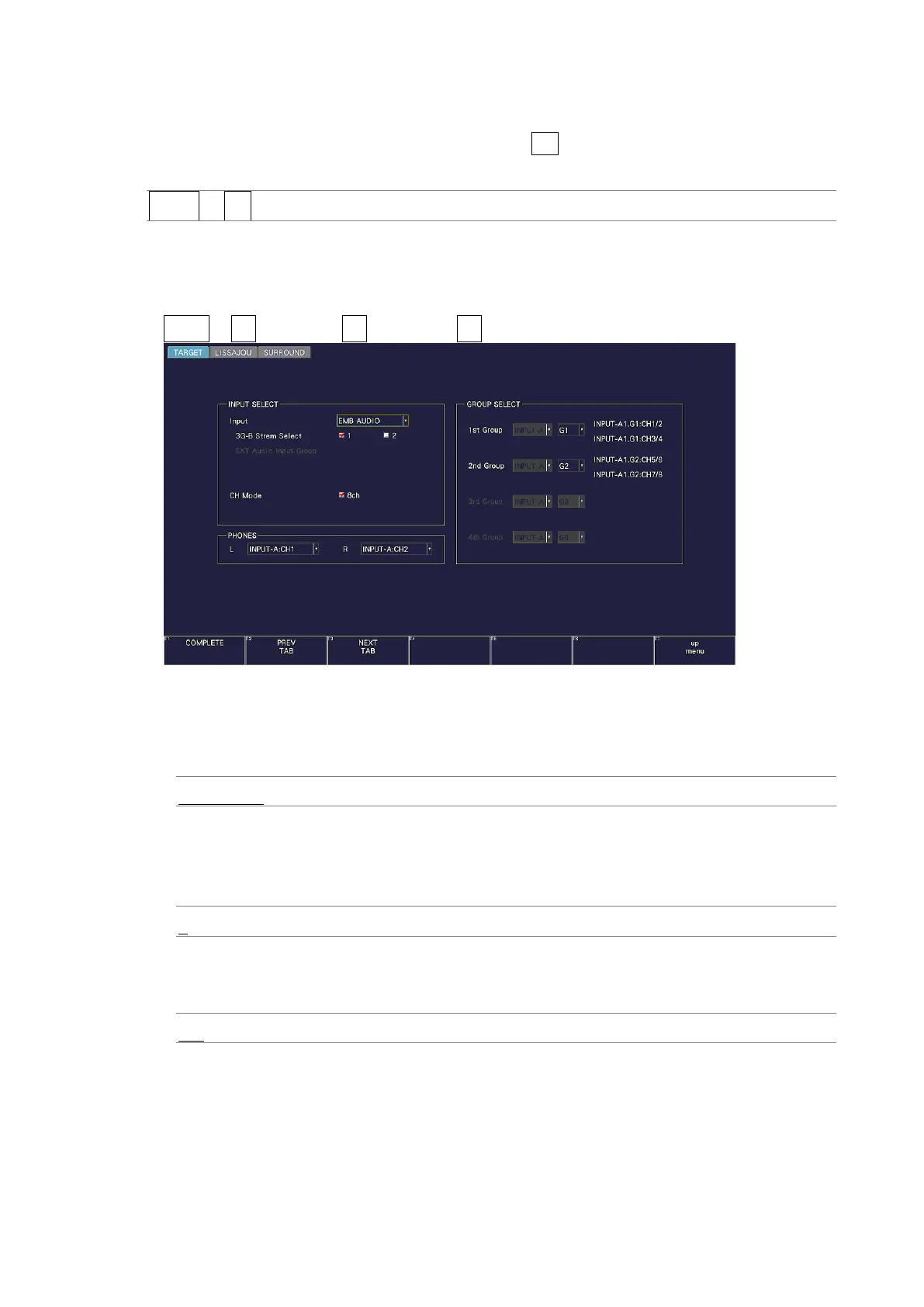
On the TARGET tab, select the audio group, and assign the headphone output.
AUDIO → F•7 MAPPING → F•2 PREV TAB or F•3 NEXT TAB →
Figure 15-2 TARGET tab
• Input
The input signal is fixed to EMB AUDIO.
EMB AUDIO: The embedded audio signal applied to SDI INPUT is measured.
• 3G-B Stream Select
Select the 3G-B stream.
This is invalid when the input signal is not 3G-B.
1 / 2
• CH Mode
This is fixed to 8 channels. Select the number of measurement channels.
8ch
• PHONES
Select the headphone output channel.



 To Next Page