7. SYSTEM SETTINGS
160
7.2.15 Configuring the LV7290
You can configure the LV 7290 REMOTE CONTROLLER (sold separately) on the LV7290
SETUP tab.
If LV7290 is not selected under Telnet on the NETWORK tab, the LV7290 will not be
displayed.
[See also] Telnet → 7.2.8, “Configuring the Server”
The connection to the LV7290 will be disconnected as soon as you change the LV7290
settings.
The settings that you specify here will not be initialized even if you initialize the instrument.
Nor are they recorded to presets.
SYS → F•2 SYSTEM SETUP → F•2 PREV TAB or F•3 NEXT TAB →
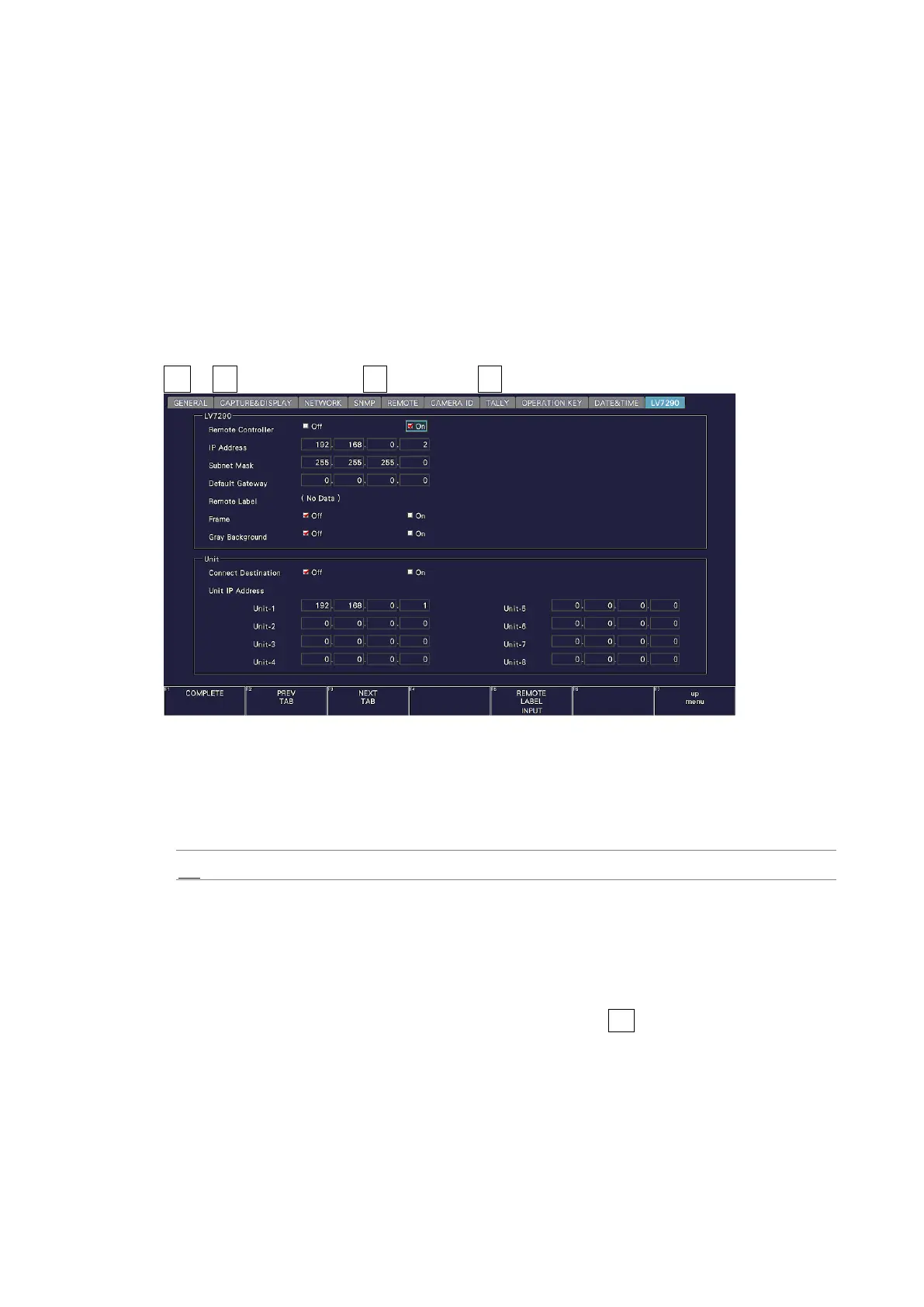
Figure 7-27 LV7290 tab
• Remote Controller
Select whether to send the IP address, subnet mask, and default gateway settings to the
LV7290.
Off / On
• IP Address / Subnet Mask / Default Gateway
Set the LV7290’s IP address, subnet mask, and default gateway.
• Remote Label
Displays the label of the REMOTE LABEL item placed in the layout.
There is no label in the default settings, but, you can press F•5 REMOTE LABEL INPUT to
enter a label.
Enter up to 16 characters.



 To Next Page