15. Audio Display
327
15.7.3 Selecting the Surround Display Format
To select the surround display format, follow the procedure below.
If adjacent channels (including Lch and Rch for PHANTOM) are of opposite phases, the scale
between the channels is displayed in red.
Procedure
AUDIO → F•3 SURROUND SETUP → F•3 SURROUND 5.1: NORMAL / PHANTOM
Settings
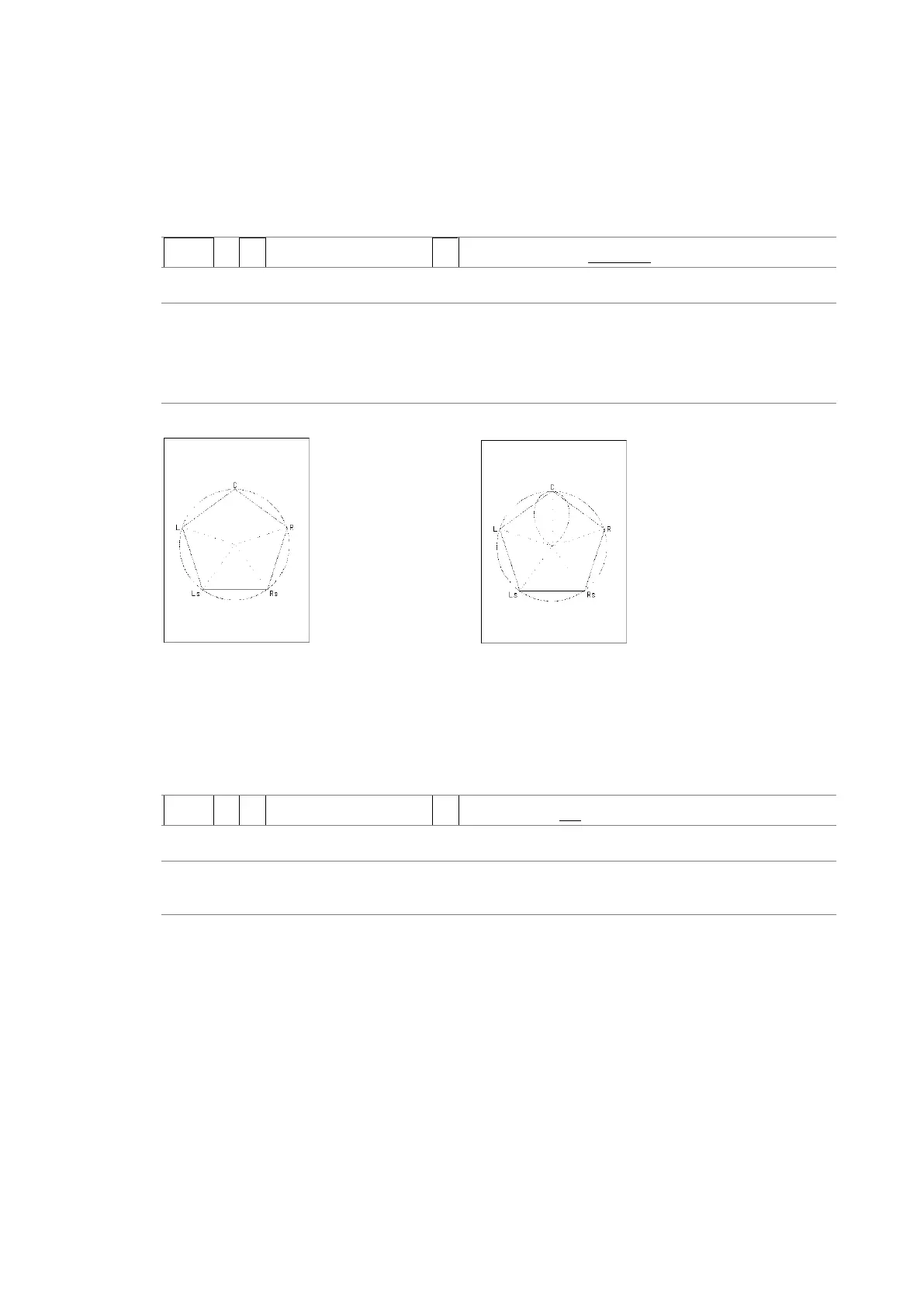
NORMAL: A waveform that combines Lch, Rch, Lsch, Rsch, and Cch (hard center) is
displayed.
PHANTOM: A waveform that combines Lch, Rch, Lsch, Rsch, and phantom center and
a Cch (hard center) waveform are displayed separately.
SURROUND 5.1 = NORMAL SURROUND 5.1 = PHANTOM
Figure 15-14 Selecting the surround display format
15.7.4 Setting the Surround Waveform Gain
To select the surround waveform gain, follow the procedure below.
Procedure
AUDIO → F•3 SURROUND SETUP → F•5 AUTO GAIN: ON / OFF
Settings
ON: The gain is automatically adjusted so that the waveform fits the scale.
OFF: The waveform is displayed with a fixed gain.



 To Next Page