9. PRESET FEATURE
177
9.4 Copying All Presets from the instrument to a USB Memory Device
To copy all the presets from the instrument to a USB memory device, follow the procedure
below.
1. Connect a USB memory device to the instrument.
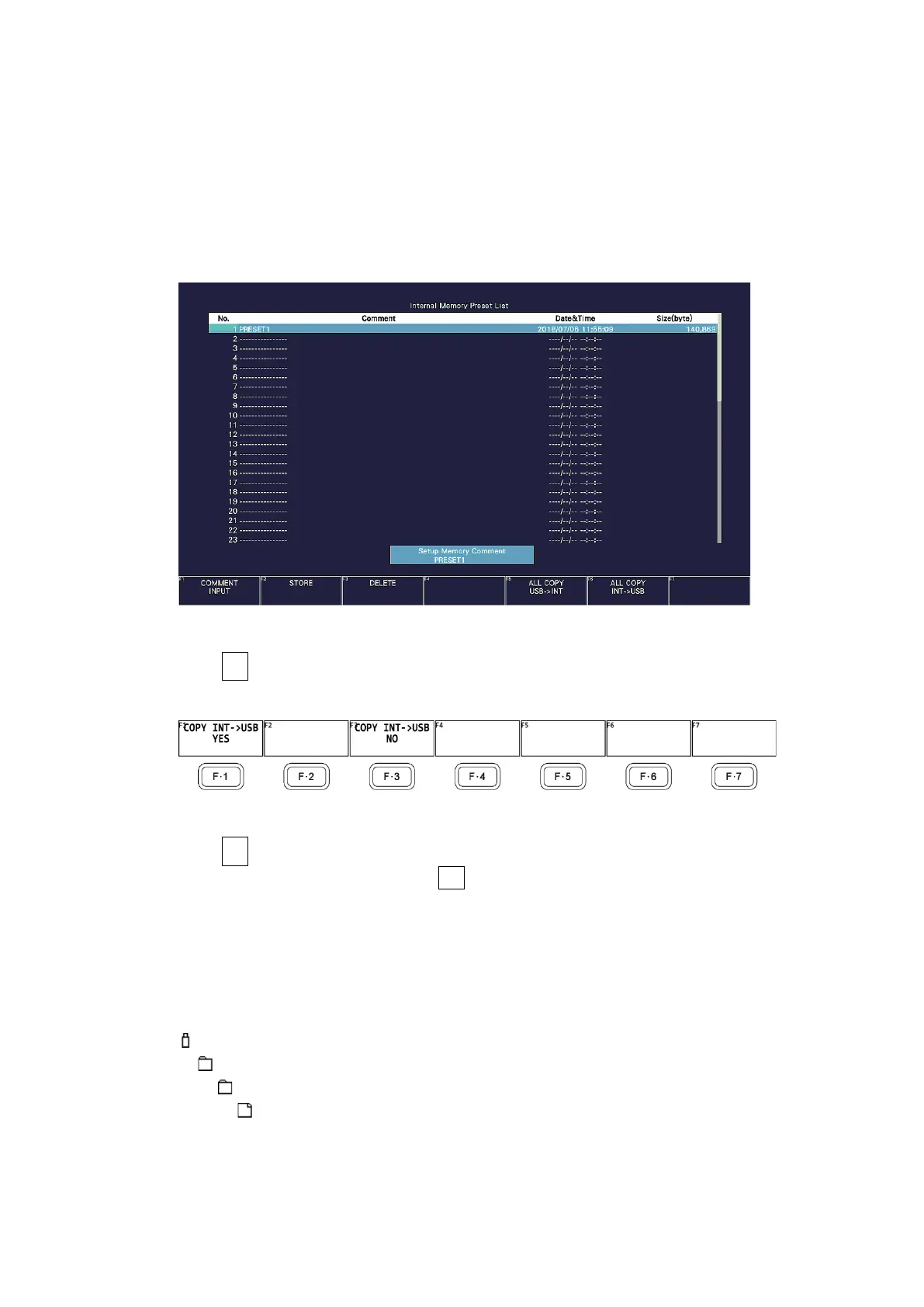
2. Press MEM.
The preset registration screen appears.
Figure 9-7 Preset registration screen
3. Press F•6 ALL COPY INT->USB.
The ALL COPY INT->USB menu appears.
Figure 9-8 ALL COPY INT->USB menu
4. Press F•1 COPY INT->USB YES.
To cancel the copy operation, press F•3 COPY INT->USB NO. If the USB memory device
already contains presets, they will be overwritten.
Presets are saved to the following location.
Note that if you use a PC to change the names of the files stored in the USB memory
device, you will no longer be able to copy the altered presets from the USB memory
device to an instrument.
USB memory device
└ LV5300_USER, LV5350_USER or LV7300_USER
└ MEM
└ PRESET_01.PRE (to PRESET_60.PRE)



 To Next Page