16. Status Display
337
16.2 Configuring Error Detection Settings
To configure the error detection settings, use F•5 STATUS SETUP.
When error detection is set to ON, the following actions are performed when an error occurs.
• Counts errors on the status display.
• Displays errors in the event log of the status display
• Displays “ERROR” in the upper right of the display.
• Transmits a signal from the alarm output remote terminal
16.2.1 Error Setup 1
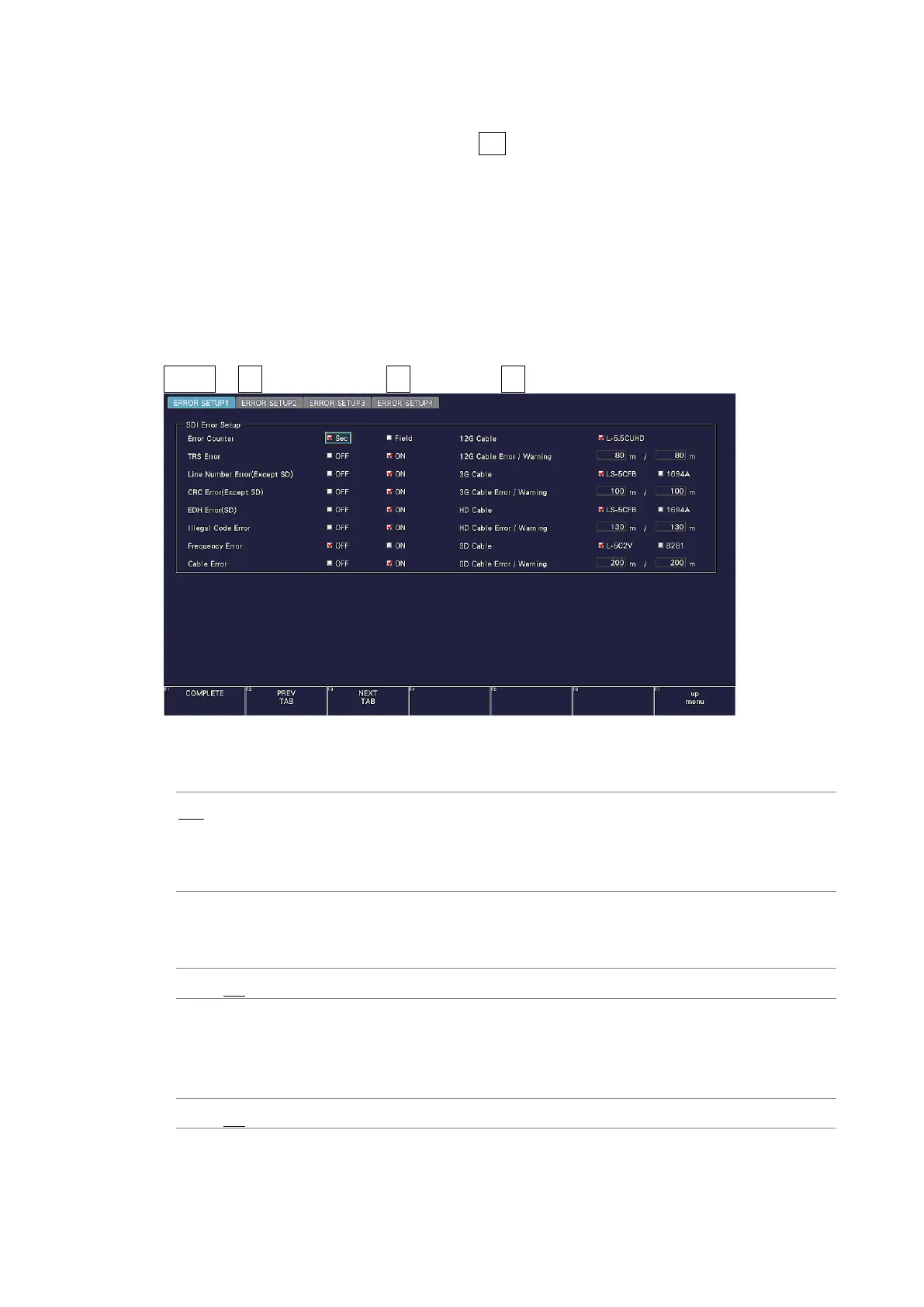
Use the ERROR SETUP1 tab to configure error detection settings for SDI signals.
STATUS → F•5 STATUS SETUP → F•2 PREV TAB or F•3 NEXT TAB →
Figure 16-2 ERROR SETUP1 tab
• Error Counter
Sec: Errors are counted in units of seconds. Even if multiple errors occur
within the same second, only a single error is counted.
Field: Errors are counted in units of fields (frames). Even if multiple errors
occur within the same field (frame), only a single error is counted.
• TRS Error
Select whether to detect TRS Pos and TRS Code errors.
OFF / ON
• Line Number Error(Except SD)
Select whether to detect line number errors. This setting is valid when the input signal is
not SD.
OFF / ON



 To Next Page