7. SYSTEM SETTINGS
155
7.2.12 Configuring the Tally Display (SER27)
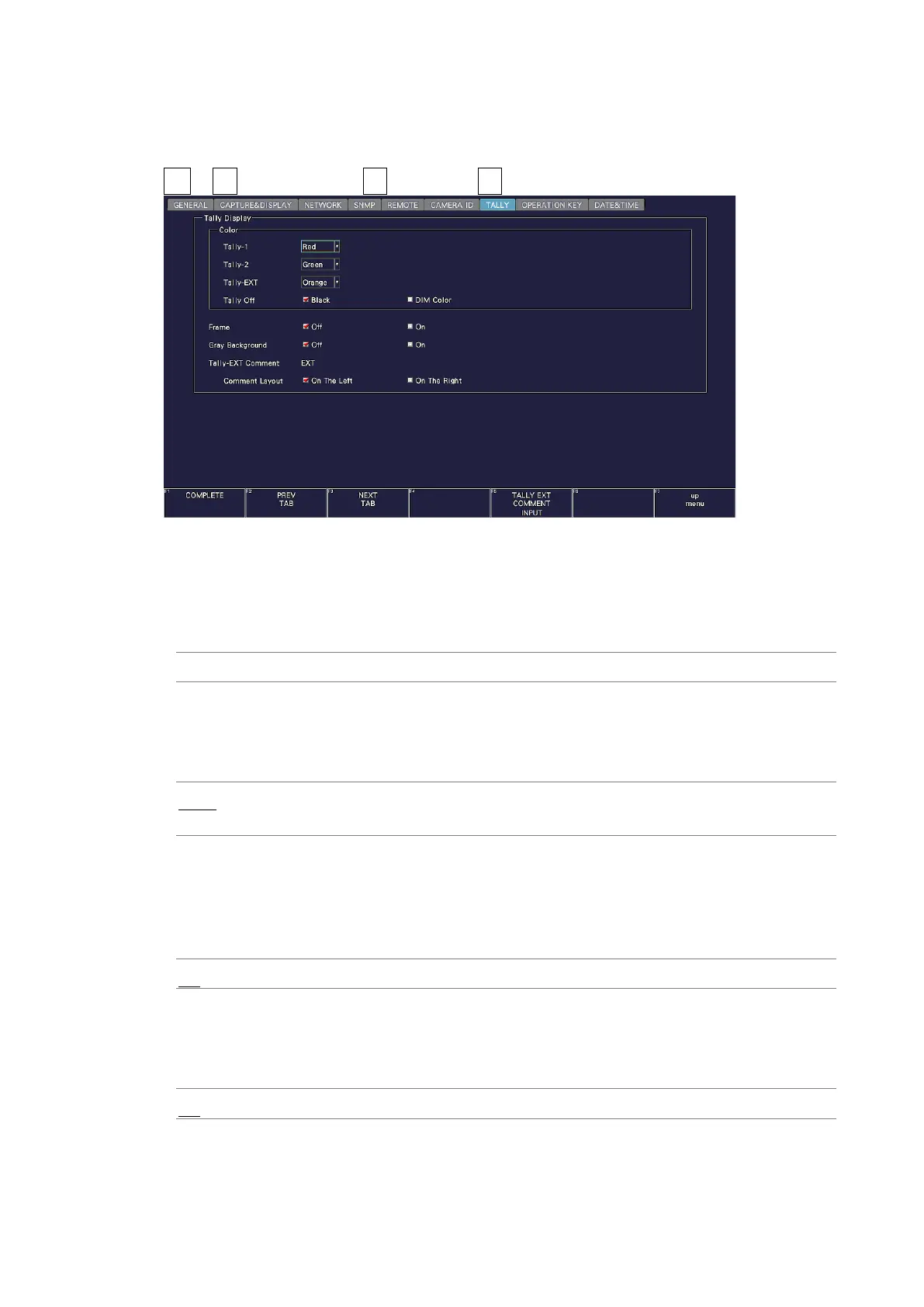
Use the TALLY tab to configure the settings of the TALLY item placed in the layout.
SYS → F•2 SYSTEM SETUP → F•2 PREV TAB or F•3 NEXT TAB →
Figure 7-23 TALLY tab
• Tally-1, Tally-2, Tally-EXT
Select the color of the TALLY item placed in the layout. The default values are red for
Tally-1, green for Tally-2, and orange for Tally-EXT.
Red / Green / Blue / Cyan / Magenta / Yellow / Orange
• Tally Off
Select the color of the TALLY item placed in the layout and that of the tally frame for when
the tally is off.
Black: No color is displayed.
DIM COLOR: The selected color is displayed dimly.
• Frame
Turns on and off the frame of the LABEL-1, LABEL-2, IRIS, TALLY-1, and TALLY-2 items
placed in the layout.
(The frame of the TALLY-EXT item is always shown.)
Off / On
• Gray Background
Select whether to display the background of the LABEL-1, LABEL-2, IRIS, and TALLY-EXT
items placed in the layout in gray.
Off / On



 To Next Page