7. SYSTEM SETTINGS
146
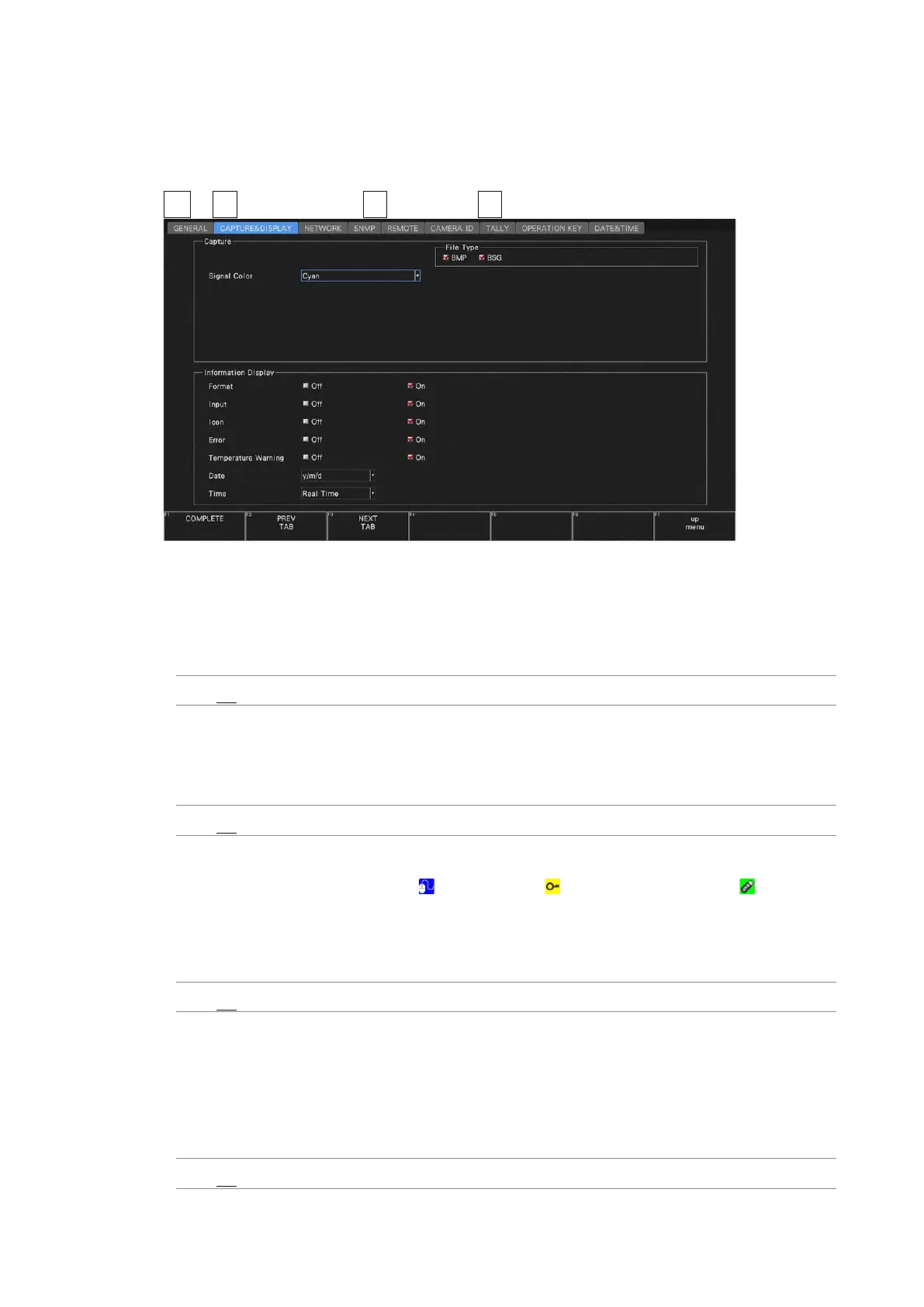
7.2.5 Configuring the Information Display
Use Information Display on the CAPTURE & DISPLAY tab to configure the information
display.
SYS → F•2 SYSTEM SETUP → F•2 PREV TAB or F•3 NEXT TAB →
Figure 7-14 CAPTURE & DISPLAY tab
• Format
Turns on and off the format display (e.g., 1920x1080/59.94I YCbCr(422) 10bit HD).
This setting is valid when a FORMAT item or Format option is placed in the layout.
Off / On
• Input
Turns on and off the input signal display (e.g., SDI A).
This setting is valid when a INPUT item or Input option is placed in the layout.
Off / On
• Icon
Turns on and off the mouse icon , key lock icon , and USB memory icon .
If you turn this off, you will not be able to tell from the screen whether a mouse, the US
interface of a touch panel monitor, or a USB memory device is connected.
[See also] 5.6, “Measurement Screen Description”
Off / On
• Temperature Warning
Turns on and off the alarm display (TEMPERATURE) that appears when the internal
temperature increases.
“OVER HEAT” will still be displayed even if this is set to off.
[See also] 7.2.15, “Displaying System Information”
Off / On



 To Next Page