16. Status Display
339
• HD Cable
Select the cable to use for cable length measurements when the input signal is HD.
LS-5CFB / 1694A
• HD Cable Error / Warning
Set the upper cable error limit and the upper cable warning limit for HD input signals. If
the value on the left side is exceeded, an error will occur, and the measured value on the
status display will be displayed in red.
If the value on the right side is exceeded, a warning will occur, and the measured value on
the status display will be displayed in yellow.
10 - 130 m
• SD Cable
Select the cable to use for cable length measurements when the input signal is SD.
L-5C2V / 8281
• SD Cable Error / Warning
Set the upper cable error limit and the upper cable warning limit for SD input signals. If
the value on the left side is exceeded, an error will occur, and the measured value on the
status display will be displayed in red.
If the value on the right side is exceeded, a warning will occur, and the measured value on
the status display will be displayed in yellow.
50 - 200 m
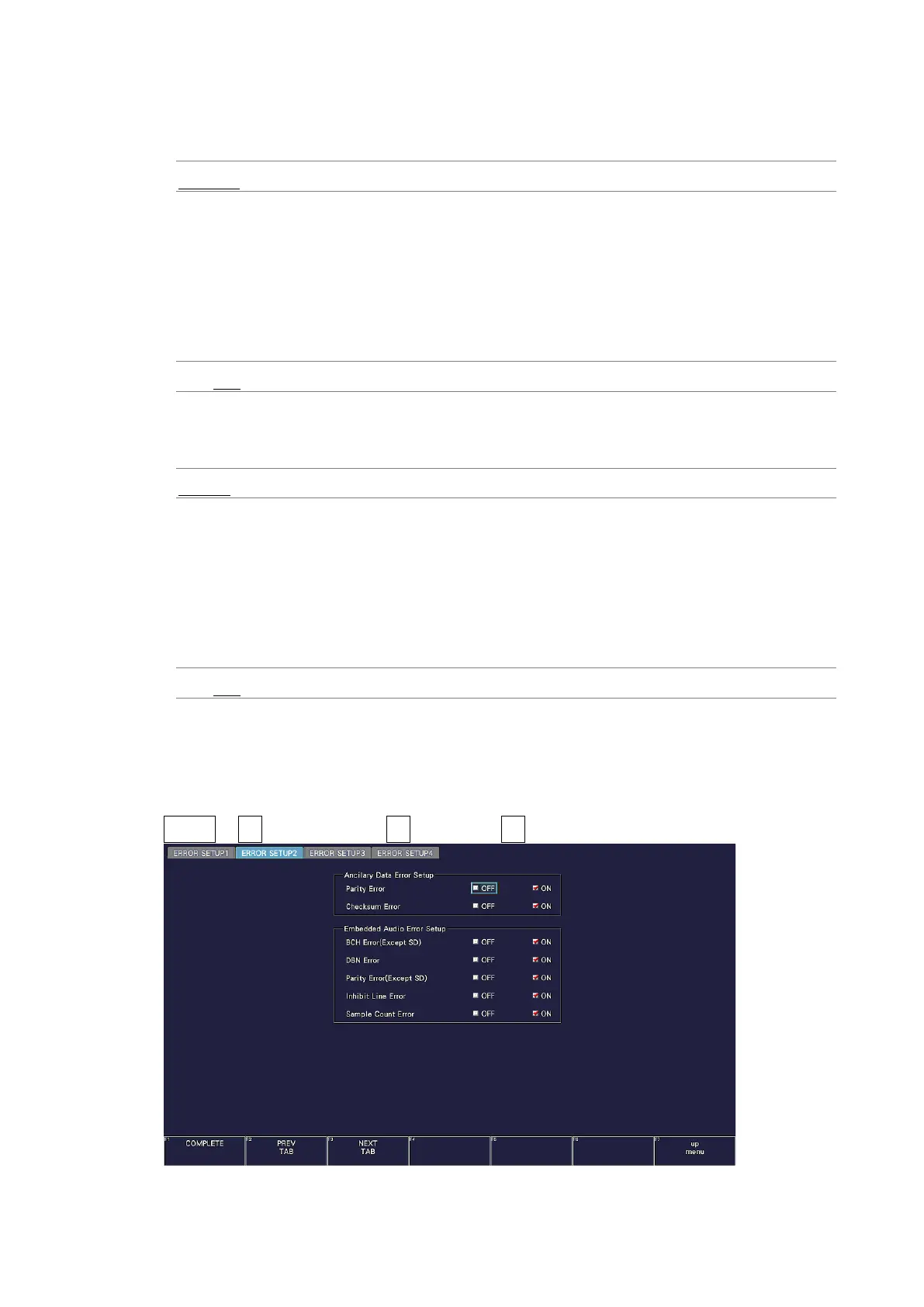
16.2.2 Error Setup 2
Use the ERROR SETUP2 tab to configure ancillary data and embedded audio error detection
settings.
STATUS → F•5 STATUS SETUP → F•2 PREV TAB or F•3 NEXT TAB →
Figure 16-3 ERROR SETUP2 tab



 To Next Page