14. HDR Display (SER23)
308
14.4 MAX FALL and MAX CLL Displays
MAX FALL (Maximum Frame Average Light Level) is a function that calculates the maximum
value among the R, G, and B values in each pixel and sums the maximums of all pixels. The
sum is divided by the number of pixels per frame to derive the average in the frame. The
average of each frame is compared among all frames from the start of measurement, and the
maximum value is displayed.
The R, G, and B values are converted linearly from the start of the calculation through OETF or
InverseOETF.
MAX CLL (Maximum Content Light Level) is a function that displays the maximum value
among the R, G, and B values from the start of measurement. The R, G, and B values are
converted linearly.
The R, G, and B values are converted linearly from the start of the calculation through OETF or
InverseOETF.
14.4.1 Turning the Display On and Off
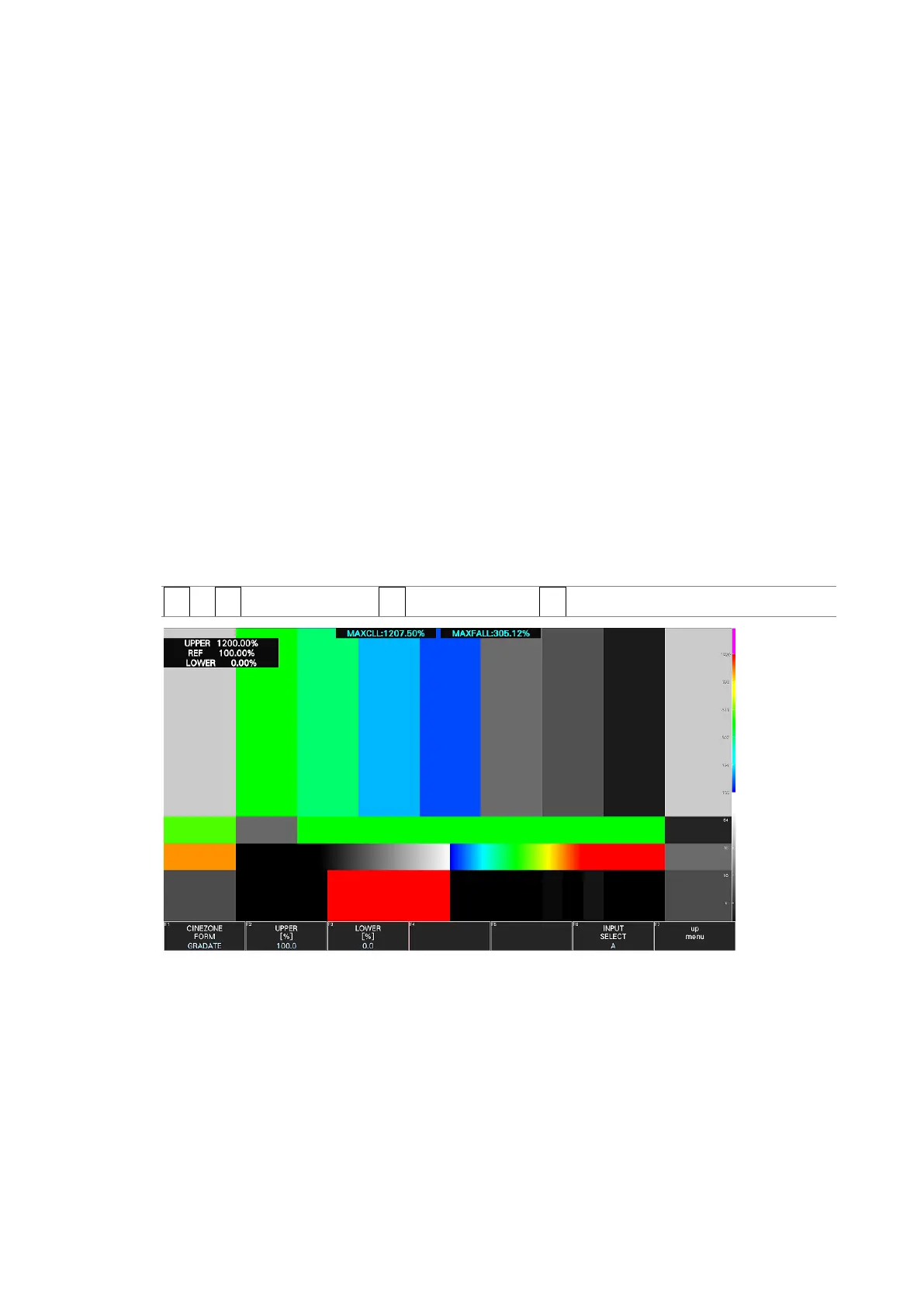
To display MAX FALL and MAX CLL at the top of the screen, follow the procedure below to
turn the function on. In addition, on the CINEZONE display, the HDR equivalents of the
display color settings are displayed in the upper left corner of the screen.
Procedure
PIC → F•2 CINELITE/HDR → F•3 MAX FALL/CLL → F•1 MAX FALL/CLL DISPLAY: OFF / ON
Figure 14-10 MAX FALL and MAX CLL displays



 To Next Page