19. Network Control
437
19. NETWORK CONTROL
The instrument can be remotely controlled through its Ethernet port on the rear panel.
Controlling the instrument remotely through its Ethernet interface has only been confirmed to
work in a local network environment. LEADER does not guarantee that this feature will work in
any network environment.
19.1 SNTP Client Function
The instrument can display time that is synchronized to an NTP server on the network.
19.1.1 How to Use
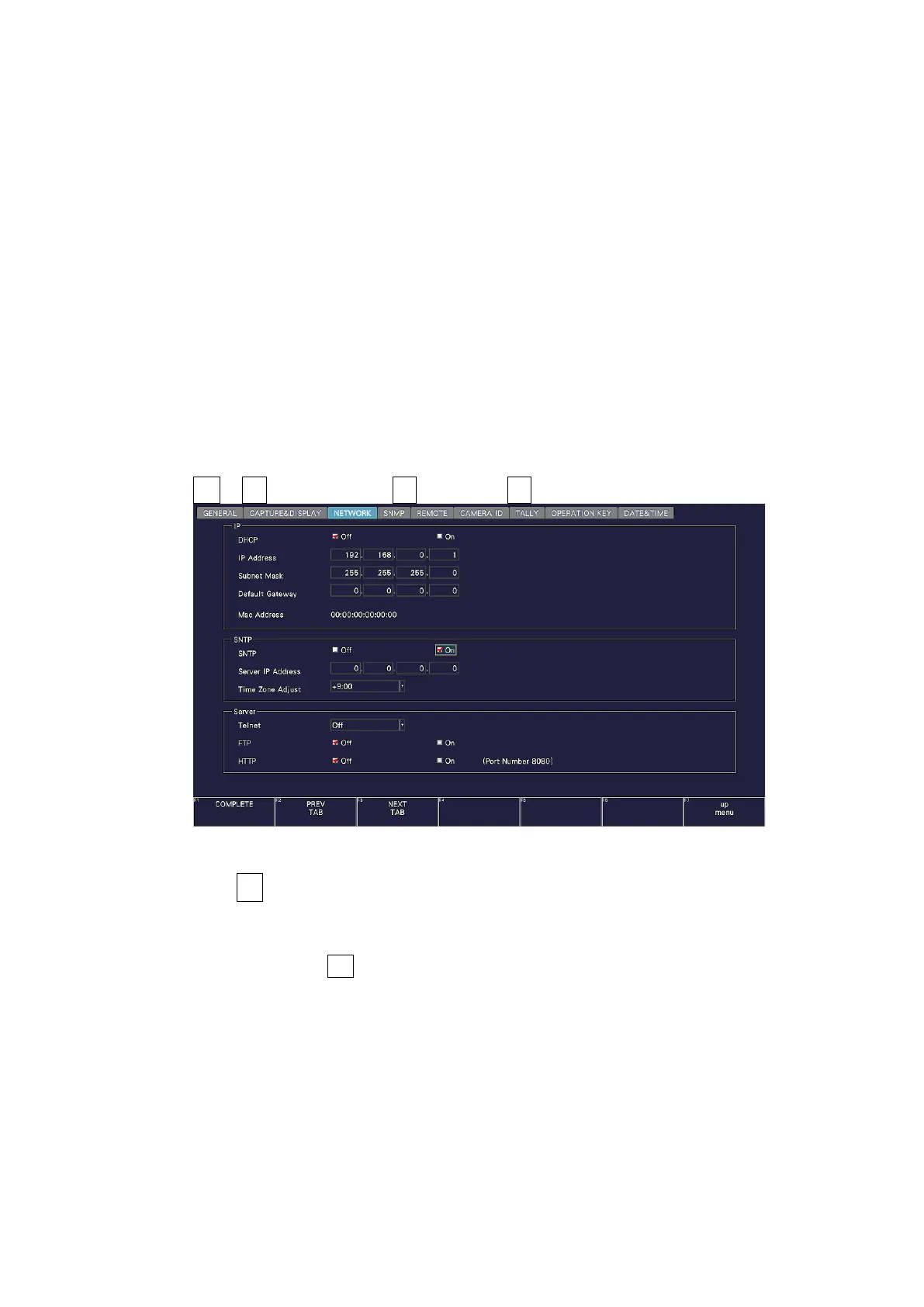
1. Configure the Ethernet settings on the NETWORK tab of the SYS menu.
Set SNTP Client Select to On, and set the IP address, server IP address, and time zone
adjustment. For details on time zone adjustment, see the next section.
[See also] 7.2.6, “Setting the Network IP”
SYS → F•2 SYSTEM SETUP → F•2 PREV TAB or F•3 NEXT TAB →
Figure 19-1 NETWORK tab
2. Press F•1 COMPLETE.
3. Connect the instrument's Ethernet port to the external network device.
The instrument connects to the NTP server at the following times.
• When you press F•1 COMPLETE in SYSTEM SETUP
• Once every approximately 10 minutes
When the instrument connects normally to an NTP server, the time is displayed at the
upper right of the screen.
If a connection cannot be established, “NTP ERROR” is displayed in red in the TIME box.



 To Next Page