13. Picture Screen
280
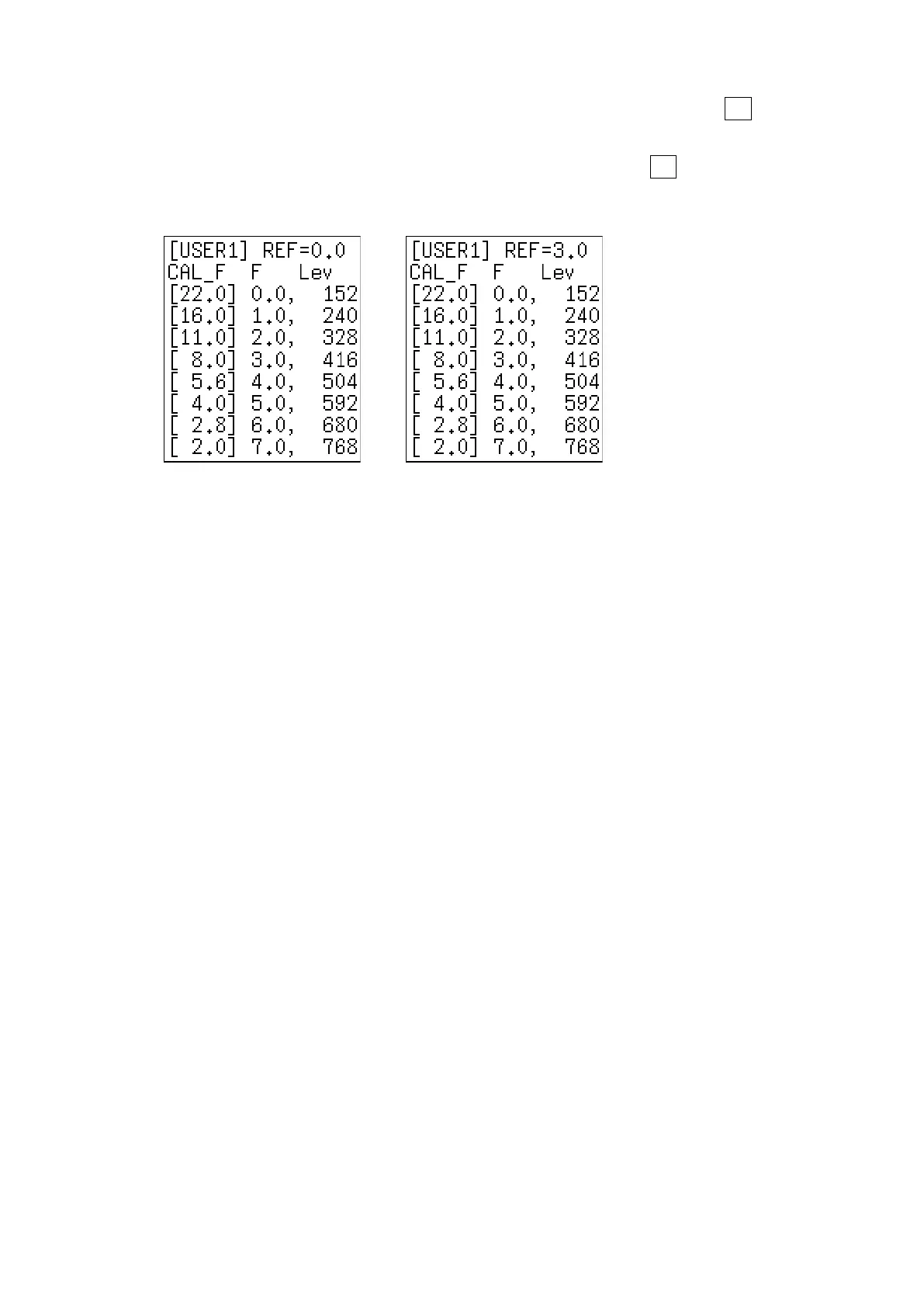
The REF value in the user-defined correction table is entered when you press F•4 18% REF-
SET on the f Stop display.
For example, if you use the left-hand table shown below and press F•4 18% REF-SET when
the luminance value at the intersection of the cursors is 416 (10-bit value), the f Stop value
at that point (3.0) is displayed as the REF value.
→
Figure 13-26 User-defined correction tables
When the above user-defined correction tables are used, f Stop values are indicated as
shown below. The values between specified values are interpolated linearly.
When Lv = 152 f Stop = -3.0
When Lv = 240 f Stop = -2.0
When Lv = 328 f Stop = -1.0
When Lv = 416 f Stop = 0.0
When Lv = 504 f Stop = 1.0
When Lv = 592 f Stop = 2.0
When Lv = 680 f Stop = 3.0
When Lv = 768 f Stop = 4.0



 To Next Page