P.10.6
SEL-411L Relay Protection Manual Date Code 20151029
Basic Relay Operations
Changing the Default Passwords
Step 6. Type QUIT <Enter> to view the relay report header.
You will see a computer screen display similar to Figure 10.4.
(Text that you type is emphasized in bold letters.)
If you see jumbled characters, change the terminal emulation
type in the computer terminal program.
=QUIT <Enter>
Relay 1 Date: 03/15/2001 Time: 00:01:05.209
Station A Serial Number: 2001001234
=
Figure 10.4 Report Header
When you communicate with the relay at the Access Level 0 = prompt, you
are in security Access Level 0. You cannot control relay functions at this level.
Higher access levels are password protected and allow increased control over
relay operation. For more information on access levels and password
protection, see Changing the Default Passwords: Terminal.
Changing the Default Passwords
It is extremely important that you change the factory default passwords
programmed in the relay. Setting unique passwords for the relay access levels
increases the security of your substation and the power system.
NOTE: Perform the password-
change steps described in Changing
the Default Passwords: Terminal.
This subsection begins with information on the access level/password system
in the relay and includes an example of changing the default passwords.
Access Levels
Access levels control whether you can perform different operations within the
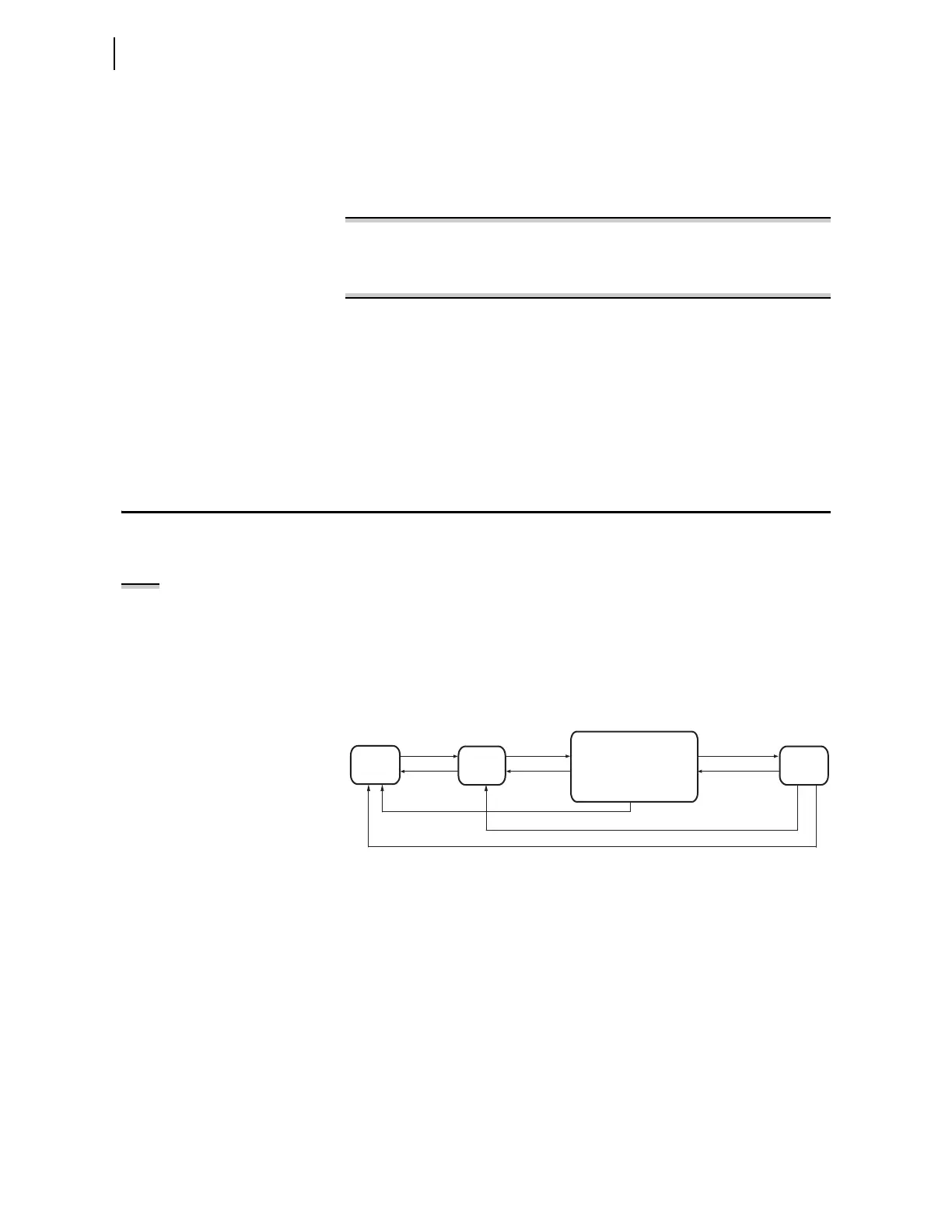
relay. These security levels are labeled 0, 1, B, P, A, O, 2, and C. Figure 10.5
presents an overview of the general access level structure in the relay.
Figure 10.5 Access Level Structure
Access Level 0 is the least secure and most limited access level, and Access
Level 2 is the most secure level at which you have total relay functionality.
(Access Level C is reserved for SEL factory operations. Only go to Access
Level C to change the Level C password or under the direction of an SEL
employee.) For example, from Access Level 1, you can view settings but you
cannot change settings.
Table 10.3 lists access levels and operator functions for the relay.
Access
Level 0
Access Level x
(Note: Use xAC to switch
between any of the access
levels x, where x = B,P,A,O,2)
ACC
QUIT
QUIT
ACC
QUIT
ACC
xAC
Access
Level 1
xAC
CAL
(from 2AC only)
Access
Level C



 To Next Page