P.12.28
SEL-411L Relay Protection Manual Date Code 20151029
Bay Control
ACSELERATOR QuickSet SEL-5030 Software Bay Control Screens
Figure 12.17 Example Application
In order to configure this bay, you need to select the appropriate busbar one-
line screen (MIMIC).
Settings Description
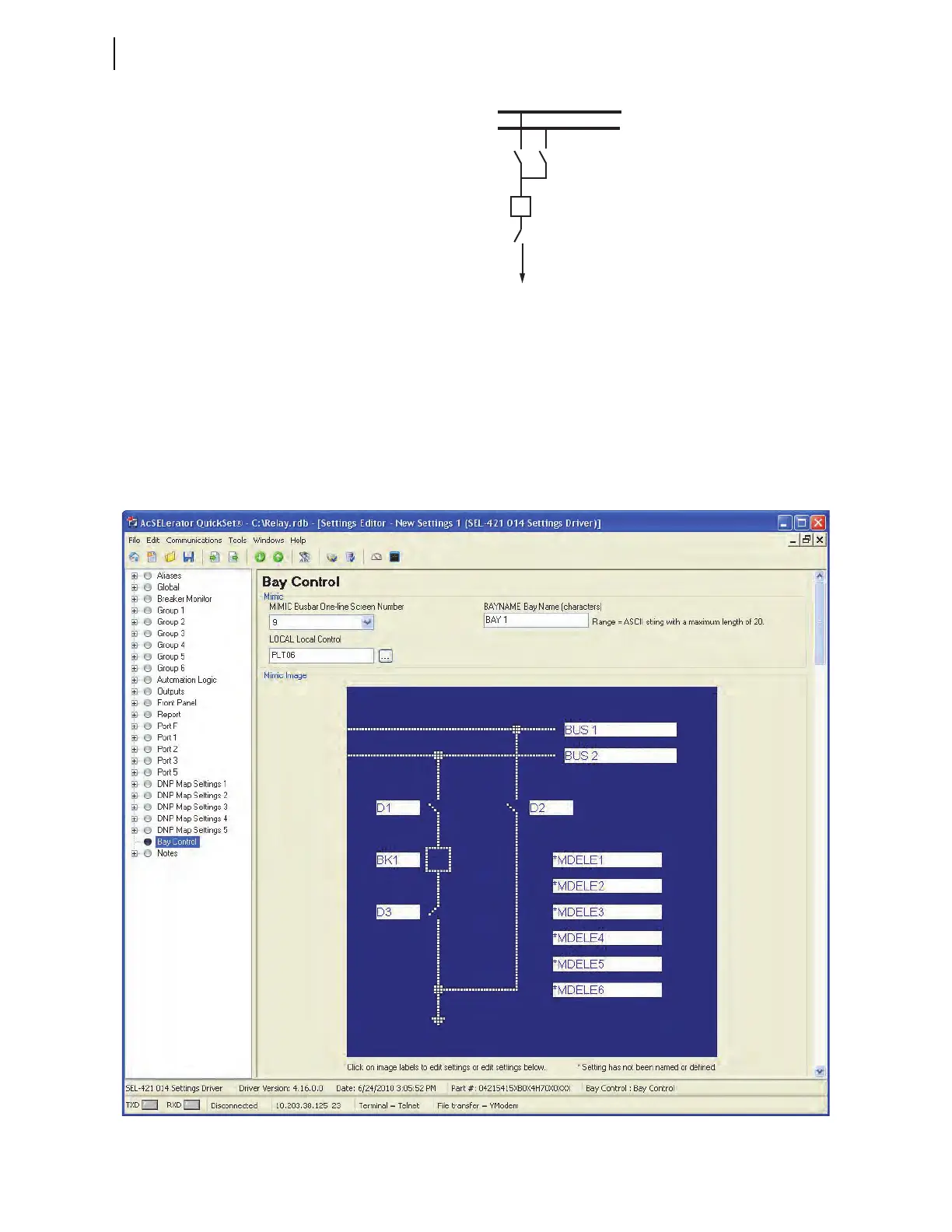
Select Bay Control from the tree to see the first interactive bay forms in
ACSELERATOR QuickSet, as shown in Figure 12.18. On this form, you set the
conditions to control the LOCAL Relay Word bit, enter the bay name, and
select the bay screen. Always select the busbar layout screen first: this
selection is the basis for other bay configuration settings. In this example, we
use the default mimic screen (MIMIC = 9).
Figure 12.18 Interactive Bay Control Setting Form
Busbar 1
Busbar 2
Disconnect 2
Disconnect 1
Breaker
Disconnect 3



 To Next Page