P.11.8
SEL-411L Relay Protection Manual Date Code 20151029
Testing and Troubleshooting
Testing Features and Tools
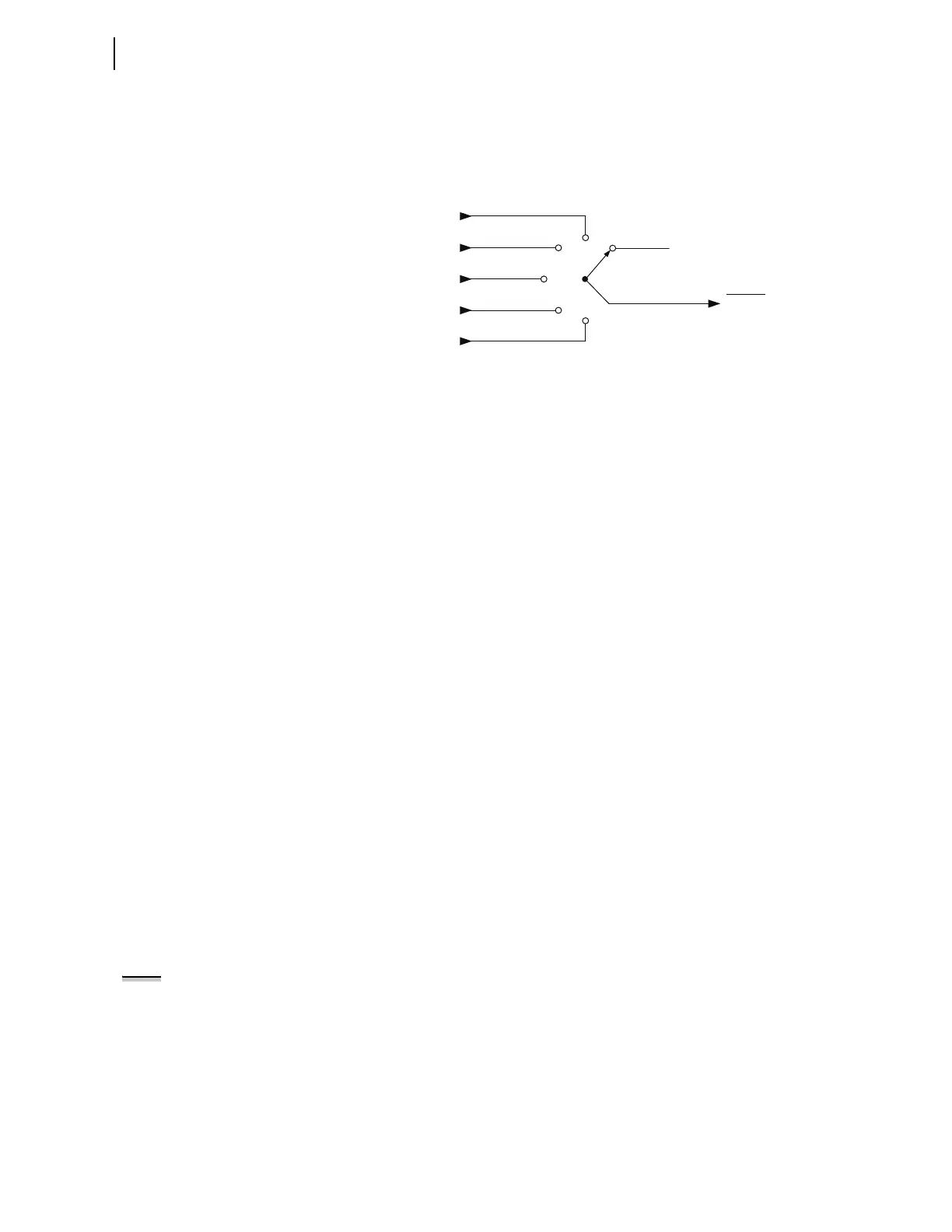
The TEST 87L command also allows you to select the particular element to
be tested (A, B, C, Q, or G) and allows either the normal or secure settings to
be selected for the test. When testing using the TEST 87L command, the
outputs from the 87LP, 87LQ, and 87LG elements are routed to the 87TOUT
Relay Word bit as shown in Figure 11.1.
Figure 11.1 87TOUT Logic
This Relay Word bit is assigned by default to an output of the relay as shown
in Table 11.4. This allows each element to be unambiguously monitored
during testing.
COM 87L Command
Use the COM 87L command to generate a report of the 87L communications
alarms and statistics. This report covers three major areas: it provides the
details of the 87L configuration and overall status, it provides current alarms
and diagnostics for each channel, and it provides long-term characteristics for
each channel.
TAR Command
Use the TAR command to view the state of relay control inputs, relay outputs,
and relay elements individually during a test. You can see relay targets at the
serial ports, and from the front-panel LCD (see TARGET on page P.15.56 and
Operation and Target LEDs on page P.7.36).
PUL Command
Use the PUL command to test the control output circuits. The specified output
closes if open, or opens if closed. You can use the PUL command at the serial
ports, in the
ACSELERATOR QuickSet HMI, and from the front-panel LCD.
TEST DB Command
Use the TEST DB command for testing the relay database, which is used for
Fast Message Data Access. The TEST DB command can be used to override
any value in the relay database. Use the MAP 1 command and the VIEW 1
command to inspect the relay database. You must be familiar with the relay
database structure to use the TEST DB command effectively.
TEST DB2 Command
Use the TEST DB2 command to test DNP3 operation, the Relay Word bit
TESTDB2 will be asserted to indicate that test mode is active. The DNP3
status bit will also show forced status for any object variations that include
status and IEC 61850 interfaces. Values you enter are “override values.”
For more information on DNP3, see Section 4: DNP3 Communications in the
Communications Manual. For more information on IEC 61850, see Section 5:
IEC 61850 Communications in the Communications Manual.
TEST 87L inhibited
0
Relay
Word
Bit
87 TOUT
From 87LA
From 87LB
From 87LC
From 87LQ
From 87LG
NOTE: The TEST DB2 command will
override the state of all instances of
the forced bit or value for all active
CADI2 protocols. This includes DNP3
serial and LAN/WAN and IEC 61850
GOOSE and MMS. Before using the
command, take precautions to ensure
against unintended operations from
inadvertent messages sent as the
result of a TEST DB2 override, for
example, a bit used to trip a breaker
on a remote relay via IEC 61850
GOOSE.



 To Next Page