Copier D014/D015/D078/D079
SM 1-31 D014/D015/D078/D079
Installation
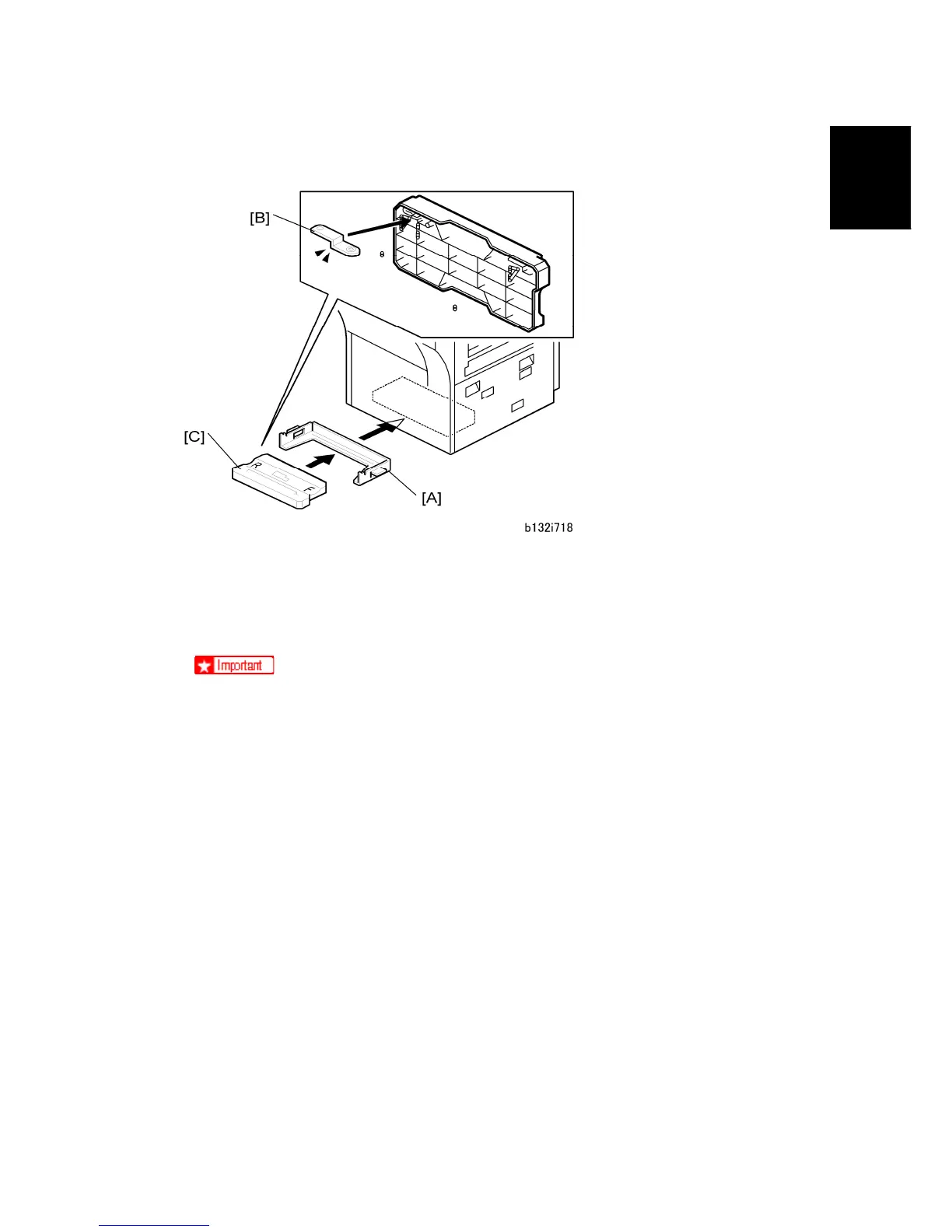
Attach the PCU Stand Rack and Store the PCU Stand
1. Hold the PCU stand rack [A] as shown, then attach it to the bottom of the machine
(magnets hold it in place).
2. Make sure long lock plate [B] is inserted into the bottom of the PCU stand.
3. Slide the PCU stand [C] into the rack below the copier.
The PCU stand is required for servicing and must remain with the machine in
the field.
After a PCU is removed from the machine, it should always be placed on the
PCU stand. The PCU stand (1) protects the OPC drum while the PCU is out of
the machine, and (2) keeps the PCU properly aligned so the development unit
can be reattached easily (after they have been separated.)
To prevent damage to the exposed OPC drum on the bottom of the PCU,
never set the PCU on the PCU stand of the previous model. Always use the
PCU stand designed for the D014/D015/D078/D079.



 To Next Page