PCU
D014/D015/D078/D079 3-44 SM
After Replacement
Do the procedure below after replacing the lubricant brush roller.
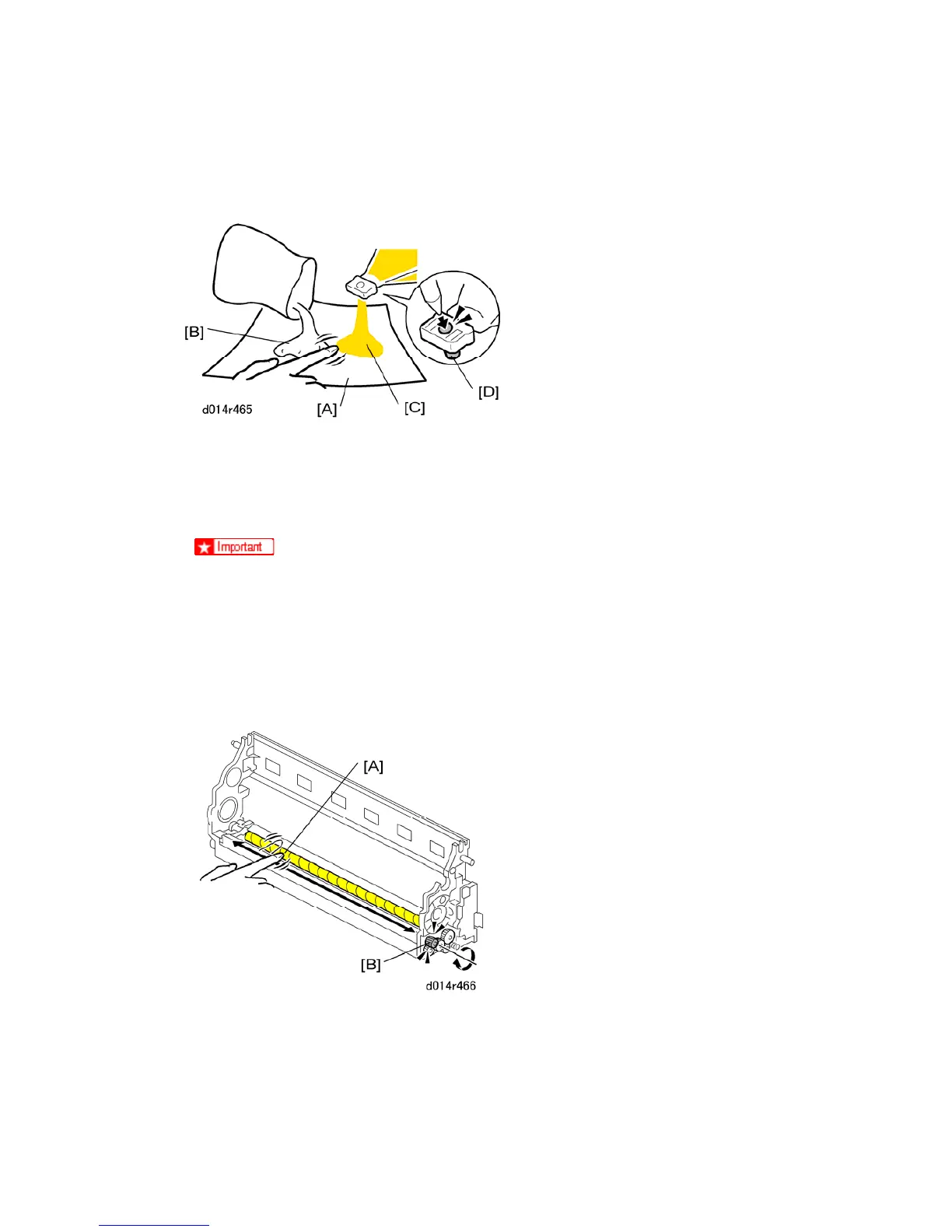
1. Place a sheet of clean paper [A] on a flat surface.
2. Pour a small amount of Lubricant Powder (B1329700) [B] from its bag onto the paper.
3. Pour a small amount of yellow toner (B132/B200) [C] from its toner cartridge. (Use the
tip of a pen or a pointed tool to depress plug [D] to release the yellow toner.)
You must use yellow toner for the B132/B200.
Do not use D014/D105/D078/D079 yellow toner because it contains
developer that could damage the drum and ITB.
The correct EDP codes for the yellow toner are listed in the table under
Required Materials in Section 2.
4. User your finger to mix evenly the lubricant powder and yellow toner on the paper.
5. Use your finger to apply the lubricant-toner mix to the cleaning brush at [A] while
rotating the gear [B] in the direction shown by the arrow.



 To Next Page