MFP Controller Options
SM 1-151 D014/D015/D078/D079
Installation
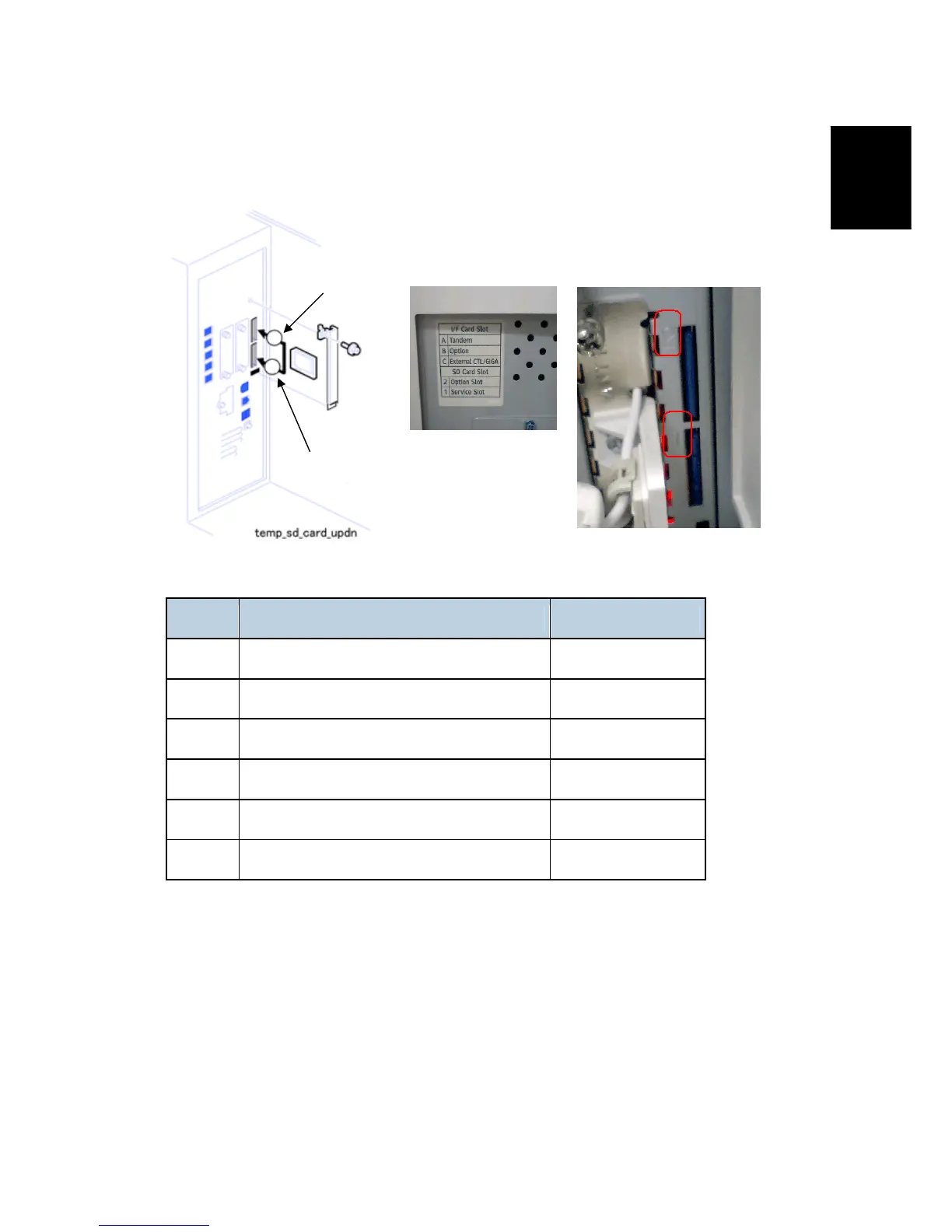
1.18.4 SD CARD APPLICATIONS
The following applications are available on SD cards.
No. Name SD Card Slot.
D377 Browser Unit Type D
Slot 1 (lower slot)
D377 Data Overwrite Security Unit Type H
Slot 2 (upper slot)
D377 HDD Encryption Unit Type a
Slot 1 (lower slot)
D378 PostScript 3
Slot 2 (upper slot)
D376 Printer/Scanner Unit Type 7500
Slot 2 (upper slot)
D377 VM Card Type E
Slot 1 (lower slot)
Note:
1. The VM Card must be inserted in Slot 1 (lower slot). This is because it requires about
22 MB of disk space, and cannot be merged onto the SD card in the upper slot if that card
already contains all the other applications.
2. If the customer needs more than one application in the upper slot, the applications must
be moved to one SD card. (See "Moving Applications to One SD Card" in this section)
3. Slot 1 (lower slot) is used for installing the Browser Unit, HDD Encryption unit, VM card
or for service only (for example, updating the firmware).
1
2
Upper slot
Lower slot
Note: The decal and numbers engraved in
the controller box (see below).
Rev. 04/13/2009
⇒



 To Next Page