Common Procedures
D014/D015/D078/D079 3-12 SM
3.2.7 TONER HOPPER, FACEPLATE, PCU
Removing Hopper, Faceplate, PCU
To avoid damaging the toner end sensor, make sure that the main power switch is
turned off and that the power cord is disconnected from the power source before
you remove the hopper.
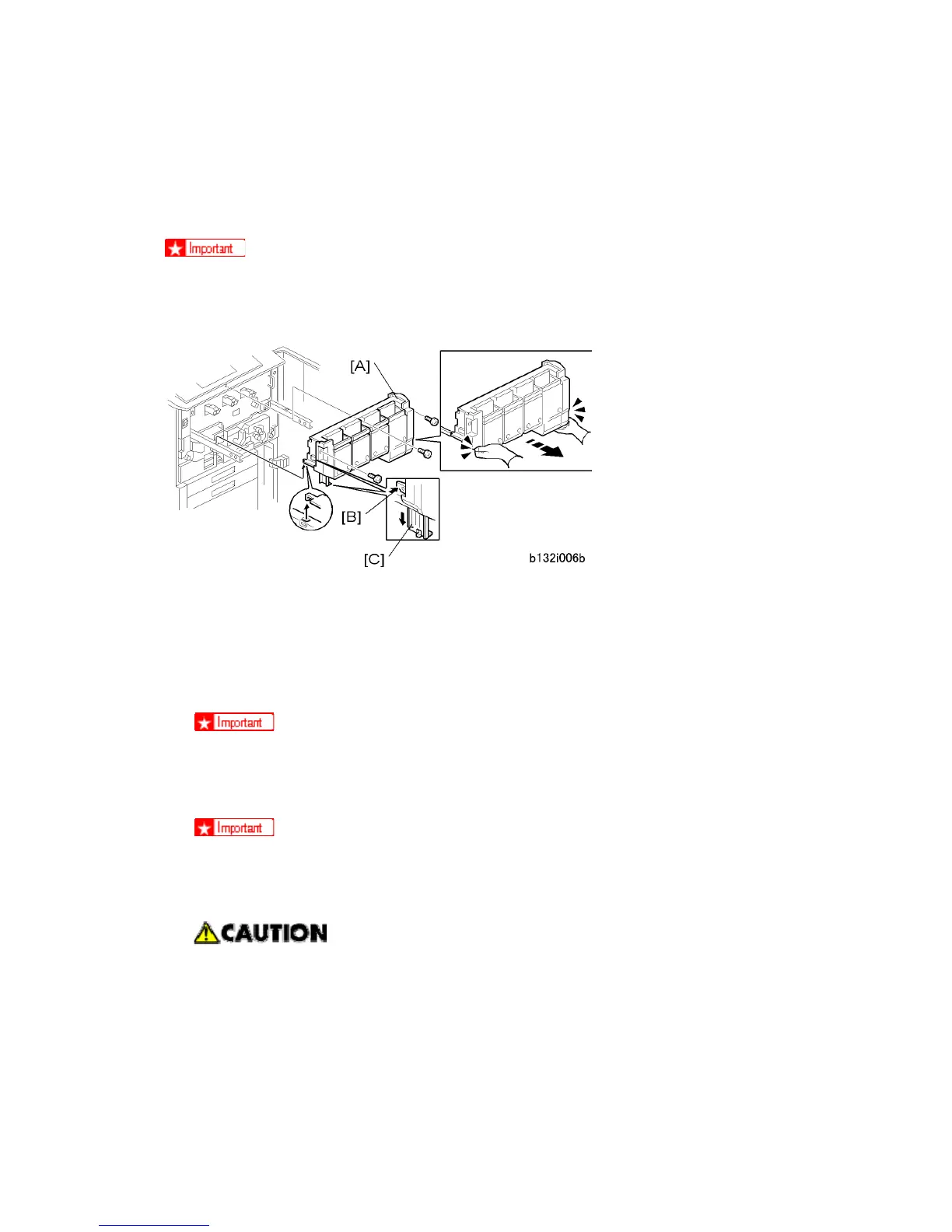
To remove the hopper:
1. Prepare an open space on the floor for the hopper.
2. Remove the screws of the toner hopper [A] ( x3).
3. Place your hands under the left and right corners of the toner hopper and slowly pull it
out on its rails until it stops.
The hopper can easily slip off its rails!
4. Press the release [B] to drop the support leg [C].
5. Confirm that the support leg is down and locked.
Always make sure that the support leg is down and locked before you remove
the hopper.
6. Lift the toner hopper off its rails and set it on the floor.
The hopper is heavy, so lift it carefully. Make sure the hopper unit tabs have
disengaged completely from the rails before you try to set the unit on the floor.
7. Push the hopper rails into the machine.



 To Next Page