Copier D014/D015/D078/D079
SM 1-23 D014/D015/D078/D079
Installation
Reinstall the Toner Hopper
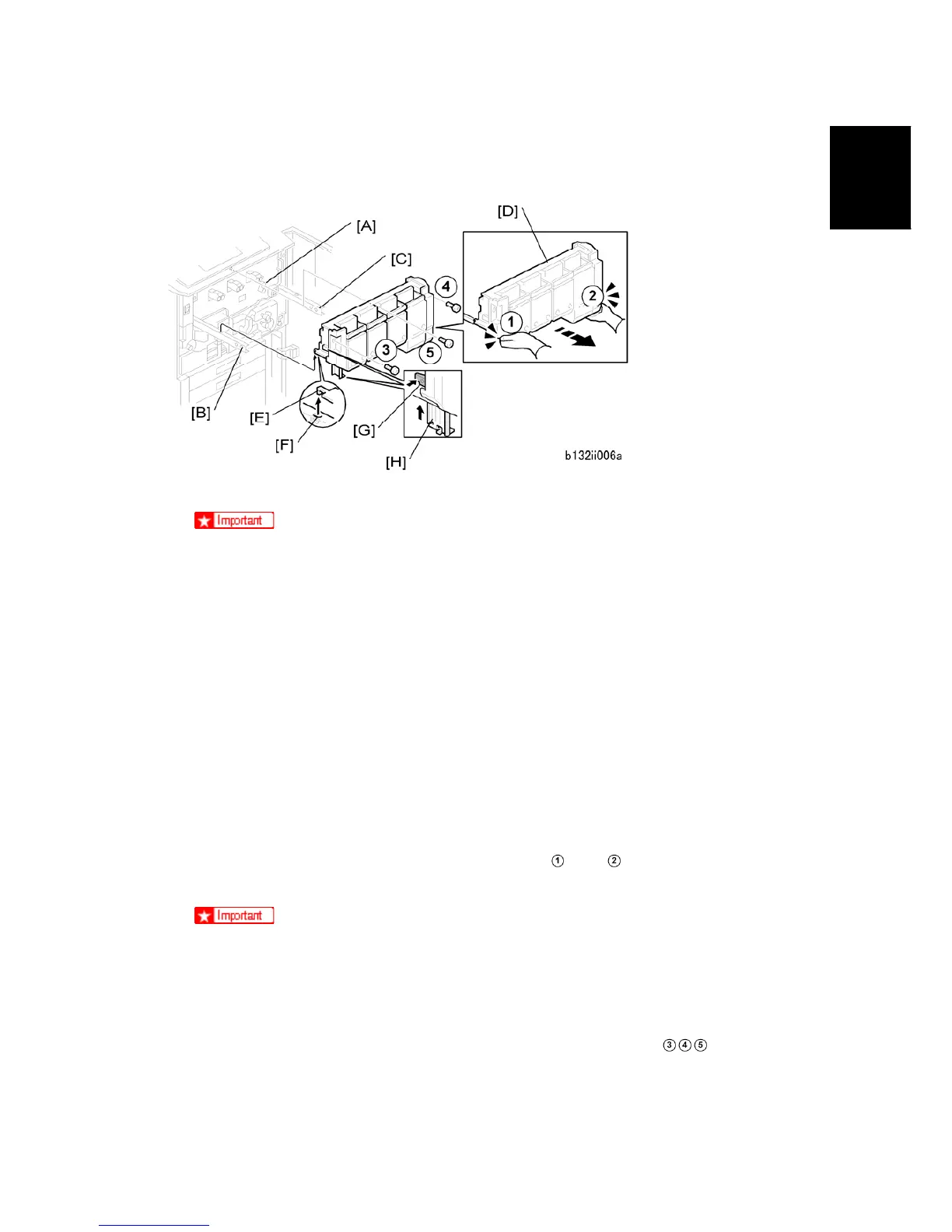
1. Rotate the transfer release lever [A] up so that it locks.
The transfer belt release lever must be turned up and locked before you install
the toner hopper. If you forget to attach the transfer belt release lever [A], or if
it is not locked, this will cause an image transfer roller position error (SC447).
2. Pull out the toner hopper left rail [B] and right rail [C] until they are fully extended. (If the
rails were pushed in fully, use a pair of needle-nose pliers to pull them out of the
machine.)
3. Set the toner hopper [D] on the rails.
4. Make sure the steel tabs [E] of the hopper are inserted fully into the left rail hole and
the right rail hole [F].
5. Push the lock [G] and push the support leg [H].
6. Make sure that the support leg is up and locked before you push the toner hopper into
the machine.
7. Put your hands at the bottom of the toner hopper at
and , then push the hopper
into the machine against the faceplate.
To prevent damage to the hopper, never push the top of the toner hopper.
8. Make sure that the hopper is flat against the faceplate on the right side.
9. If the toner hopper [D] is not flat against the faceplate on the right side, pull it out a
short distance and make sure that the transfer belt release lever is turned up fully.
10. Attach the toner hopper ( x 3). Attach the screws in this sequence:



 To Next Page