Z-Folding Unit ZF4000 (B660)
D014/D015/D078/D079 1-144 SM
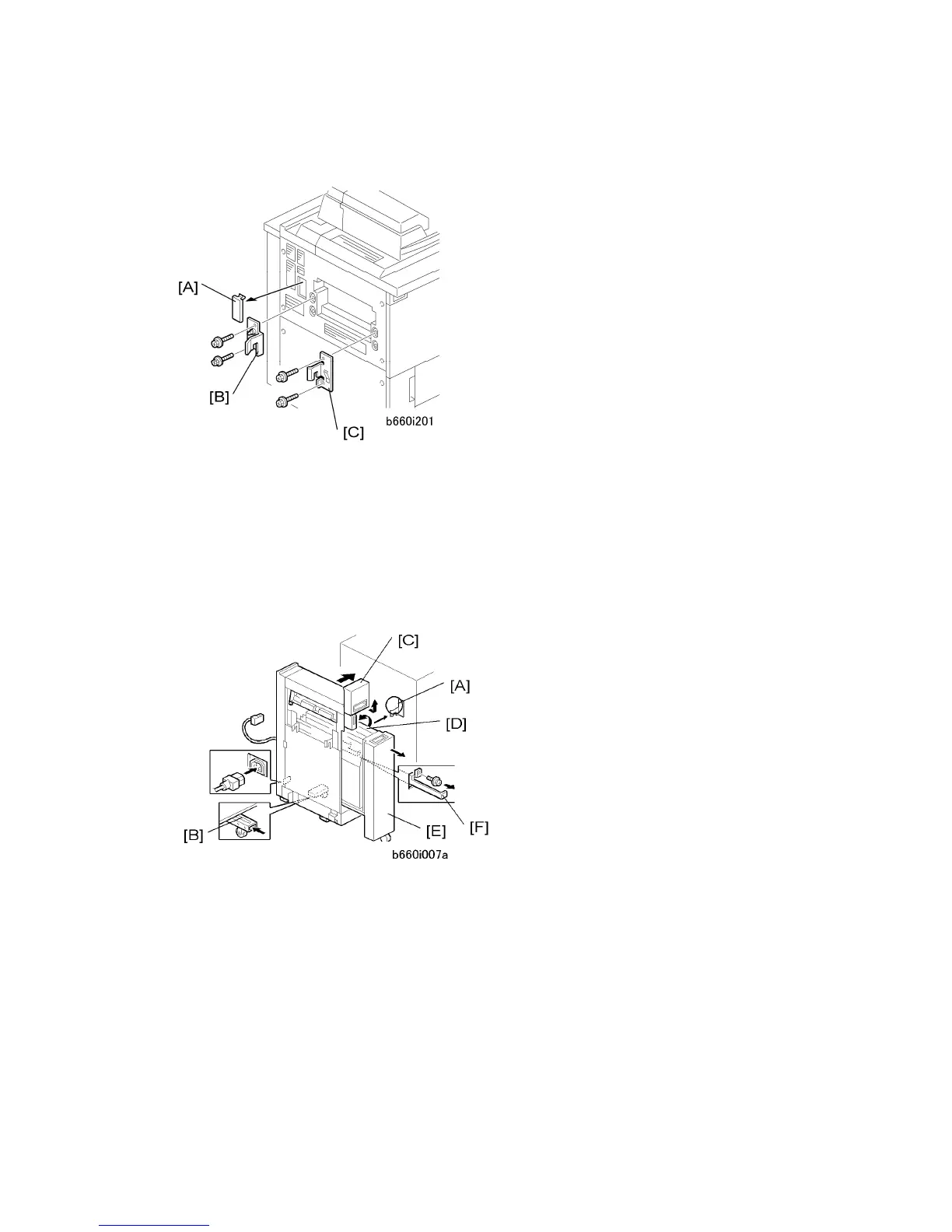
Z-Fold B660 to Copier
1. Remove the connector plate [A].
2. Attach the rear docking bracket [B].
3. Attach the front docking bracket [C].
4. Connect the Z-folding unit.
Connecting the Z-Folding Unit B660
1. Fasten brackets [A] (x2) (provided accessories) to the Cover Interposer Tray B835 (or
Copier) ( x 2 each).
2. Remove support screw and bracket [B], push in the support, then reattach the screw
and bracket.
3. Pull the top cover [C] toward you then raise it.
4. Raise the horizontal transport plate [D] to the left.
5. Pull out the Z-folding mechanism [E].
6. Pull out the Z-folding unit lock lever [F] ( x 1).



 To Next Page