Z-Folding Unit ZF4000 (B660)
SM 1-145 D014/D015/D078/D079
Installation
7. At the right bottom edge of the Z-folding unit, confirm that the breaker switch is ON.
This switch should display "—". If you see "O", set the switch to "—". The
machine will not recognize the Z-folding unit if this switch is off.
8. Dock the Z-folding unit to the cover interposer tray (or Copier).
9. Push in the lock lever [F] and fasten it ( x 1).
10. Push in the Z-folding mechanism [E], lower the horizontal transport plate [D], then
close the front door [C].
11. Connect the Z-Folding unit to the copier.
12. Connect the Z-Folding unit power cord to the Z-folding unit and connect the other end
of the cord to the power ac supply.
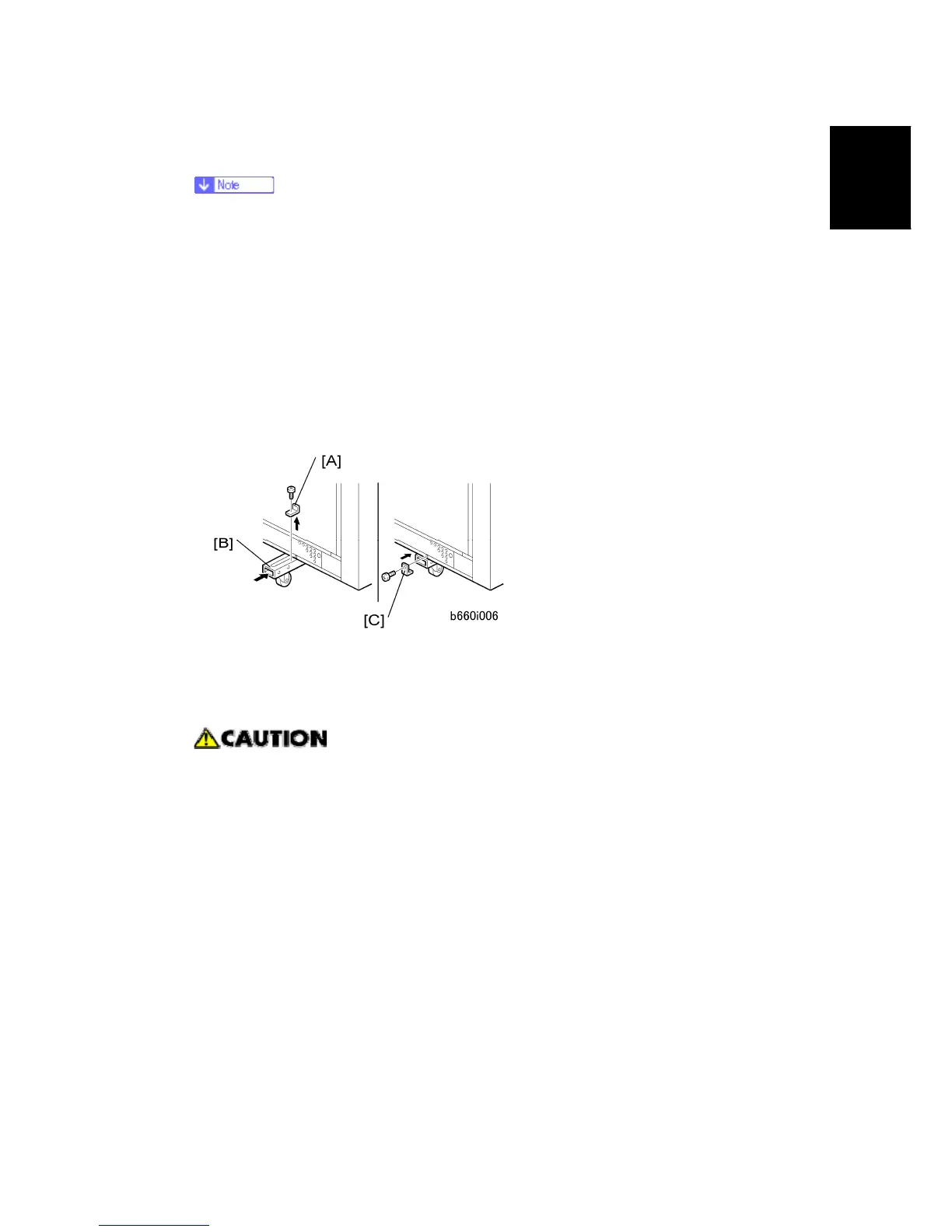
13. At the left bottom edge of the Z-folding unit, remove the bracket [A] ( x 1).
14. Push in the support [B].
15. Reattach the bracket [C] ( x 1).
With the support retracted, the Z-folding unit tips easily!
16. Attach the I/F cable to the cover interposer tray (or Copier).
17. Connect the power cord to the Z-folding unit.



 To Next Page