Image Transfer Unit
D014/D015/D078/D079 3-82 SM
Dusting the ITB with Lubricant Powder
1. Get a pack of Lubricant Powder B1329700.
The ITB must be coated with lubricant powder B1329700 before installing a new
ITB.
The lubricant powder (B1329700) (composed of ZnSt) is specially designed for
this machine.
Never use setting powder (54429101) for this machine. Using this setting power
will damage the drum charge roller and cause problems with image quality.
Do not use the yellow toner from this machine, because it contains
developer, and this will damage the drum and ITB.
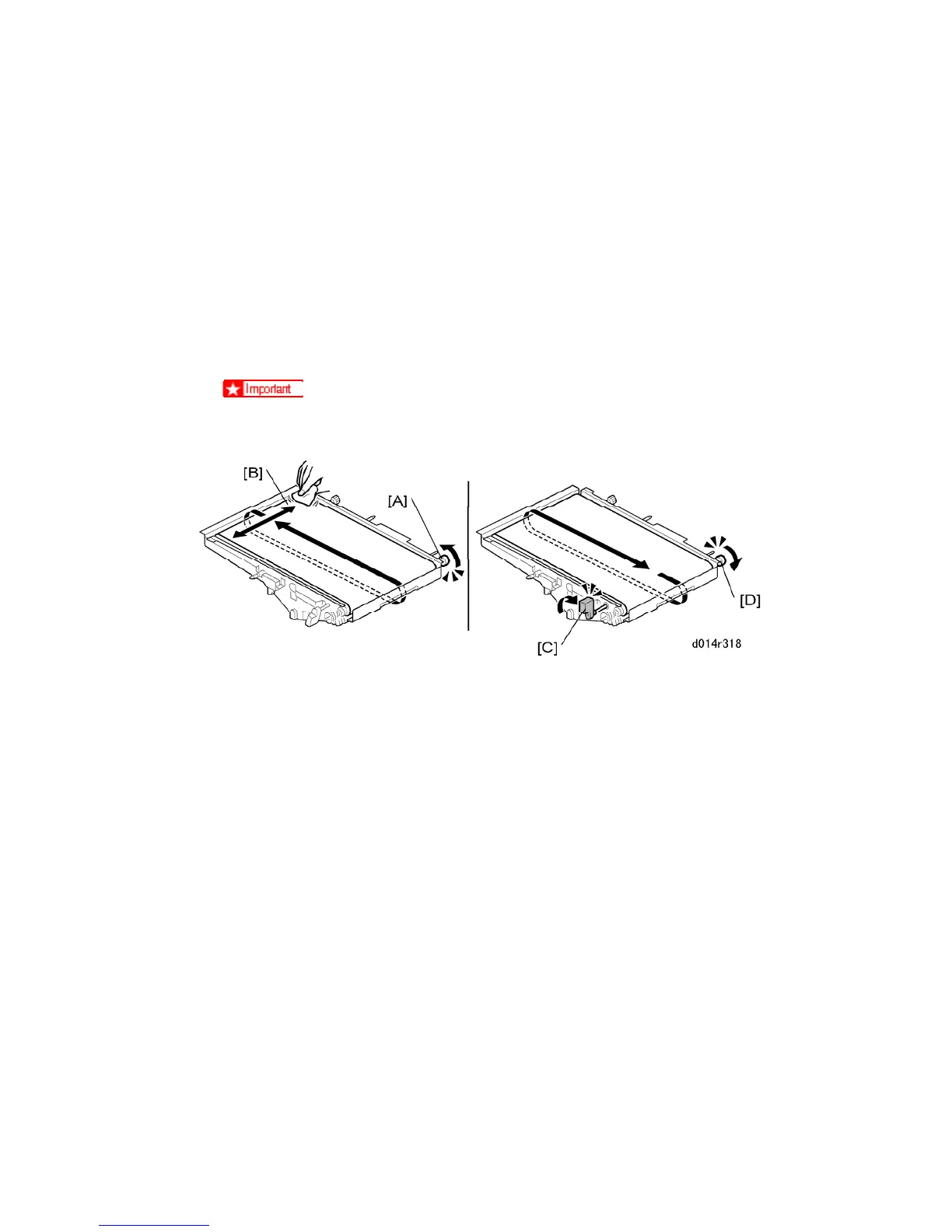
2. While rotating the knob [A] in the direction indicated by the arrow, apply Lubricant
Powder B1329700 at [B] with a soft dry cloth.
3. Keep rotating the ITB at [A] while continuing to apply the powder at [B] through one full
rotation until the ITB is completely covered with powder.
4. After the ITB has been completely covered with the lubricating powder, turn lever [C] to
the up position.
5. After the ITB is completely covered with powder, rotate the knob [D] in the direction
indicated by the arrow.
6. Keep rotating the knob at [D] until the ITB has made one full rotation. This reverse
rotation covers the edge of the belt cleaning blade with lubrication powder.
Reinstallation
Do the forced MUSIC adjustment with SP2111-1.



 To Next Page