Copier D014/D015/D078/D079
D014/D015/D078/D079 1-14 SM
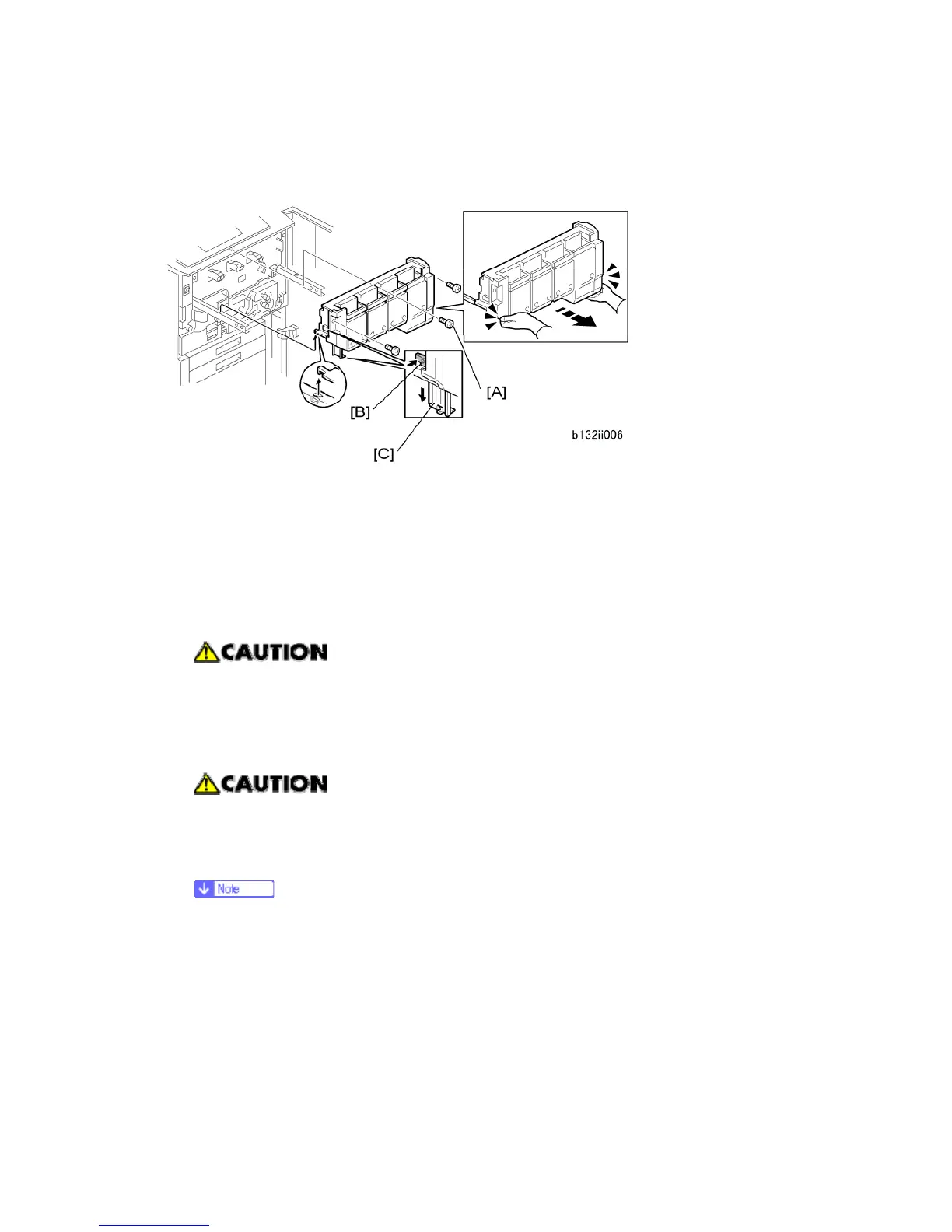
Shipping Retainer Removal
1. Prepare an open space on the floor for the hopper.
2. Remove the screws of the toner hopper cover [A] ( x 3).
3. Put your hands under the left and right corners of the toner hopper, and slowly pull it
out on its rails until it stops.
4. Push the lock [B] then pull down the support leg [C].
5. Make sure that the support leg is down and locked before you remove the hopper.
Always make sure that the support leg is down and locked before you remove
the hopper.
6. Hold the toner hopper using the handles at the top left and right sides. Then lift the
toner hopper off its rails and set it on the floor.
The hopper is heavy! Lift it carefully. Make sure that it disengages fully from
the rails on the left and right, and then set it on the floor.
7. Push the hopper rails into the machine.
Push in the rails until approximately an inch is out of the machine. If you push
the rails in fully, you must use a pair of needle-nose (radio) pliers to pull them
out again.



 To Next Page