Cover Interposer Tray CI5000 (B835)
D014/D015/D078/D079 1-128 SM
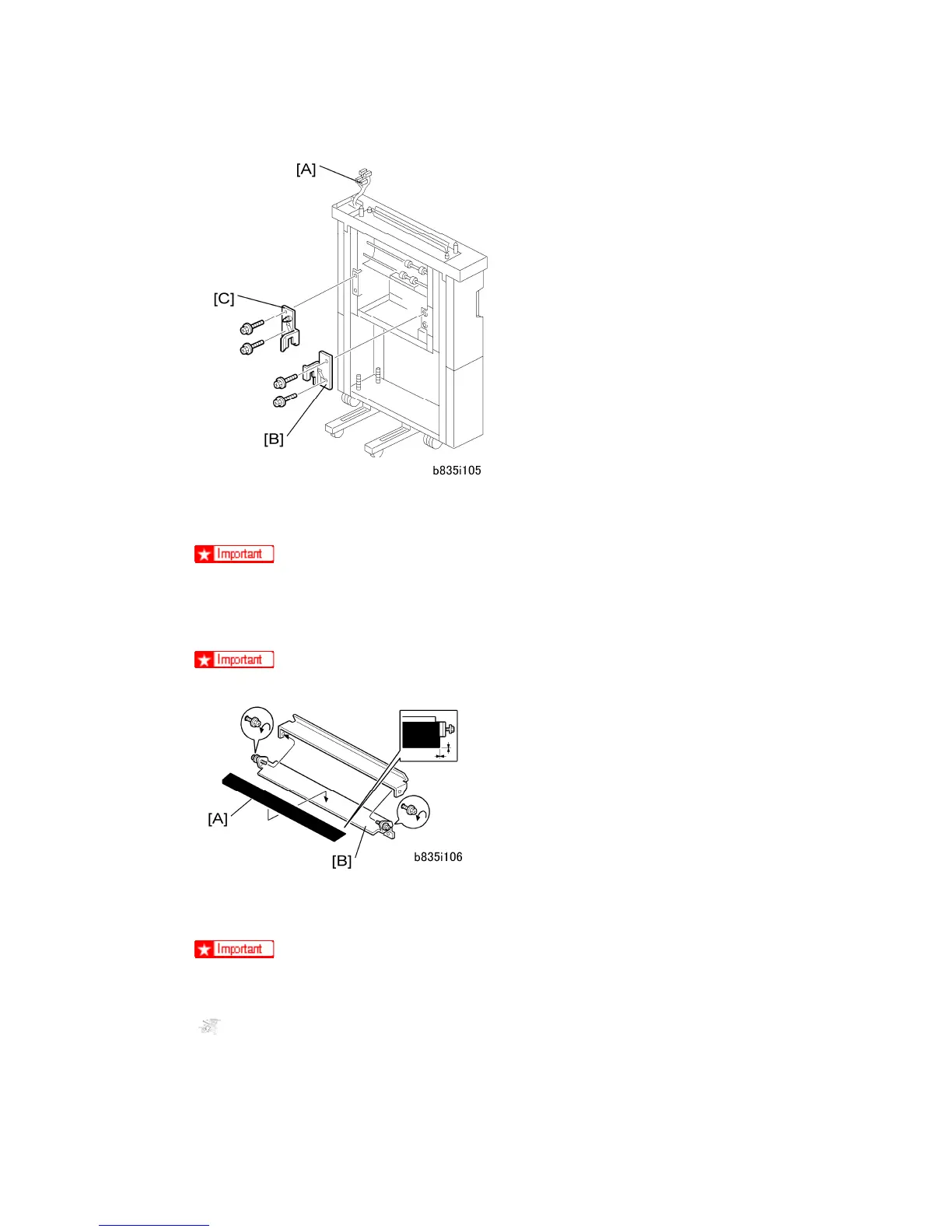
4. Confirm that the connectors [A] are free.
5. Attach the front docking plate [B] ( x2).
You must use the M4 x 14 screws.
6. Attach the rear docking plate [C] ( x2). These are the docking plates for the next
device to be installed in the paper feed line.
You must use the M4 x 14 screws.
7. Attach the black mylar [A] to the relay guide plate [B] of the next finishing device to be
installed to the left of the cover interposer tray (Z-folding unit or finisher).
Do not attach this mylar to either the long or short guide plates provided with
the cover interposer tray accessories.
.
8. Peel the tape from the back of the sponge strip [A] and attach it as shown.
9. Attach the relay guide plate [B] ( x2).



 To Next Page