EPSON AcuLaser CX11/CX11F Revision B
TROUBLESHOOTING Printer 240
FIP-67
Panel Message
K Toner Low
Possible parts that caused the error
Troubleshooting
Toner Cartridge K ANTENNA ASSY-CTRG
HARNESS ASSY MAIN ANTENNA CTRG
PWBA MCU
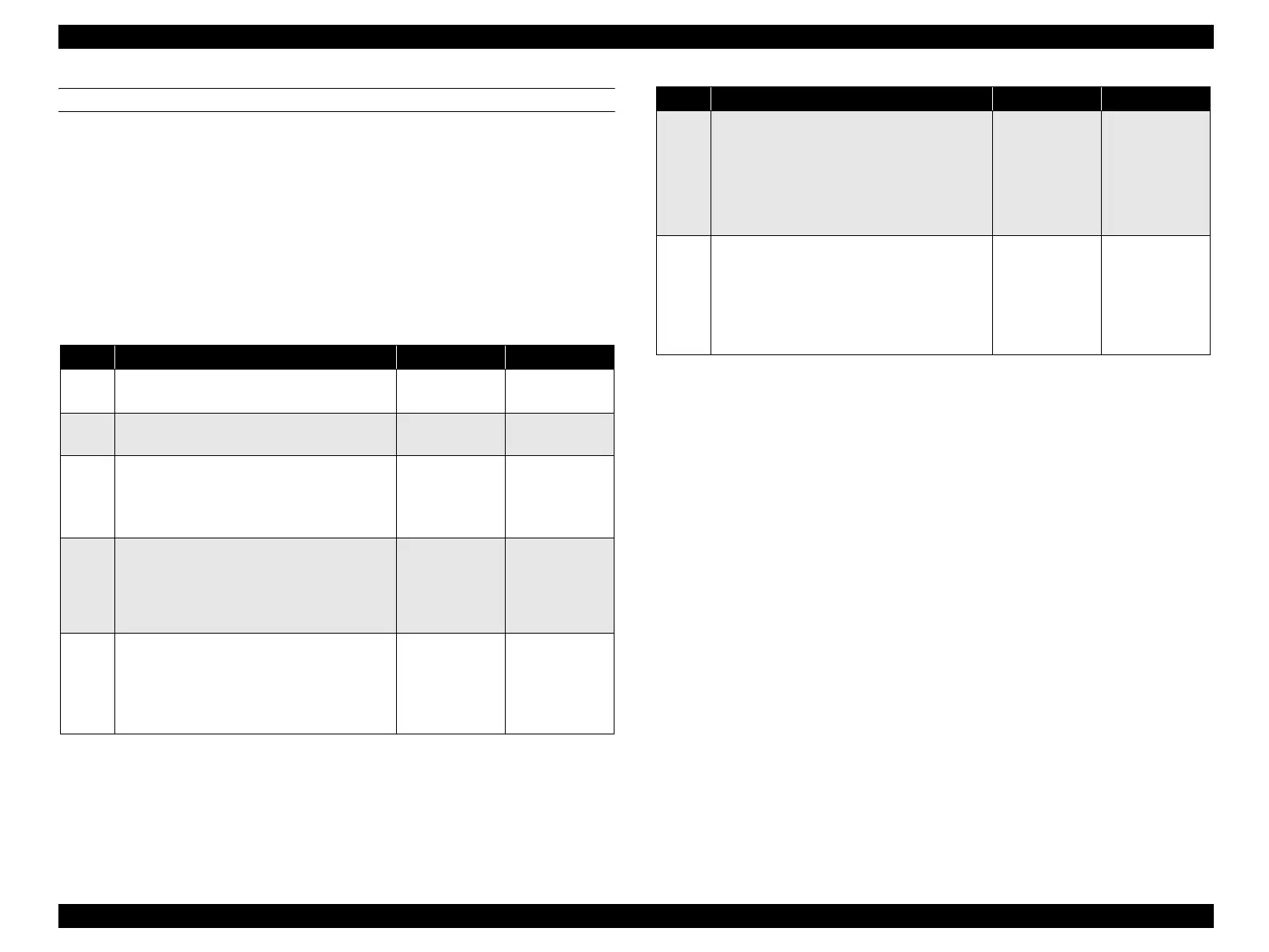
Step Check Yes No
1
Check of Toner Cartridge K attachment
Is Toner Cartridge K attached correctly?
Go to Step [4]. Re-attach, and go
to step [2].
2
Does the error recur when the power is
turned ON?
Go to Step [3]. End of procedure
3
Check after replacement of Toner Cartridge K
Replace Toner Cartridge K.
Does the error recur when the power is turned
ON?
Go to Step [4]. End of procedure
4
Check of ANTENNA CTRG
Is ANTENNA CTRG dirty and damaged?
Clean
ANTENNA
CTRG, and then
proceed to step
[5].
Go to Step [5].
5
Operation check of ANTENNA CTRG
Disconnect the P/J415 from PWBA MCU and
reconnect it.
Does the error recur when the power is turned
ON?
Go to Step [6]. End of procedure
6
Continuity check of HARNESS ASSY MAIN
Disconnect P/J415 from PWBA MCU.
Do all of the wiring below have normal
continuity?
J415-1 ↔ J106-2
J415-2 ↔ J106-1
Go to Step [7]. Repair broken or
shorted part.
7
Check after replacement of ANTENNA
ASSY-CTRG or ANTENNA CTRG
Replace ANTENNA ASSY-CTRG or
ANTENNA CTRG. (p.405) or (p.407)
Does the error recur when the power is turned
ON?
Replace PWBA
MCU. (p.432)
End of procedure
Step Check Yes No
manuals4you.commanuals4you.com



 To Next Page
 Loading...









