EPSON AcuLaser CX11/CX11F Revision B
DISASSEMBLY AND ASSEMBLY Printer 366
4.2.5 TRANSFER
4.2.5.1 CHUTE ASSY-FSR, COVER ASSY-RR 2ND
REMOVAL
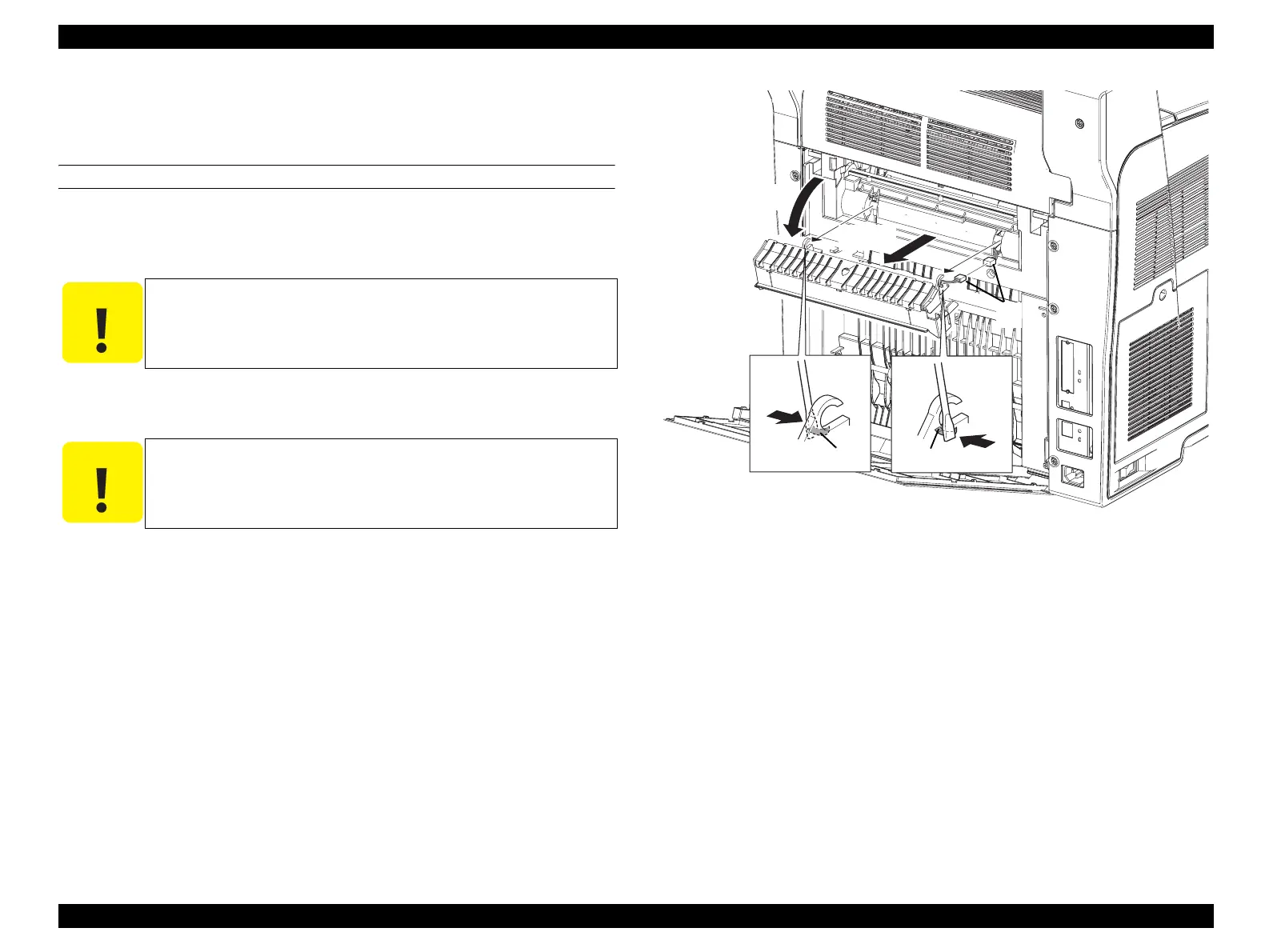
CHUTE ASSY-FSR
1. Open CHUTE ASSY-FSR.
2. Press the hinge on CHUTE ASSY-FSR to the inside with a flat-blade screwdriver
or a similar tool, and remove CHUTE ASSY-FSR from the main unit.
3. Disconnect the connector (P/J620) from CHUTE ASSY-FSR connected to the
main unit.
Figure 4-58. Removal of CHUTE ASSY-FSR
C A U T I O N
When performing the following work, take care not to remove
CHUTE ASSY-FSR too far as it is connected by a harness.
C A U T I O N
When performing the following work, leave the intermediate
connector on the harness side.
Leg_Sec03_511RA
2)-1 2)-1
Produsion
Produsion
2)-2
3)
1)
manuals4you.commanuals4you.com



 To Next Page
 Loading...









