Cobalt 8.1 - 20181029
1046
Congo Jr/Kid - Direct Selects
The Direct Selects tab provides extremely fast and hands on access to all
kinds of data. In the Jr and Kid consoles there are ten Direct Select keys for
quick access to content in the DS tab. You can also use a touch screen or
mouse to access these functions directly from the Direct Selects tab. See
Direct Selects tab.
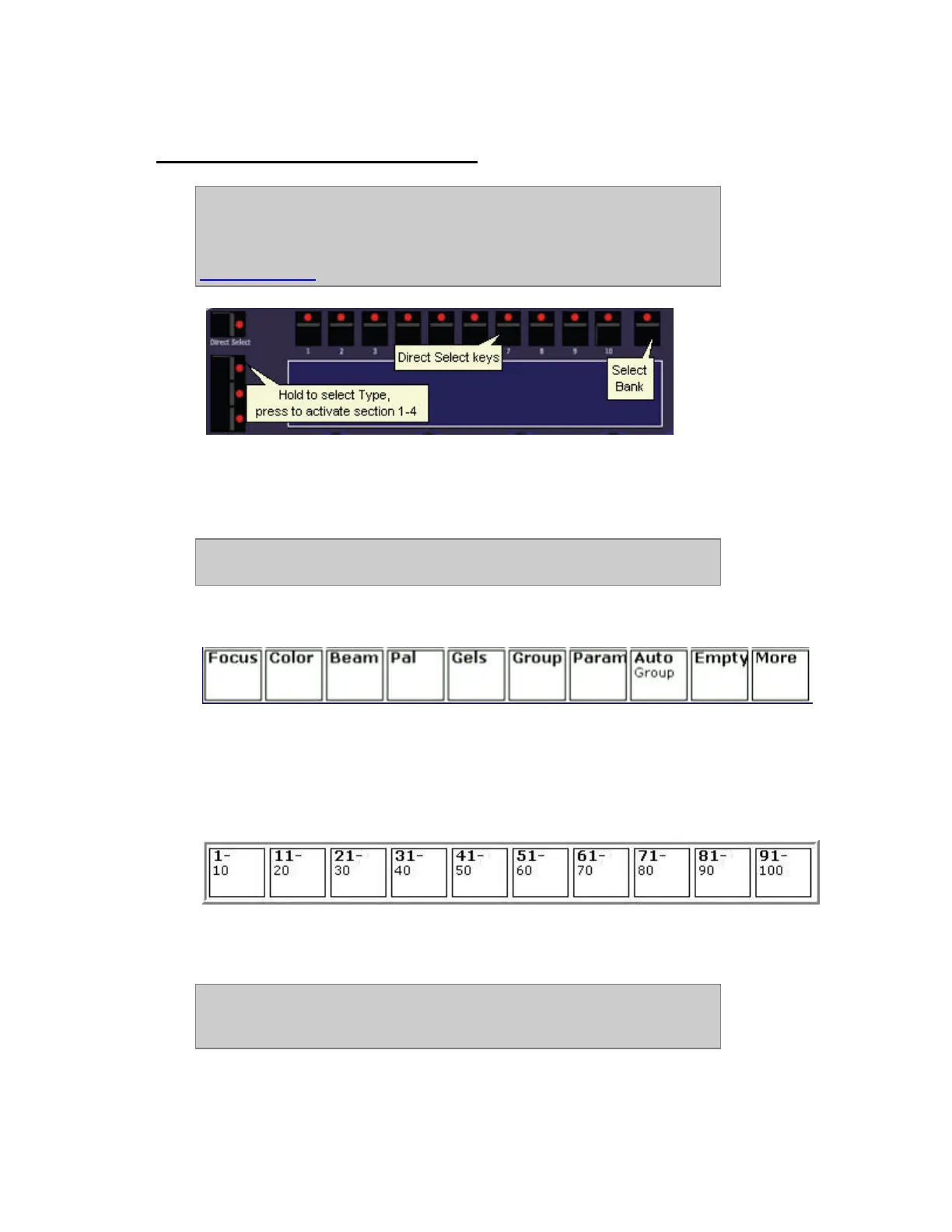
• Press the Direct Select keys 1-4 to the left to connect DS section 1-4 in the DS tab
• Hold the Direct Select key to select type of content for that section
• Hold Bank to select range for the content within each section
NOTE
You can exit Direct Select Mode by pressing the same Direct Select key again.
Type of content (hold TYPE)
When TYPE is held the different types are displayed over each section. Press the key corresponding to
the Type you want, without letting go of TYPE. Press More to get those that don't fit. You can hold
the GROUP key and use the level wheel to change levels for this group directly.
Bank (hold BANK)
When BANK is held the different banks are displayed over each section. Press the key corresponding
to the Bank you want, without letting go of BANK.
NOTE
A bank contains the content that has been stored to those numbers. For
example Focus Palette 11 is in bank 11-20.



 To Next Page