Cobalt 8.1 - 20181029
737
Record Keep Dynamics (New Base Value)
Keep Dynamics will set a Keep Dynamics flag to an existing Preset. When this Preset is played back
in a Sequence it will change the Base Values for a running Dynamic Effect without stopping it.
There are two ways of setting this. From a checkbox in the Recording Popup, or from the Dynamics
Soft Key page (described below). See The Recording Popup
.
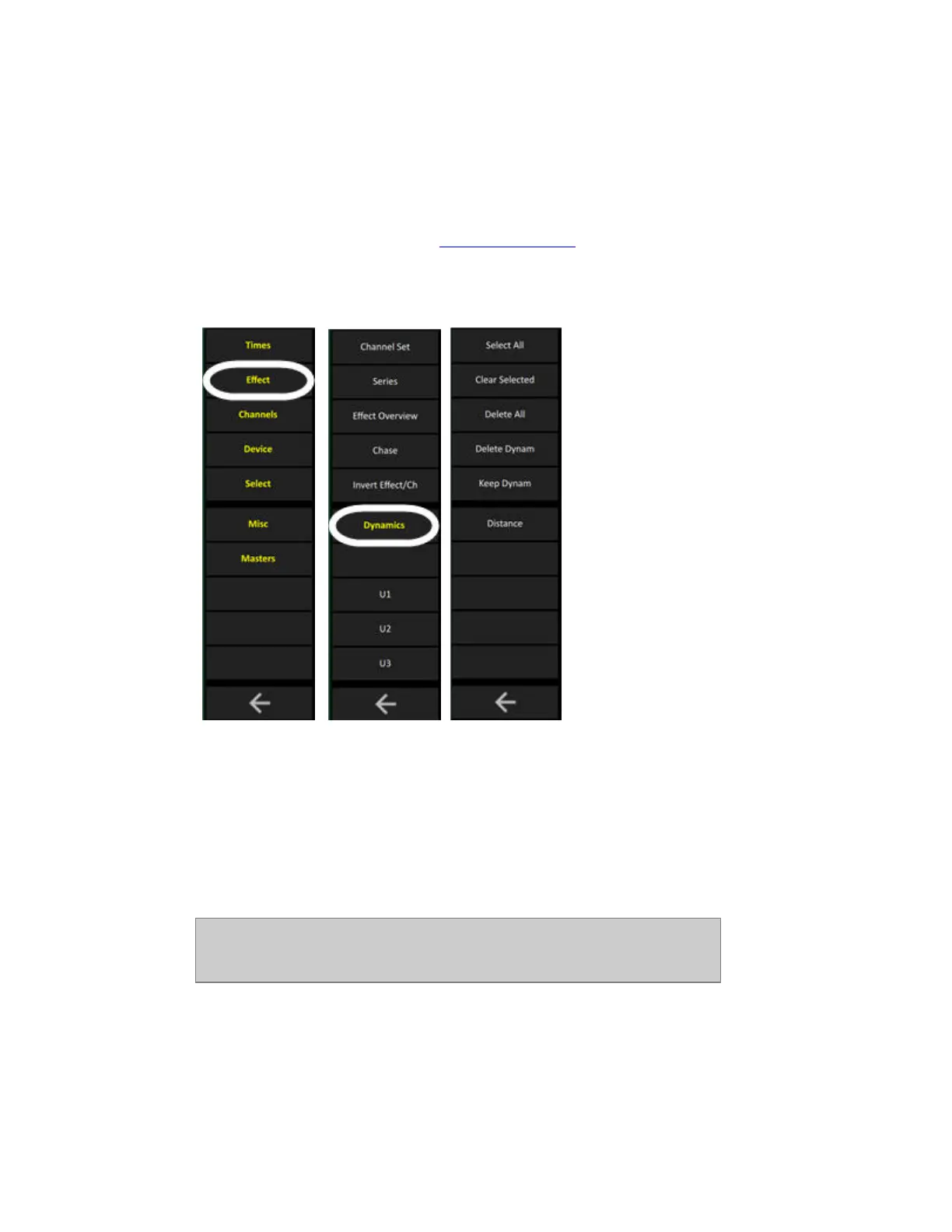
1. Select the Dynamics Soft Key Page in the Main Display of the console facepanel by pressing
DYNAMICS in the top menu.
2. Press KEEP DYNAM.
The Currently running dynamics are stored with a Keep Dynamics flag in the Preset active in the A
field of the Main Playback. Keep dynamics is shown with a waved line under the value in the Preset
Attribute Editor.
You can store to a different Preset by entering a number before Keep Dynam. The Preset has to be
recorded first.
NOTE
You can set a Keep Dynamics flag for a parameter group (Focus, Color,
Beam) by holding KEEP DYNAM and pressing either of these keys.



 To Next Page