Cobalt 8.1 - 20181029
446
Channels - Introduction
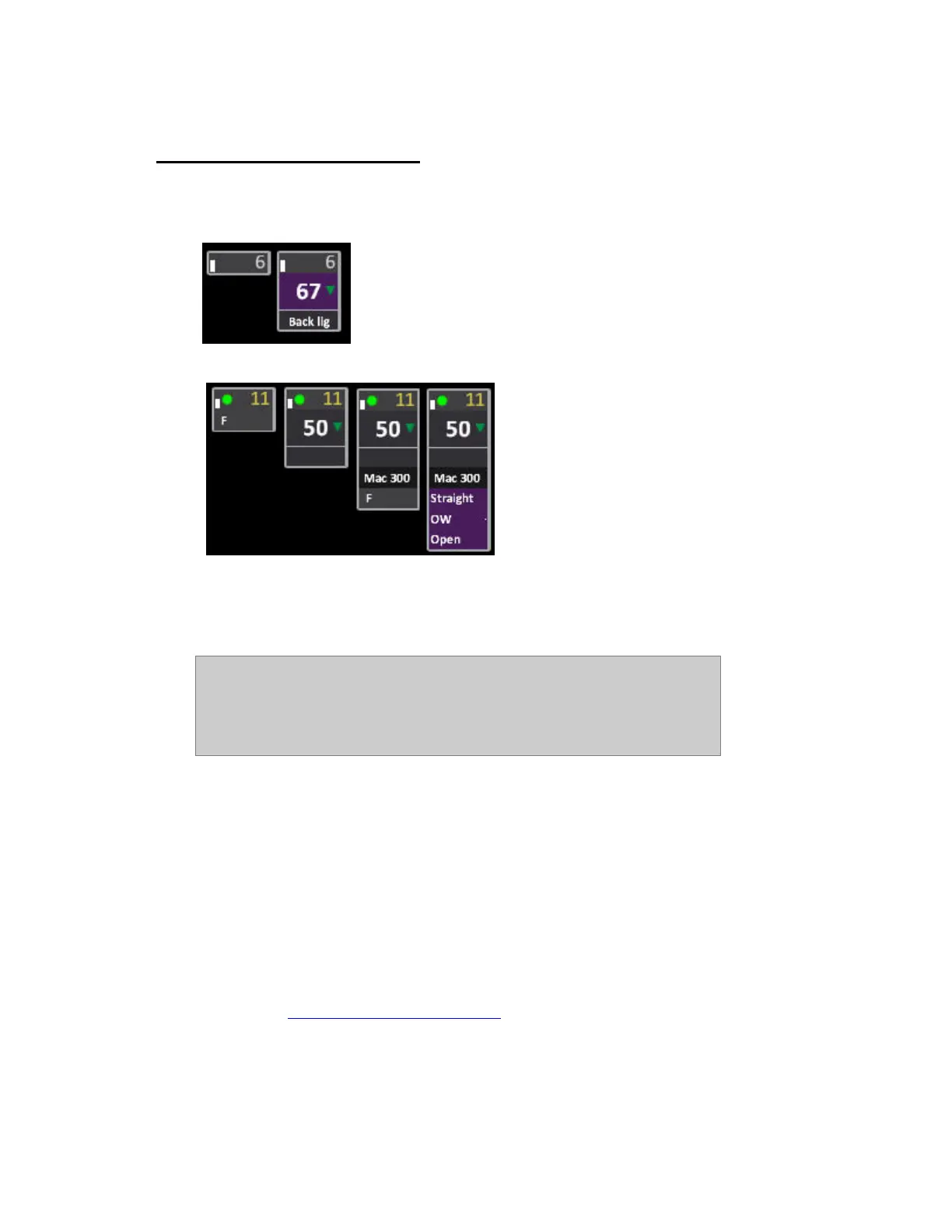
A channel is the "handle" you call upon to control any dimmer or device connected to the system.
Dimmer channel formats.
Device channel formats
Channels are selected with the channel functions of the programming section. The Channel Control
functions are mapped to any section of the console at any time - for example pressing LIVE connects
to the A field of the Main Playback, pressing BLIND connects to the Blind field.
NOTE
Channel Control is not the same thing as a "programmer" where channels
are "stolen" into the programmer and have to be "released" - instead the
Channel Control is mapped to any Playback (A, B, Live, Blind, Masters), and
controls the channels directly in that playback.
General Facts
• Channel levels can be set with the faders in Channels Only Mode
• Channels can be selected and set with a Command Syntax from the keypad
• Channel levels are set from 0-100%. 0% values are not displayed on the channel screen and
100% values are displayed as F, standing for "Full". The full resolution of DMX 512 is
higher than 100 steps, its 256 steps called bits. Therefore there are functions for setting and
changing levels in increments of bits (0-255).
• Channels are always controlled directly in a playback or an editor, and the current one is
indicated in the small display "Channel Control" at the bottom of all screens.
• There is a Highlight mode, mainly used for focusing devices, that can also be used for
conventional lights.
(See Device Control -- Highlight Mode
)



 To Next Page