Cobalt 8.1 - 20181029
92
Tab - Direct Selects (DS)
The Direct Select Tab gives you fast direct access to all kinds of show content in four user definable
matrix sections.
Symbol in the Tab Selector
The Direct Selects tab contains sets of buttons that can be assigned provide direct access to a number
of different data types:
• record targets, like groups and palettes
• parameter ranges for devices, like color wheels, gobo wheels, strobe, etc.
• recall objects, like screen layouts, sections and masks
• control handles, like channels, masters and effects
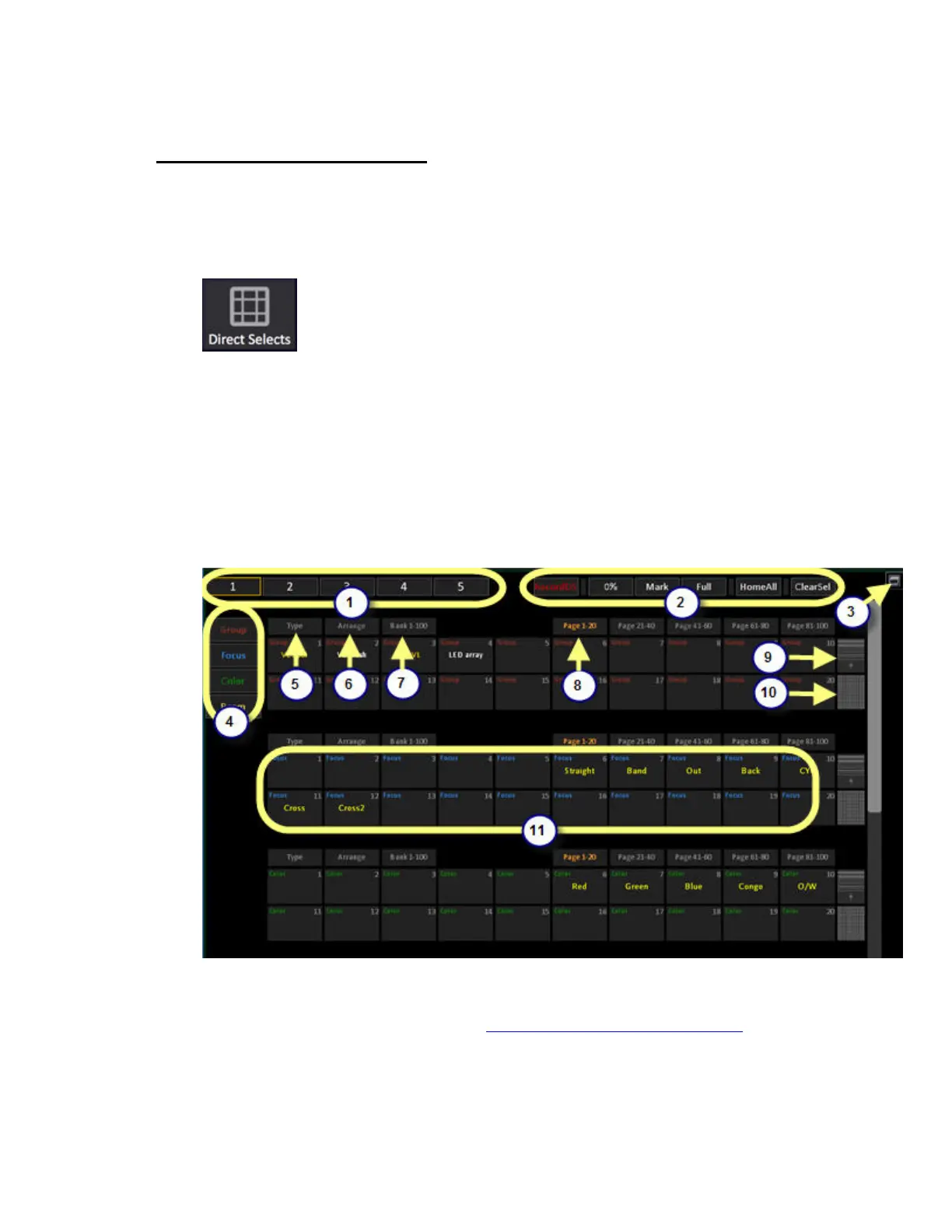
The Direct Select tab
1. Tap to select User Page 1-5 of Direct Selects.
2. The Special Functions allow you to record data directly, and set the current selection to
0/Mark/Full/Home and deselct. (See Cobalt Direct Selects - Special Functions
)
3. Toggle to full screen mode.
4. The quick jump buttons display the types of data assigned to each of the direct select blocks,
and allow you to pull a block of direct selects to the top of the tab quickly. Each block can be



 To Next Page