Cobalt 8.1 - 20181029
73
Cobalt Screens (8.0)
Cobalt systems can support three external monitors/touch screens besides the two built in touch
screens.
In addition to this each section of five master playbacks share a smaller touch screen.
Screens can be navigated with tap and gestures, mouse and console keys.
• A status bar is available at the top of all screens.
• All screens can have a multi-section layout containing tabs.
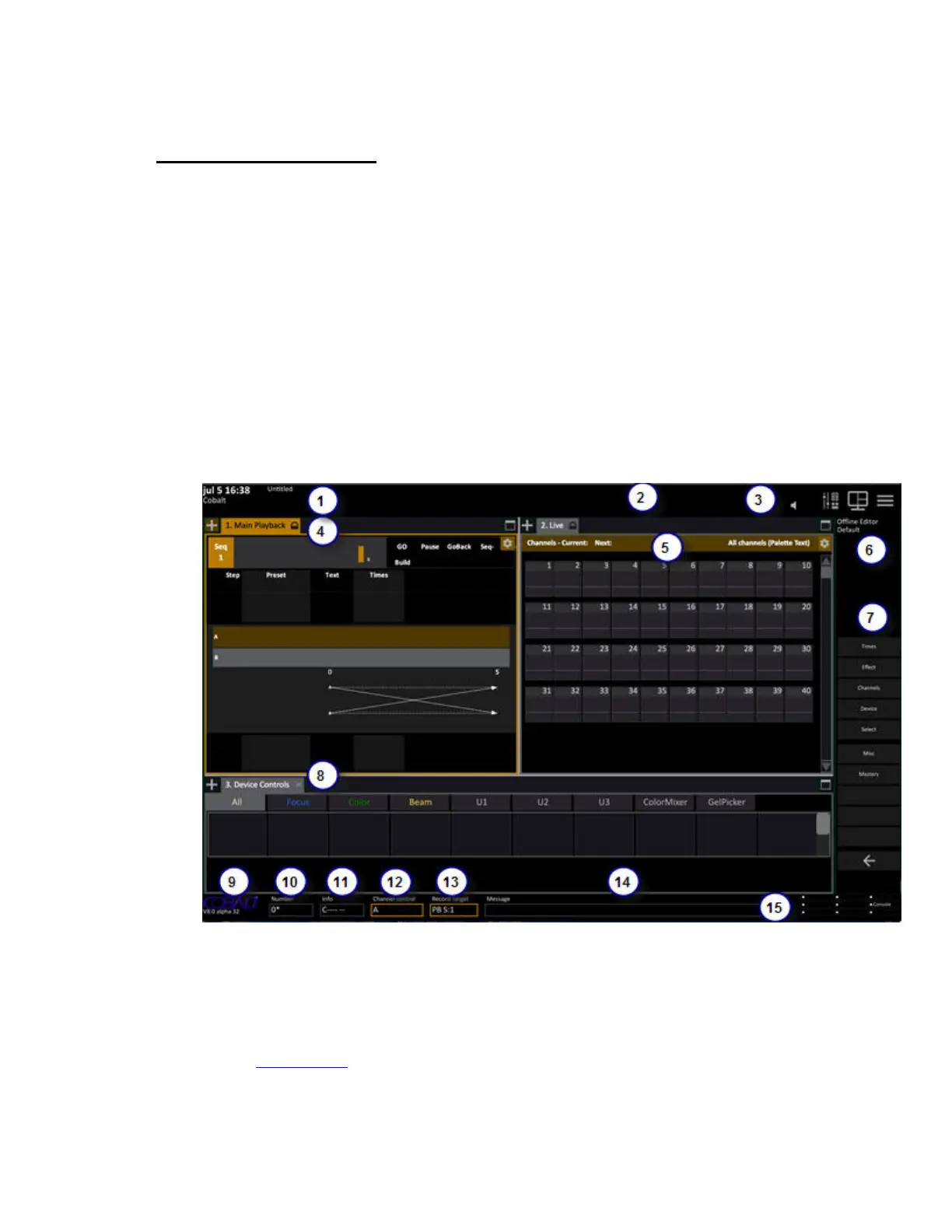
Screen Functions (8.0)
Screens can be set up any way you want. These are some basic functions.
Screen 1
1. Server status, Play name
2. Status area for temporary modes that affect output
3. Volume, screen and direct buttons for console mimic, layouts and the Browser
4. A tab area
5. Tab information area
6. Info area about selected tab or channel
7. Soft key pages
8. A screen split from the layout tool



 To Next Page