iPECS eMG80 & eMG800 & UCP
Administration and Programming Manual Issue 1.6
146
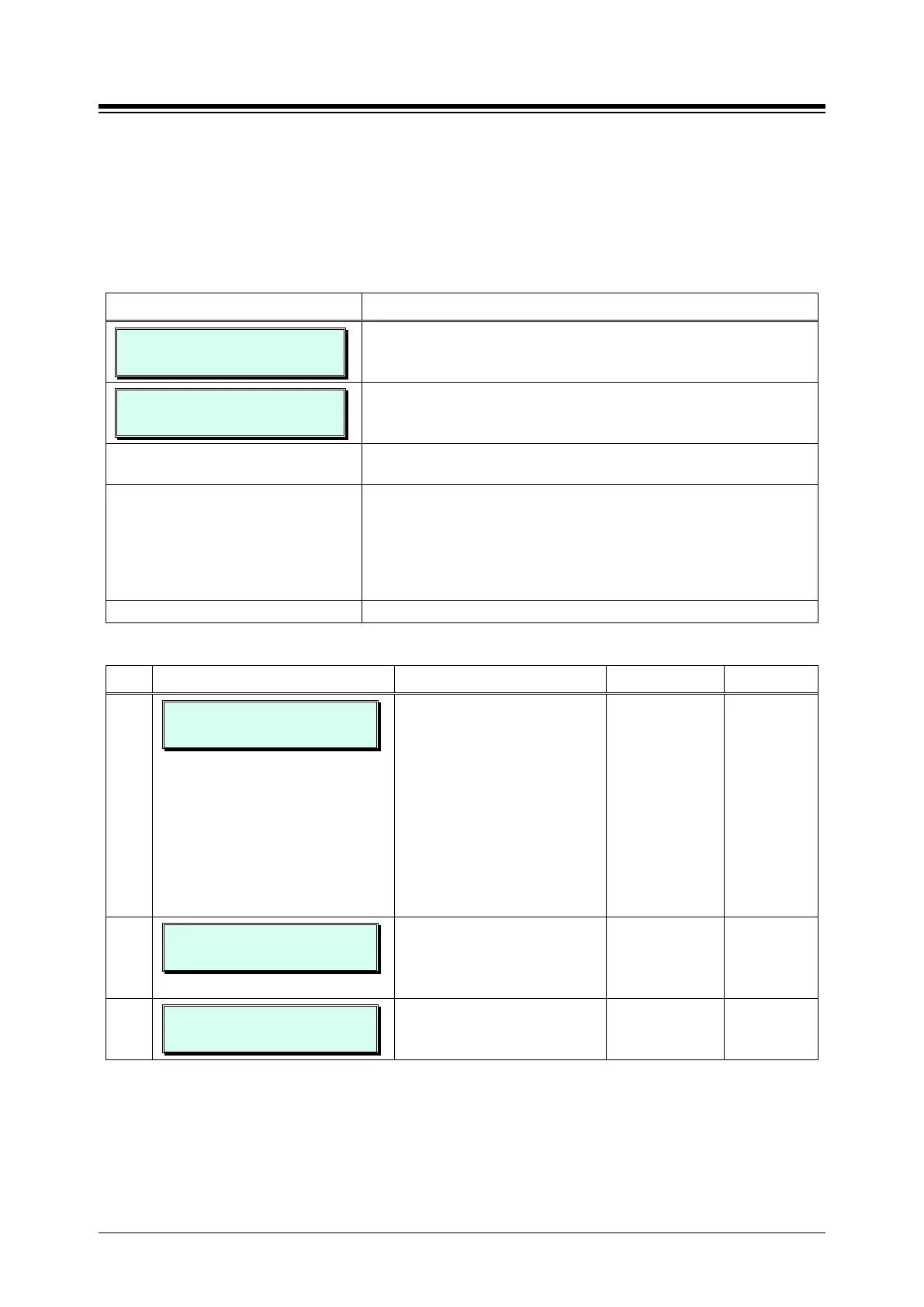
3.3.7.1 Station Group Assignment -PGM 190
Under Station Group Assignments the type, members and Pick-Up attribute are assigned to the
Station Group. Note for the Net VM group, the network number must be assigned as the Net VM
group member station. Refer to Table 3.3.7.1-1 for a description of the functions, the LCD
displays and data entries required.
PROCEDURE:
STATION GRP ASSIGN
ENTER GRP NO(401-440)
1. Press the [PGM] button and dial 190.
STATION GRP 401
F1:TYPE F2:PKUP F3:MEM
Use the dial pad to enter the desired Station Group number.
Press the Flex button for the desired setting; refer to Table
3.3.7.1-1.
Use the dial pad to enter the desired Station Group data.
Note for group members, enter a station or station range.
For an individual station press the desired Flex button for the
position of the station in the group and dial the station
number. For a range, enter the first and last station number
in the range.
Press the [Save] button to store the data entry.
Table 3.3.7.1-1 STATION GROUP ASSIGNMENT (PGM 190)
BTN ATTRIBUTE/DISPLAY DESCRIPTION RANGE DEFAULT
1
STATION GRP 401
CIRCULAR GROUP (00-10)
This entry defines the type of
station group.
00: Not Assign
01: Circular
02: Terminal
03: UCD/ACD
04: RING
05: Ext VM
06: PICK-UP
07: VSF-VM
08: UMS
09: NET-VM
Not Assign
2
GROUP 401 PICK-UP
(1:ON/0:OFF) : OFF
Stations can pick-up group calls
ringing at other stations in the
group. This does not apply to
VSF groups.
0: OFF
1: ON
OFF
3
CIRCULAR GROUP 401
. . . . . . . . . . . .
This entry assigns stations as
members of a station group, or
for Net VM, the Network number.





 To Next Page