iPECS eMG80 & eMG800 & UCP
Administration and Programming Manual Issue 1.6
499
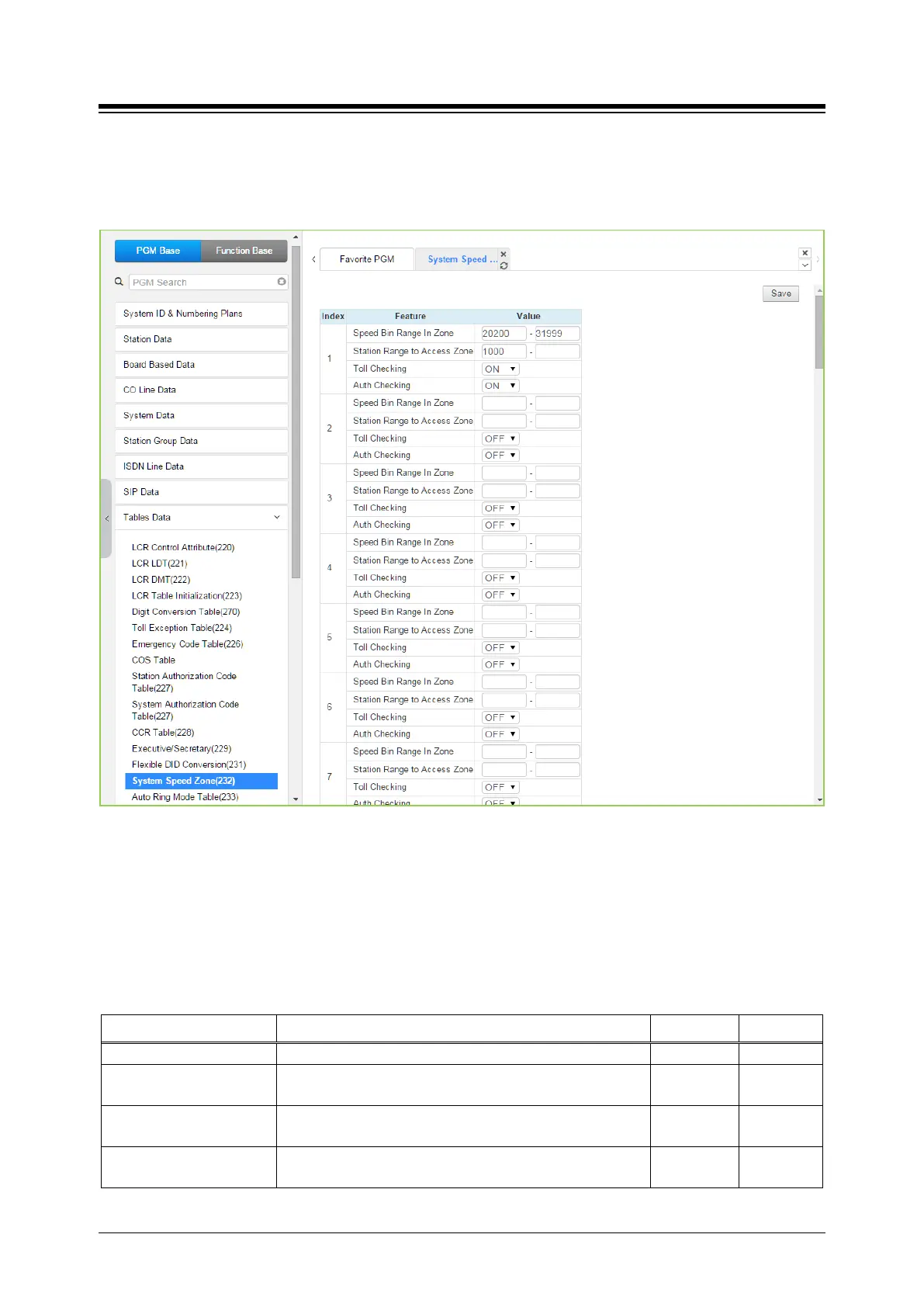
4.4.9.13 System Speed Zone Table - PGM 232
Selecting System Speed Zone will display the System Speed Zone data entry page. Click [Save]
button after changing Value.
Figure 4.4.9.13-1 System Speed Zone
System Speed Dial Bins assigned to a zone are only available to stations allowed access to that
zone. Each zone can be assigned to apply the appropriate Station and CO Line COS for the
speed dial number prior to dialing.
The speed Bin in Zone and Station Range to access zone is different according to selecting
Speed Numbering, refer to ‘Speed Numbering’ in System ID (100)
Table 4.4.9.13-1 SYSTEM SPEED ZONES
ATTRIBUTE DESCRIPTION RANGE DEFAULT
A range of Speed Dial Bins is assigned to a zone.
Station Range to Access
A range of Stations is permitted access to the System
Toll Checking Toll restriction can be applied to Speed Dials in the Zone.
OFF
ON
Auth Checking
The user can be required to enter a valid Authorization
code to use Speed Dials in the zone.
OFF
ON





 To Next Page