iPECS eMG80 & eMG800 & UCP
Administration and Programming Manual Issue 1.6
381
4.4.5.20 System Timers - PGM 180 ~ 182 & 186
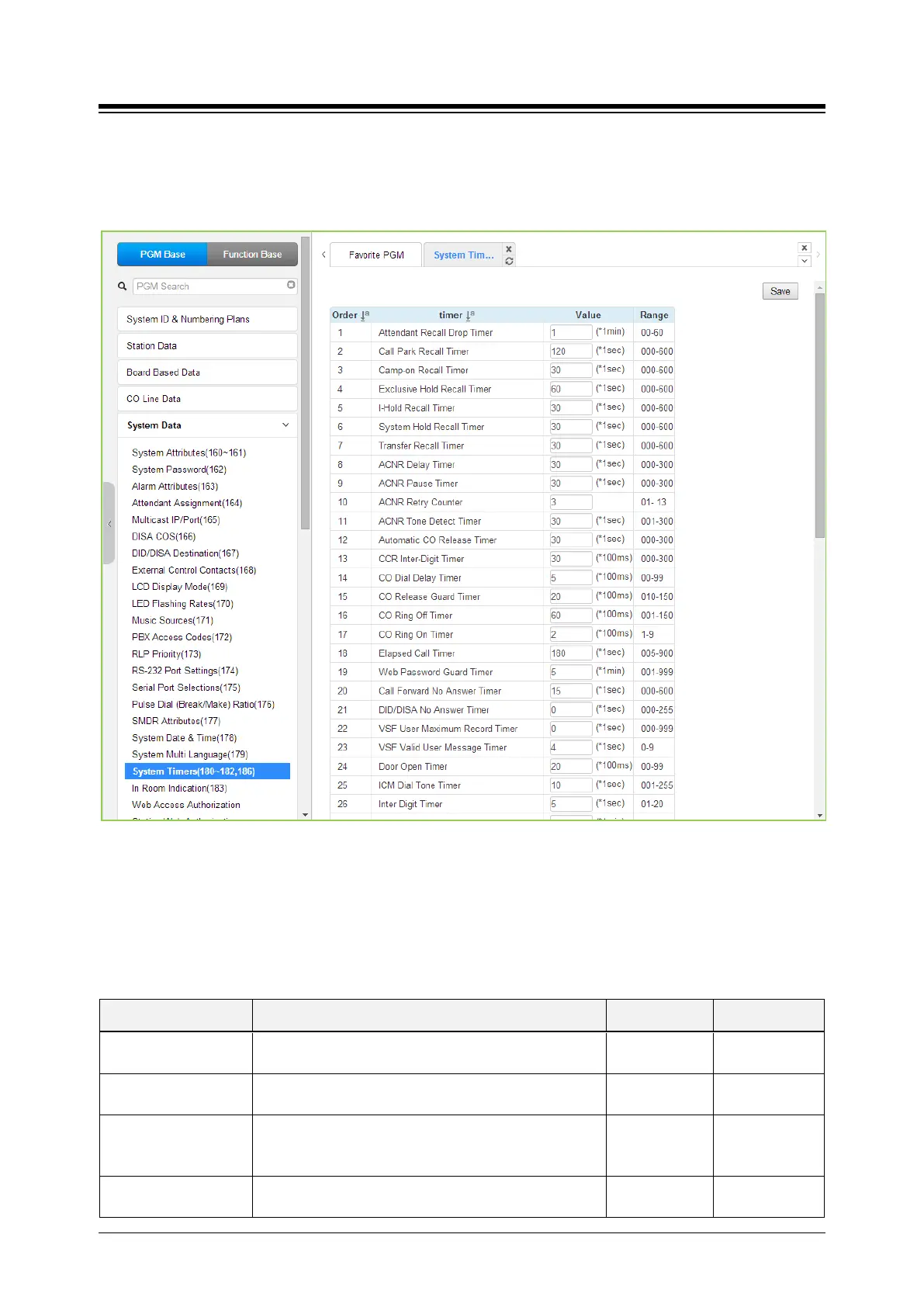
Selecting System Timers will display the System Timers data entry page. Click [Save] button
after changing Value.
Figure 4.4.5.20-1 System Timers
A number of timers can be assigned to control and affect many features and functions. Refer to
the following table for a description of the timers and the input required.
Table 4.4.5.20-1 SYSTEM TIMERS
ATTRIBUTE DESCRIPTION RANGE DEFAULT
Attendant Recall Timer
Enter the desired time that Attendant receives recall
after the system will disconnect the call.
00~60
01
Call Park Recall Timer
Enter the desired recall time for call park. Parked call
will recall the station at a specified time.
000~600
120
Camp-on Recall Timer
When a call is transferred using Camp-On, this field
determines the desired recall time for Camp-on. The
station receives the call again with a specified time.
000~600
(seconds)
030
Exclusive Hold Recall
Enter the desired time for Exclusive hold. The station
receives the call again after a specified time.
000~600
060





 To Next Page