iPECS eMG80 & eMG800 & UCP
Administration and Programming Manual Issue 1.6
37
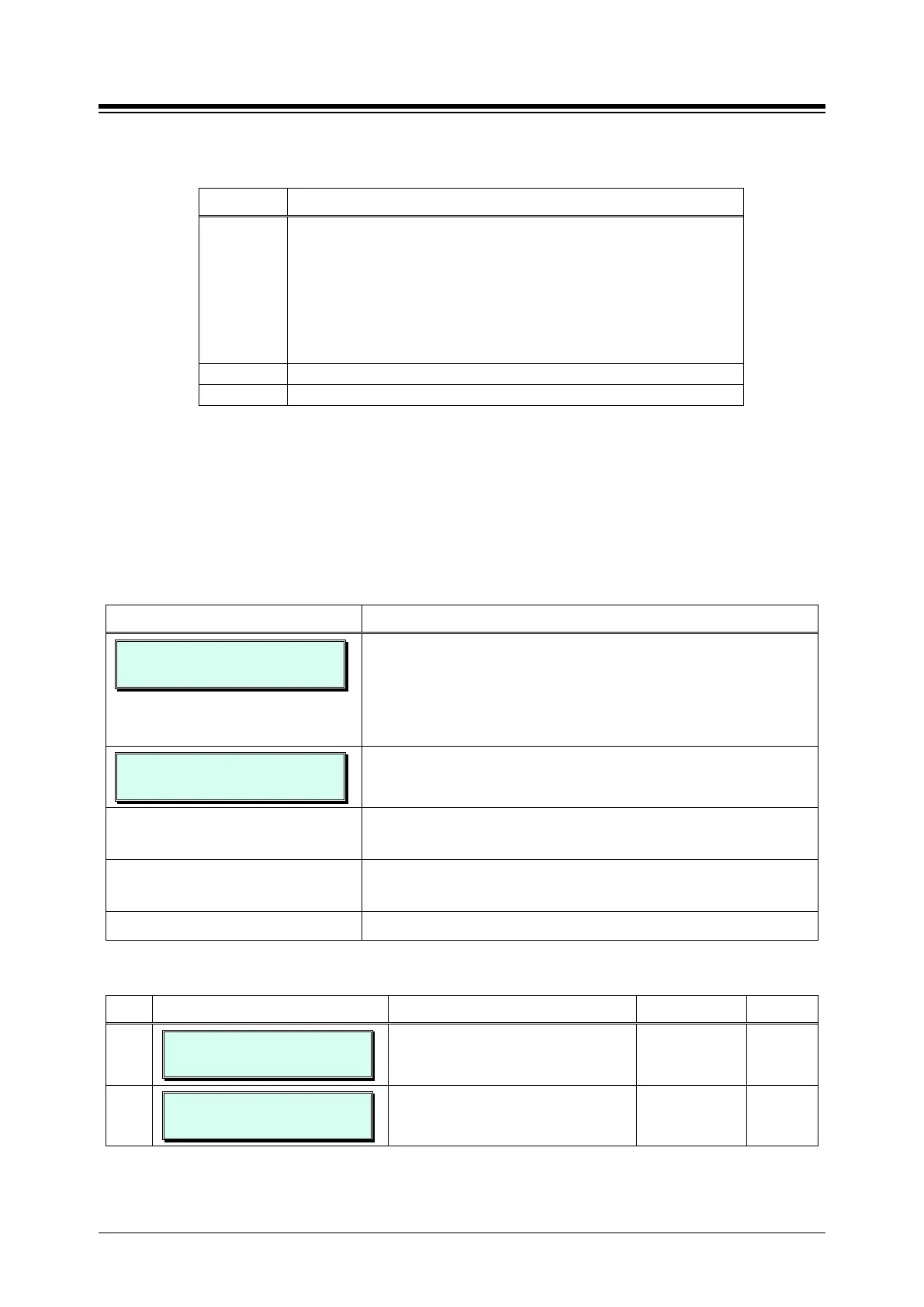
Table 3.3.3.1-2 CONSOLE BUTTON CONFIGURATION (PGM 110)
MAP DEFAULT CONSOLE BUTTON CONFIGURATION
MAP 1
Button 4: Station Group 1
Button 6: Internal All Call Page
Button 8: Station Group 2
Button 10: Ext. All Call Page
Button 12: Station Group 3
Buttons 13 ~ 48: Station Ports 100 ~ 135
3.3.3.2 Station Attributes I to III - PGM 111-113
Station Attributes define features and functions available to the station. Generally, the entry will
turn the feature ON (enable) or OFF (disable). Refer to Table 3.3.3.2-1 to Table 3.3.3.2-3 for a
description of the features and the input required.
PROCEDURE:
STATION ATT 1
ENTER STA RANGE
1. Press the [PGM] button and dial:
111 for Station Attributes I
112 for Station Attributes II
113 for Station Attributes III
100-110 S TATION ATT 1
PRESS FLEX_KEY (01-24)
Use the dial-pad to enter a station range (Ex. 100~110). For
a single station, enter the same number twice.
Press the desired Flex button; refer to Table 3.3.3.2-1 to
Use the dial-pad to enter desired data for the attribute
setting, refer to Table 3.3.3.2-1 to Table 3.3.3.2-3.
Press the [Save] button to store the data entry.
Table 3.3.3.2-1 STATION ATTRIBUTES I (PGM 111)
BTN ATTRIBUTE/DISPLAY DESCRIPTION RANGE DEFAULT
1
100-110 AUTO SPKR
(1:ON/0:OFF) : ON
Enables [SPEAKER] activation when
a CO/IP, DSS or other feature button
is pressed, no need to lift handset.
0: OFF
1: ON
ON
2
100-110 CALL FWD
(1:ON/0:OFF) : OFF
Enables Call Forward activation by the
station.
0: OFF
1: ON
OFF





 To Next Page