iPECS eMG80 & eMG800 & UCP
Administration and Programming Manual Issue 1.6
560
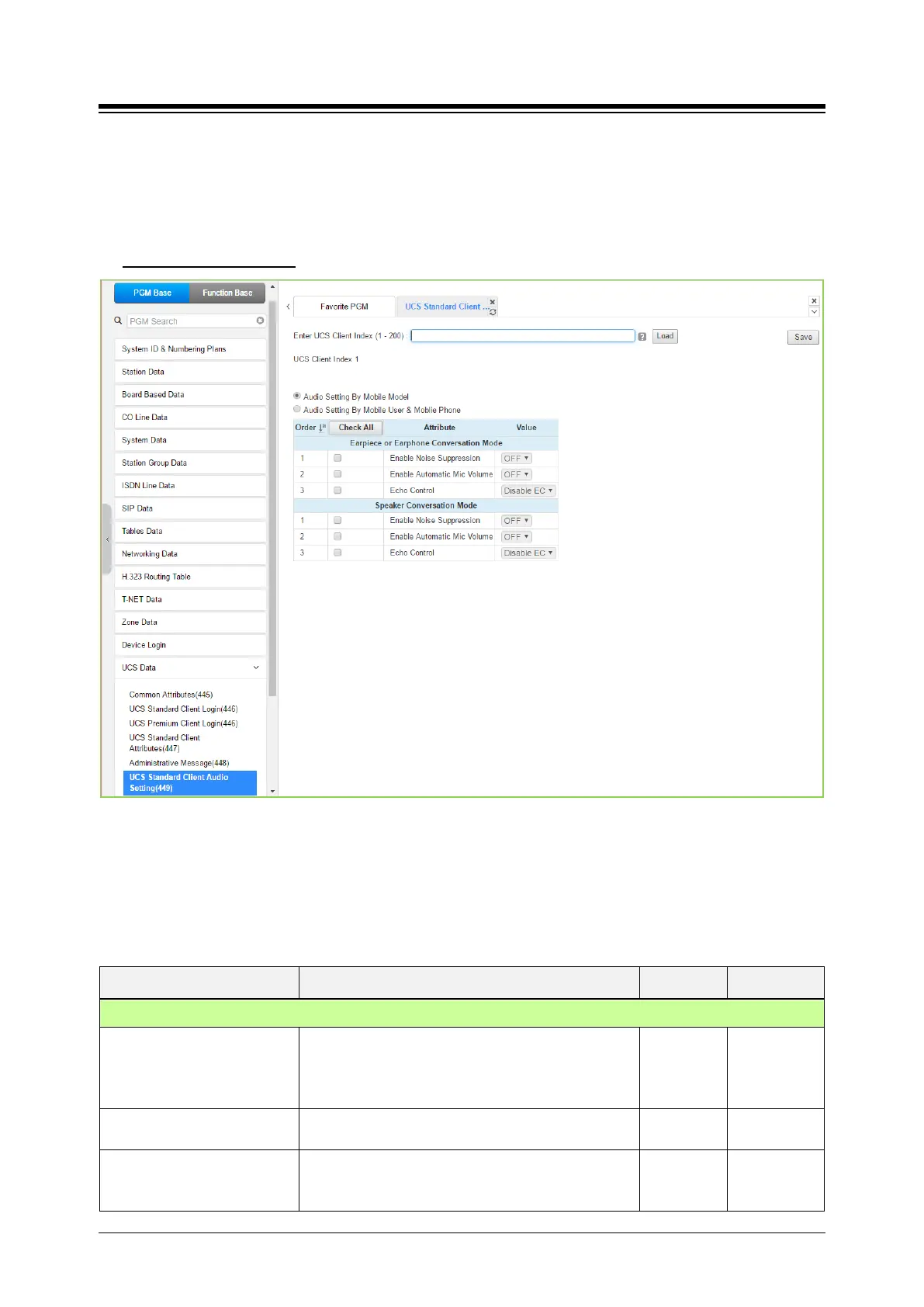
4.4.15.6 UCS Standard Client Audio Setting – PGM 449
Selecting UCS Standard Client Audio setting will display the audio setting input page. Enter the
Client index and click [Load] to modify the Client data. Use the check mark to indicate which
attributes to modify; data for checked attributes is stored by clicking [Save] button.
Enter UCS Client Index
: eMG80: 1-32 / eMG800: 1-200 / UCP: 1-200
Figure 4.4.15.6-1 UCS Standard Client Audio Setting
Audio characteristic for the Speaker and earphone mode can be established for best overall
audio performance.
Table 4.4.15.6-1 Audio Setting by Mobile User & Mobile phone
ATTRIBUTE DESCRIPTION RANGE DEFAULT
Earpiece or Earphone conversion mode
Enable Noise Suppression
The system can implement various levels of “Noise
suppression from “OFF” to “Very High” in six levels.
OFF
ON
OFF
Enable Automatic Mic. Volume
The system can implement Auto gain control for the
OFF
OFF
Echo Control Echo cancellation can be enabled for the Earphone.
Disable
Minimum
Disable EC





 To Next Page